
Dominant Colors Extractor vs ColorUI Extract
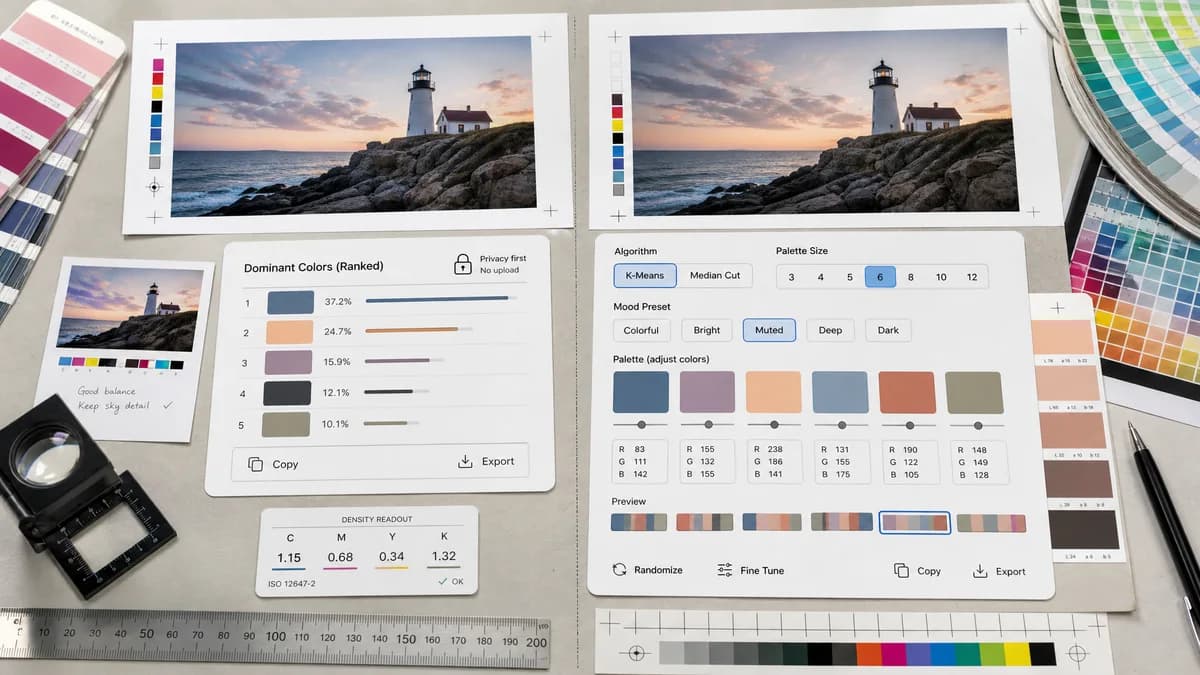
Dominant Colors Extractor is the baseline in this comparison: Upload an image and extract a ranked browser-local color palette with HEX, RGB, HSL, and percentage values without sending the file to a server.
ColorUI extracts palettes from images with selectable k-means or median-cut algorithms, palette size controls, and mood presets.
Quick verdict
Choose TextFaker for a direct ranked dominant-color report; choose ColorUI when algorithm choice and creative mood adjustments matter.
How Dominant Colors Extractor fits
TextFaker provides a simpler privacy-first extractor with ranked percentages and copyable formats rather than exposing algorithm choices as the main workflow.
How ColorUI Extract fits
ColorUI's official page says users can upload an image, pull dominant colors, switch between k-means and median-cut, choose 3 to 12 colors, apply mood presets such as colorful, bright, muted, deep, and dark, and tweak swatches by hand.
Side-by-side comparison
| Decision point | Dominant Colors Extractor | ColorUI Extract | Takeaway |
|---|---|---|---|
| Algorithm controls | Our workflowSimple extraction with clear explanation, likely no algorithm selector. | Competitor workflowSelectable k-means and median-cut algorithms. | ColorUI is stronger for users who understand extraction algorithms. |
| Palette size | Our workflowShould allow user-selected number of dominant colors. | Competitor workflowPalette size can be dialed from 3 to 12 stops. | Both supports count control. |
| Creative adjustment | Our workflowAnalysis-first; minimal mood editing. | Competitor workflowMood presets adjust saturation and lightness, and swatches can be tweaked manually. | ColorUI is more creative and adjustable. |
| Output data | Our workflowHEX, RGB, HSL, and percentage coverage. | Competitor workflowThe researched page focuses on palette extraction and controls rather than percentage reporting. | Dominant Colors Extractor can own quantitative reporting. |
| User complexity | Our workflowSimple for nontechnical users. | Competitor workflowAlgorithm and mood controls add power but also choices. | Dominant Colors Extractor can reduce decision load. |
| Best workflow | Our workflowUpload image, inspect ranked colors, copy values. | Competitor workflowUpload image, select algorithm, set count, apply mood, and tweak palette. | Dominant Colors Extractor can be faster for users who only need values. |
Use Dominant Colors Extractor when
- Straightforward color analysis
- Percentage ranking by image share
- Users who want fewer creative controls
- Copying standard color formats
Use ColorUI Extract when
- Users comparing extraction algorithms
- Designers refining palette mood
- Manual swatch tweaking
- Palette generation with creative presets
Detailed comparison
Algorithm Transparency
ColorUI's algorithm selector is useful, but not every user knows whether k-means or median-cut is appropriate. Dominant Colors Extractor can explain its method while keeping controls limited.
- Use plain-language methodology.
- Avoid advanced settings on the first screen unless they solve common problems.
Creative vs Analytical
ColorUI turns extraction into palette design. Dominant Colors Extractor stays closer to measurement: what colors are in this image and how much of the image do they cover.
Possible Enhancements
If TextFaker later adds controls, practical filters such as ignore transparent pixels or merge similar colors may be more valuable than algorithm naming.
Research Notes
The official page describes k-means, median-cut, 3 to 12 colors, mood presets, and manual swatch tweaking.
Research notes
- ColorUI is a useful comparison because it surfaces algorithm choice directly.
- Its workflow is more adjustable and design-oriented than the planned TextFaker utility.
- Dominant Colors Extractor can differentiate by avoiding algorithm complexity and making percentages visible.
Official source
The only outbound competitor link on this page is placed here for source checking after the comparison.
Official ColorUI Extract source