
Dominant Colors Extractor vs Coolors
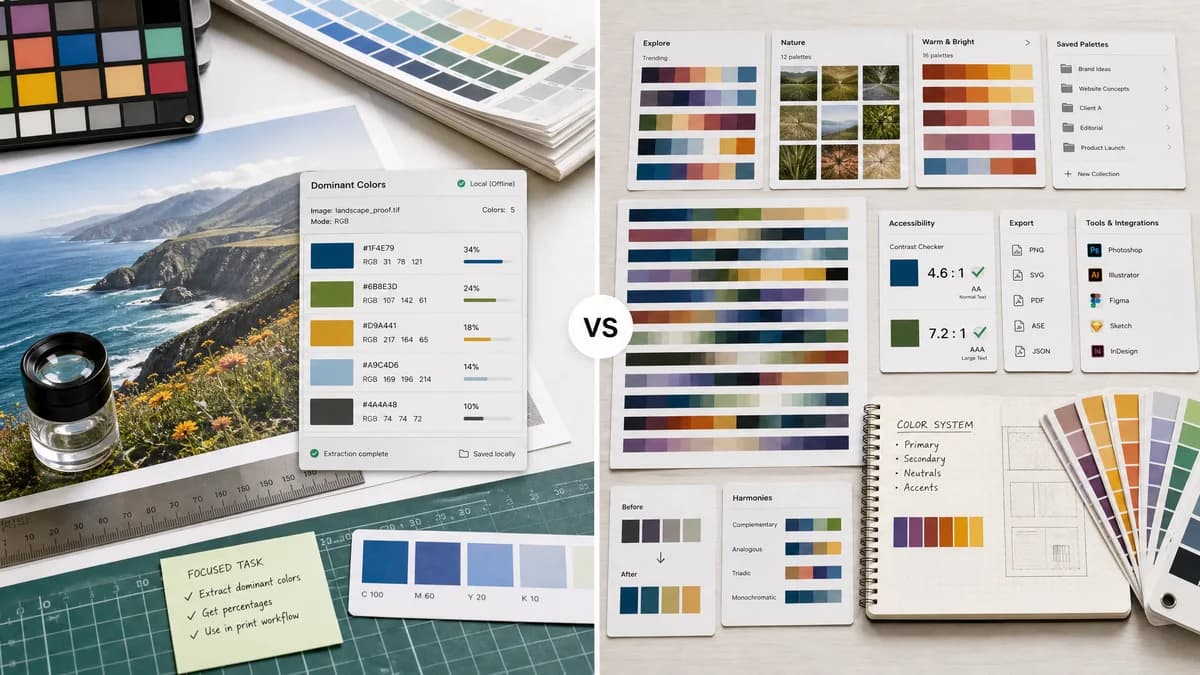
Dominant Colors Extractor is the baseline in this comparison: Upload an image and extract a ranked browser-local color palette with HEX, RGB, HSL, and percentage values without sending the file to a server.
Coolors is a full color palette platform with an image picker, palette generator, exports, accessibility checks, accounts, and Pro features.
Quick verdict
Choose TextFaker for a single private extraction task; choose Coolors for ongoing palette generation, exploration, saving, and design-system inspiration.
How Dominant Colors Extractor fits
Dominant Colors Extractor is a focused dominant-color extractor for images, offering local processing and complete per-swatch data without the broader palette management platform.
How Coolors fits
Coolors offers palette generation, millions of palettes to explore, an image picker for extracting colors from photos, contrast checking, visualizers, export options, apps, plugins, and account-based saved palettes.
Side-by-side comparison
| Decision point | Dominant Colors Extractor | Coolors | Takeaway |
|---|---|---|---|
| Scope | Our workflowOne focused tool for extracting ranked dominant colors from an uploaded image. | Competitor workflowA broad palette platform with generator, image picker, explorer, contrast checker, and visualizer tools. | Coolors is broader; Dominant Colors Extractor can be faster for a narrow task. |
| Dominance ranking | Our workflowPercent coverage is displayed for each swatch. | Competitor workflowCoolors emphasizes extracting colors and making palettes, not quantitative distribution as the main page promise. | Dominant Colors Extractor can make image share visible and copyable. |
| Account model | Our workflowNo account needed for the core extraction workflow. | Competitor workflowCoolors supports accounts and Pro features for saving, organizing, and advanced exports. | TextFaker minimizes interruptions for casual users. |
| Creative tools | Our workflowBasic extraction-focused controls. | Competitor workflowPalette exploration, visualizer, contrast checker, AI, and export features. | Coolors is stronger for creative iteration. |
| Export | Our workflowLikely copy HEX/RGB/HSL rows and perhaps JSON or CSV for extracted values. | Competitor workflowCoolors advertises multiple export formats for palettes. | Dominant Colors Extractor can include enough export utility without becoming a full palette manager. |
| Audience | Our workflowDevelopers, SEOs, creators, and reviewers checking actual image colors. | Competitor workflowDesigners and creators building or organizing palettes over time. | Messaging can separate analysis from palette inspiration. |
Use Dominant Colors Extractor when
- One-off image color extraction
- Users who need percentages
- Privacy-first local file handling
- Simple SEO utility workflows
Use Coolors when
- Palette exploration and inspiration
- Saving and organizing palettes
- Designers using plugins and apps
- Users who need broad color tools beyond extraction
Detailed comparison
Competitive Angle
Coolors is one of the best-known palette tools, but its breadth creates room for a smaller utility that answers a specific image-analysis query immediately.
- Avoid competing on palette community size.
- Compete on privacy, speed, percentages, and clarity.
Feature Priorities
For TextFaker, the essential feature is trust in the output. The page can explain that colors are grouped from image pixels and sorted by coverage.
- Expose sample count or processing note if feasible.
- Make similar-color grouping understandable.
Conversion Path
Coolors pushes users toward saving, exploring, and upgrading. TextFaker provides value without an account path.
Research Notes
Coolors' official page lists image picking, palette generation, contrast checking, real-design previewing, exporting, apps, plugins, accounts, and Pro limits.
Research notes
- Coolors officially describes an Image Picker that extracts colors from photos and turns them into palettes.
- Coolors also includes palette exploration, accessibility, visualizer, export, app, plugin, account, and Pro workflows.
- Dominant Colors Extractor can not try to match the whole platform; it wins the focused extraction job.
Official source
The only outbound competitor link on this page is placed here for source checking after the comparison.
Official Coolors source