
Dominant Colors Extractor vs HexPickr
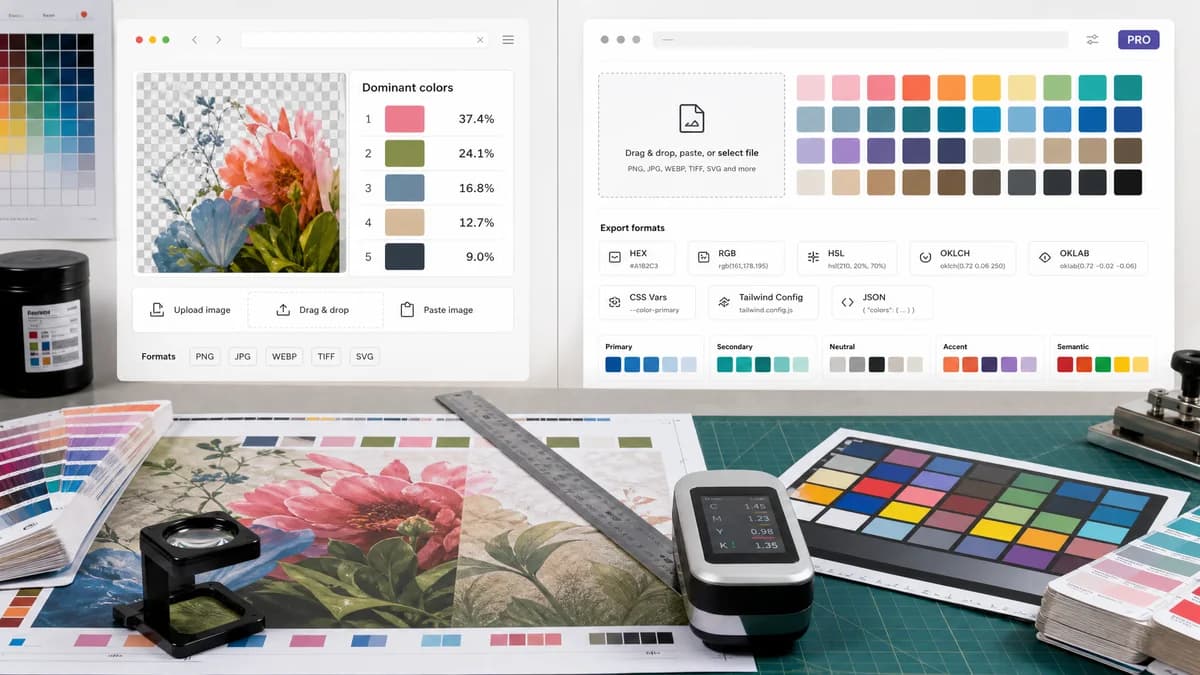
Dominant Colors Extractor is the baseline in this comparison: Upload an image and extract a ranked browser-local color palette with HEX, RGB, HSL, and percentage values without sending the file to a server.
HexPickr extracts dominant colors from uploaded or pasted images and emphasizes production-ready tokens, OKLCH, Tailwind, CSS variables, and JSON export.
Quick verdict
Choose TextFaker for straightforward dominant color percentages; choose HexPickr for developer-ready palette tokens and modern color-space exports.
How Dominant Colors Extractor fits
TextFaker focuses on transparent image color analysis with ranked percentages and mainstream formats, while leaving advanced design-token workflows secondary.
How HexPickr fits
HexPickr's official page describes drag-and-drop, file choose, and paste input; PNG, JPG, WebP, AVIF, and SVG support; up to 24 dominant colors; HEX, RGB, HSL, OKLCH, OKLAB, CSS variables, Tailwind config, and JSON exports; and a Pro option.
Side-by-side comparison
| Decision point | Dominant Colors Extractor | HexPickr | Takeaway |
|---|---|---|---|
| Developer exports | Our workflowBasic copy and possible simple structured export. | Competitor workflowCSS variables, Tailwind config, and JSON exports are advertised. | HexPickr is stronger for code handoff. |
| Modern color spaces | Our workflowHEX, RGB, HSL, and percentages. | Competitor workflowIncludes OKLCH and OKLAB in addition to common formats. | HexPickr is stronger for advanced color science workflows. |
| Dominance count | Our workflowShould allow a sensible count for ranked swatches. | Competitor workflowDetects up to 24 dominant colors. | Dominant Colors Extractor can document its maximum count. |
| Input methods | Our workflowUpload-first browser tool. | Competitor workflowDrag and drop, click to choose, or clipboard paste. | Paste support would improve parity. |
| Account and monetization | Our workflowCore utility avoids account requirements. | Competitor workflowThe page advertises free use and a Pro option for unlimited palettes and removing ads. | Dominant Colors Extractor can be simpler for one-time users. |
| Primary promise | Our workflowExtract dominant colors from an image with percentages. | Competitor workflowGenerate developer-ready color palettes and tokens quickly. | The tools can target different levels of technical depth. |
Use Dominant Colors Extractor when
- Simple ranked dominant color reports
- Users needing HEX/RGB/HSL and percentages only
- No-friction one-off extraction
- SEO visitors with basic color-code needs
Use HexPickr when
- Frontend developers
- Tailwind and CSS variable exports
- OKLCH and OKLAB workflows
- Users managing production-ready palettes
Detailed comparison
Developer Segment
HexPickr targets frontend developers more directly than many palette tools. Dominant Colors Extractor can still serve developers if it makes copying values fast, but it does not need to match every token export on day one.
- Add JSON export if easy.
- Use HSL and percentages as the core table columns.
Advanced Formats
OKLCH and OKLAB are useful differentiators for HexPickr. Dominant Colors Extractor can not mention those formats unless implemented and tested.
Search Fit
For generic dominant color searches, simpler output may beat a token-heavy workflow. Dominant Colors Extractor can make the first result understandable to non-developers.
Research Notes
The official page advertises up to 24 dominant colors, common formats, OKLCH/OKLAB, Tailwind, CSS, JSON exports, and paste/upload input.
Research notes
- HexPickr is a close competitor for developer users.
- It supports more advanced output formats than the planned TextFaker scope.
- TextFaker keeps claims limited to implemented HEX, RGB, HSL, and percentage outputs.
Official source
The only outbound competitor link on this page is placed here for source checking after the comparison.
Official HexPickr source