
Dominant Colors Extractor vs ImageColorPicker.com
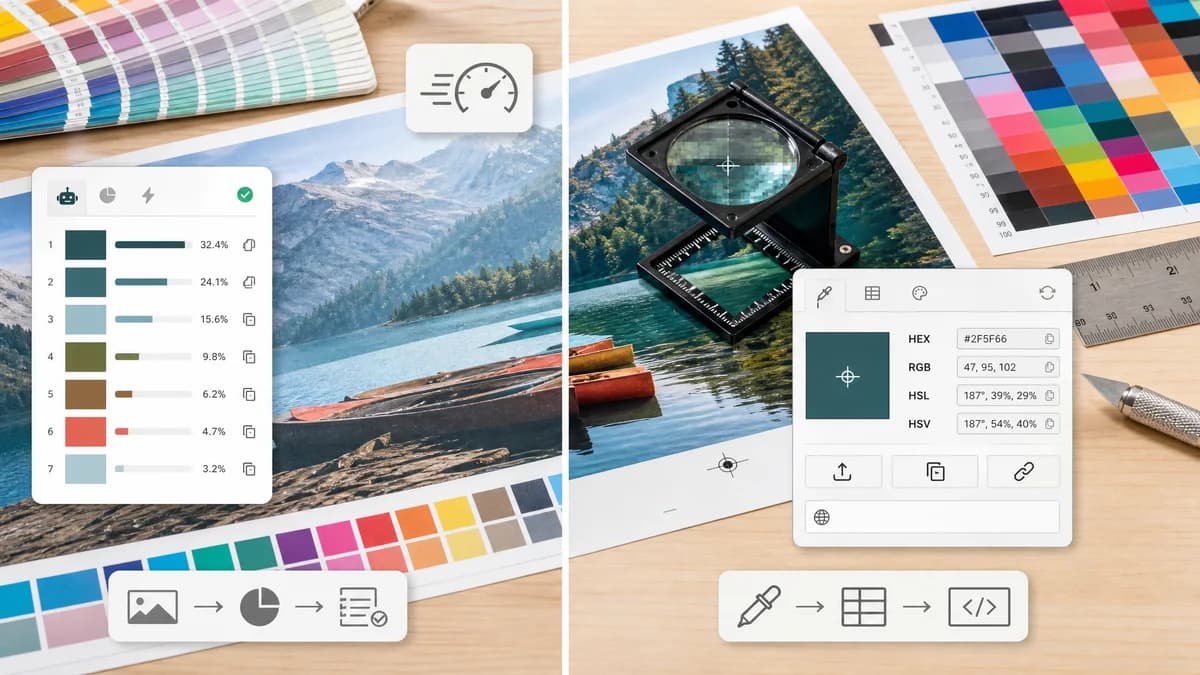
Dominant Colors Extractor is the baseline in this comparison: Upload an image and extract a ranked browser-local color palette with HEX, RGB, HSL, and percentage values without sending the file to a server.
ImageColorPicker.com lets users upload, paste, or enter an image URL and pick colors, with HEX, RGB, HSL, and other color information.
Quick verdict
Choose TextFaker for automatic ranked dominant colors; choose ImageColorPicker.com for manual pixel picking and general color-code lookup.
How Dominant Colors Extractor fits
Dominant Colors Extractor can emphasize automatic dominant-color extraction with ranked percentage swatches, while still making individual values easy to copy.
How ImageColorPicker.com fits
ImageColorPicker.com focuses on selecting colors from images, displaying color codes such as HEX, RGB, HSL, and HSV, and states that processing happens in the browser with no data sent.
Side-by-side comparison
| Decision point | Dominant Colors Extractor | ImageColorPicker.com | Takeaway |
|---|---|---|---|
| Automatic extraction | Our workflowAutomatically returns ranked dominant swatches from the whole image. | Competitor workflowPrimarily supports picking colors from an image and also displays a palette area. | Dominant Colors Extractor is clearer for users who want automatic dominant colors. |
| Manual picking | Our workflowMay include optional sampling, but the core workflow is ranked extraction. | Competitor workflowClicking an image pixel to get a color code is a central workflow. | ImageColorPicker is better for exact pixel selection. |
| Color formats | Our workflowHEX, RGB, HSL, and percentages per dominant color. | Competitor workflowHEX, RGB, HSL, HSV, and related color information are available. | Both can cover core formats; TextFaker's percentage column is the differentiator. |
| Input methods | Our workflowLikely upload-first browser-local image handling. | Competitor workflowUpload, paste, image URL, and website URL inputs are described. | ImageColorPicker has broader input modes. |
| Privacy | Our workflowNo-upload browser-local processing is explicit. | Competitor workflowThe official page states no data is sent and processing happens in the browser. | Privacy parity means TextFaker needs stronger output structure. |
| Use case | Our workflowExtract the palette of a logo, screenshot, product photo, or artwork. | Competitor workflowFind the code of a specific color visible in an image. | The products overlap but optimize for different color questions. |
Use Dominant Colors Extractor when
- Automatic palette ranking
- Color percentage estimates
- Batch-like analysis of one image's full palette
- Users who want no-upload extraction and distribution
Use ImageColorPicker.com when
- Manual eyedropper picking
- Finding the exact color at a clicked pixel
- Image URL based color picking
- Color-code reference pages
Detailed comparison
Differentiation
ImageColorPicker.com already has a strong privacy and format story. Dominant Colors Extractor's sharper angle is automatic dominance ranking with percentages rather than eyedropper-first picking.
- Use table columns for rank, swatch, percent, HEX, RGB, and HSL.
- Consider a color histogram or percentage bar for scannability.
Privacy Parity
Because ImageColorPicker.com also claims browser-side processing, Dominant Colors Extractor cannot rely on privacy alone.
- Pair privacy with transparent ranking and no account friction.
Input Choices
Image URLs are convenient but can create CORS and privacy complexity. TextFaker's no-upload promise is cleanest with local files.
Research Notes
The official page states that users can upload, paste, or enter a URL and get HEX, RGB, HSL, and more, with processing happening in the browser.
Research notes
- ImageColorPicker.com supports image upload, paste, URL input, and website URL input according to its official page.
- The page explicitly states no data is sent and processing occurs in the browser.
- Dominant Colors Extractor can compete by making automatic ranked percentages central.
Official source
The only outbound competitor link on this page is placed here for source checking after the comparison.
Official ImageColorPicker.com source