
Open Source Alternatives to Adobe Color
Dominant Colors Extractor is a browser-based alternative for users who need this focused result without installing a proprietary desktop app or entering a larger hosted workflow.
This research compares that workflow with Adobe Color while keeping the outbound source link at the bottom after the analysis.
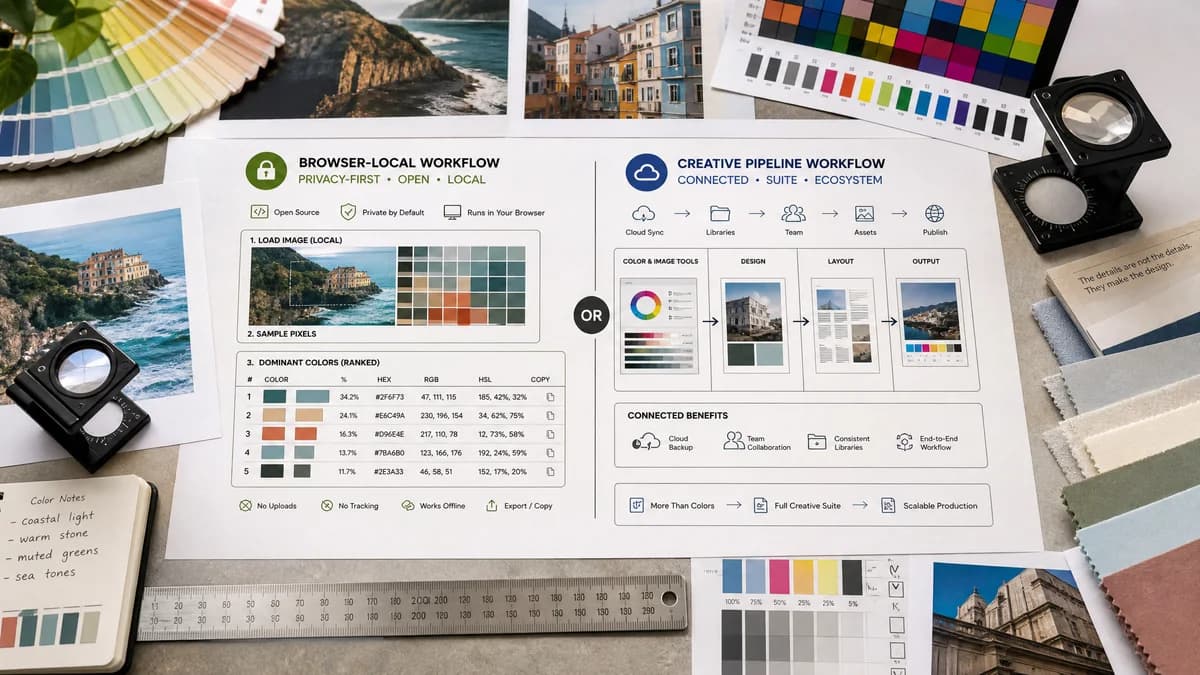
Why Dominant Colors Extractor fits
Dominant Colors Extractor can focus on a narrow, privacy-forward workflow: load an image in the browser, sample pixels locally, rank dominant colors, and expose copyable HEX, RGB, HSL, and percentage values.
What Adobe Color offers
Adobe Color is a polished creative ecosystem tool for extracting themes from images and continuing into Adobe's color and creative workflows.
Open alternative signals
Privacy posture
Dominant Colors ExtractorImage can be processed locally in the browser with no upload required.
Adobe ColorHosted creative service workflow.
Output focus
Dominant Colors ExtractorRanked dominant colors with HEX, RGB, HSL, and percentage share.
Adobe ColorTheme-oriented palette creation for creative workflows.
Workflow scope
Dominant Colors ExtractorSingle-purpose extraction tool.
Adobe ColorPart of a broader design and color platform.
Implementation framing
Dominant Colors ExtractorBrowser-based and open-source-powered using standard web APIs.
Adobe ColorClosed hosted product experience.
Decision guide
Fast local inspection, privacy-sensitive images, exportable color values, and lightweight SEO utility use cases.
Designers already working inside Adobe's ecosystem who want theme creation, creative library continuity, and broader color inspiration features.
Side-by-side open source alternative comparison
| Decision point | Dominant Colors Extractor | Adobe Color | Takeaway |
|---|---|---|---|
| Image handling | Our workflowDesigned for client-side image analysis without uploading the file. | Proprietary workflowRuns inside Adobe's hosted color product. | Dominant Colors Extractor can win on privacy and simplicity. |
| Color data | Our workflowExpose HEX, RGB, HSL, and pixel-share percentages together. | Proprietary workflowPrimarily presents extracted theme colors for creative use. | Dominant Colors Extractor is more data-oriented. |
| Use case | Our workflowQuick extraction for developers, designers, marketers, and documentation. | Proprietary workflowPalette creation for Adobe-centered design workflows. | Different intent: utility output versus creative ecosystem. |
| Access model | Our workflowFree browser utility positioning. | Proprietary workflowProprietary Adobe service experience. | Avoid claiming open source; emphasize open-source-powered browser processing. |
| SEO angle | Our workflowTarget exact searches like extract dominant colors from image and get HEX RGB HSL from image. | Proprietary workflowBrand-driven searches around Adobe Color. | The page can capture non-brand utility demand. |
| Export behavior | Our workflowCan prioritize copy buttons and downloadable palette data. | Proprietary workflowOptimized for theme exploration. | Practical export features are central. |
Detailed research
Positioning
Adobe Color is one of the highest-recognition competitors because it connects image extraction with a broader color theme workflow. A Dominant Colors Extractor alternative does not try to imitate the full creative-suite experience; it is the direct utility for extracting dominant image colors locally.
- Lead with no-upload browser processing.
- Show ranked swatches, percentages, and copyable color formats above the fold.
- Avoid Adobe-specific workflow claims or compatibility promises unless implemented.
Feature Priorities
The strongest gap is structured output. Users looking for dominant colors often need exact values for CSS, brand checks, image analysis, and quick palette documentation.
- HEX, RGB, and HSL for every swatch.
- Percentage share based on sampled pixels.
- Optional adjustable number of colors and color merging tolerance.
Content Angle
The comparison page frames TextFaker as a privacy-first, browser-based alternative for one job: extracting dominant colors from an image.
- Use plain wording around local processing.
- Mention open standards and open-source-powered extraction carefully.
- Do not imply TextFaker itself is open source.
Risks
Adobe's color tooling includes broader creative features. The comparison can avoid over-claiming parity and focus on the narrower extraction workflow.
- No claims about Adobe Libraries integration.
- No claims about color harmony generation unless built.
- No references to Adobe account behavior unless verified.
Research notes
- Official research confirms Adobe Color offers an image-based theme extraction flow.
- Adobe Color belongs to a proprietary creative ecosystem rather than a standalone browser-local utility.
- Use the phrase proprietary software only when explaining that Adobe Color is not positioned as an open-source tool.
Official source
The proprietary product link is included once here for source checking after the alternative analysis.
Official Adobe Color source