
Open Source Alternatives to ImageColorPicker
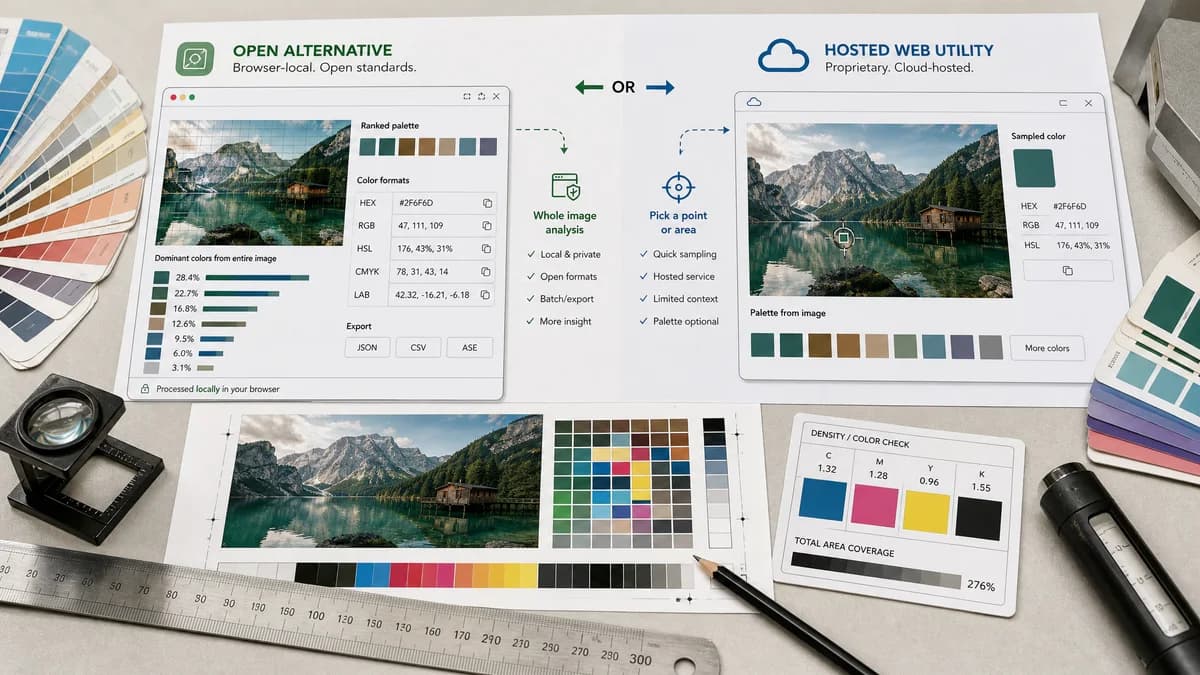
Dominant Colors Extractor is a browser-based alternative for users who need this focused result without installing a proprietary desktop app or entering a larger hosted workflow.
This research compares that workflow with ImageColorPicker while keeping the outbound source link at the bottom after the analysis.
Why Dominant Colors Extractor fits
Dominant Colors Extractor can go beyond point color picking by extracting a ranked palette from the whole image and showing each color's approximate share.
What ImageColorPicker offers
ImageColorPicker is a hosted image color picker site for selecting colors and working with palettes from images.
Open alternative signals
Automatic extraction
Dominant Colors ExtractorAutomatically ranks dominant colors across the image.
ImageColorPickerHosted image color picker and palette tool.
Manual picking
Dominant Colors ExtractorMay include click-to-sample as a secondary feature.
ImageColorPickerStrong fit for manually selecting a pixel color.
Privacy
Dominant Colors ExtractorDesigned for local browser processing with no upload.
ImageColorPickerHosted website workflow.
Color formats
Dominant Colors ExtractorHEX, RGB, HSL, and percentage values together.
ImageColorPickerCommon color picker formats and palette output.
Decision guide
Users who need automatic dominant colors instead of manually clicking pixels.
Users who want a simple hosted image color picker with manual selection behavior.
Side-by-side open source alternative comparison
| Decision point | Dominant Colors Extractor | ImageColorPicker | Takeaway |
|---|---|---|---|
| Primary interaction | Our workflowUpload image and receive ranked dominant swatches automatically. | Proprietary workflowPick colors from an image through a hosted site interface. | TextFaker focuses on automatic extraction, not just cursor picking. |
| Data output | Our workflowEach swatch can include percentage share. | Proprietary workflowPicker tools often emphasize selected color values. | Dominance percentages are the main differentiator. |
| Privacy | Our workflowLocal processing keeps private images on the device. | Proprietary workflowHosted page workflow. | Privacy copy is explicit and verifiable. |
| Developer usefulness | Our workflowCopy all values as CSS, JSON, or CSV if implemented. | Proprietary workflowManual picker output is useful but may be less structured. | Bulk export can make TextFaker more useful. |
| Use cases | Our workflowBrand audits, palette extraction, screenshot analysis, product photo colors. | Proprietary workflowManual sampling and quick color lookup. | The two tools overlap but serve different workflow emphasis. |
| Algorithm explainability | Our workflowCan describe clustering and sampling behavior. | Proprietary workflowClosed hosted implementation. | Clear method notes reduce confusion around approximate colors. |
Detailed research
Positioning
ImageColorPicker captures broad image color picker intent. Dominant Colors Extractor can capture the more analytical intent: what are the dominant colors in this image and how much of the image do they represent.
- Use automatic extraction as the headline distinction.
- Optionally include manual pixel picking only if it does not distract.
- Present percentages as approximate results.
Feature Priorities
The tool produces a ranked palette without requiring the user to click around the image.
- Default to 6 to 10 dominant colors.
- Allow increasing or decreasing swatch count.
- Handle transparency and backgrounds predictably.
Content Angle
SEO copy can target both image color picker and dominant colors extractor, but the page can not become a generic color picker page.
- Use extract dominant colors from image as the main phrase.
- Mention copyable HEX RGB HSL values.
- Explain no-upload browser processing.
Risks
Manual color picking is a different expectation. If Dominant Colors Extractor does not implement manual click-to-pick, the comparison can be careful to say it is an alternative for dominant extraction, not a full manual picker replacement.
- Do not claim pixel-level picker parity unless built.
- Avoid implying exact percentages for compressed or color-managed images.
- Disclose approximate clustering behavior.
Research notes
- ImageColorPicker is a direct search-result competitor for image color picking.
- The comparison can distinguish automatic dominant color extraction from manual pixel picking.
- It is safer to describe ImageColorPicker as a hosted proprietary web utility unless public open-source licensing is proven.
Official source
The proprietary product link is included once here for source checking after the alternative analysis.
Official ImageColorPicker source