
Etsy Listing Image Checker vs Adobe Express Image Resizer
Etsy Listing Image Checker is the baseline in this comparison: Check Etsy listing photos in your browser and get clear pass, warning, and fail messages for size, format, orientation, transparency, file size, and crop-safe thumbnails.
Adobe Express provides an online image resizer with custom dimensions, aspect ratio changes, downloads, and broader editing tools.
Quick verdict
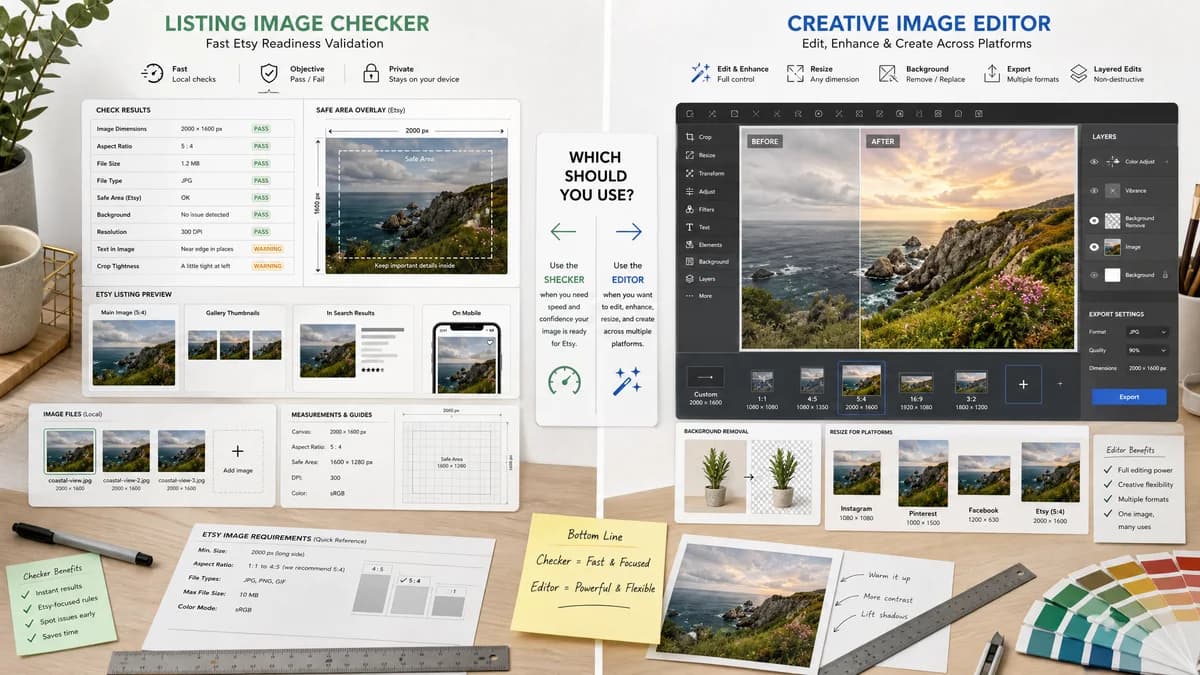
Adobe Express is broader and better for editing; TextFaker should be faster for checking Etsy readiness, especially when a seller wants objective warnings rather than a full editor.
How Etsy Listing Image Checker fits
Etsy Listing Image Checker would be a lightweight Etsy-specific validation tool that inspects files locally and reports whether each image meets measurable listing guidance.
How Adobe Express Image Resizer fits
Adobe Express is a good fit when sellers need to resize, crop, remove backgrounds, or continue editing in a creative suite that Etsy itself references for seller image creation.
Side-by-side comparison
| Decision point | Etsy Listing Image Checker | Adobe Express Image Resizer | Takeaway |
|---|---|---|---|
| Scope | Our workflowEtsy listing image validation and optional corrective outputs. | Competitor workflowGeneral image resizing plus broader Adobe Express editing. | TextFaker should be narrower but more explicit about Etsy listing checks. |
| Validation model | Our workflowPass, warning, and fail statuses based on measurable Etsy guidance. | Competitor workflowResize controls and export workflow rather than a dedicated Etsy validation matrix. | A checker reduces ambiguity for sellers asking if a file is ready. |
| Privacy posture | Our workflowDesigned to run locally in the browser for selected files. | Competitor workflowHosted editor workflow with account and cloud features around the broader product. | Local-only processing is a clear differentiator for product photos and digital artwork previews. |
| File guidance | Our workflowCan flag unsupported extensions, transparent PNG behavior, large file warnings, and possibly color-profile risks. | Competitor workflowThe official resizer page lists accepted upload types and a file-size cap for the tool, not Etsy-specific acceptance checks. | TextFaker should tie messages directly to Etsy listing concerns. |
| Output artifacts | Our workflowValidation report, proposed filenames, and optional resized or flattened files with exact dimensions and sizes. | Competitor workflowResized images and continued editing outputs. | TextFaker's report is useful even if the seller edits elsewhere afterward. |
| Testability | Our workflowAutomated tests can upload fixtures and assert exact status labels and dimensions. | Competitor workflowCreative editor results are harder to test without visual or account-dependent behavior. | The TextFaker implementation can fit the site's deterministic tool pattern. |
Use Etsy Listing Image Checker when
- Privacy-first local checks of existing Etsy listing images
- Deterministic status messages for size, type, file size, orientation, and transparency
- Testing first listing image separately from the rest of the gallery
- Simple mobile workflow without a full creative suite
Use Adobe Express Image Resizer when
- General image resizing across social, print, and ecommerce needs
- Creative edits after resizing
- Users who want Adobe templates, fonts, stock assets, and AI tools
- Sellers following Etsy's Adobe Express promotion
Detailed comparison
Demand Signal
Etsy Help references Adobe Express as a way to create professional-looking images, but public seller discussions still show uncertainty after images are exported. That leaves room for a post-export checker.
- Sellers ask why crisp local files become blurry in Etsy previews.
- Sellers need to know if pixel dimensions and file size are likely to trigger issues.
Product Gap
Adobe Express helps create and resize. TextFaker can verify readiness after any editor, including Adobe Express, Canva, phone camera apps, or desktop design software.
- Check image 1 orientation and minimum dimensions.
- Check every gallery image for consistent orientation and ratio labels.
- Warn when file size is above Etsy's slow-upload threshold.
Implementation Path
Keep the core workflow upload-first and report-first. Optional correction controls can be secondary so the page remains a checker rather than another full editor.
- Fixture tests can cover small, valid, transparent, oversized, and portrait samples.
- Expose stable labels such as pass, warning, fail, and not_detectable.
- Generate proposed names like listing-01-etsy-2000x1500.jpg.
Positioning
The strongest positioning is after-edit validation: export anywhere, then check locally before uploading to Etsy.
- Mention Adobe Express as a creative editor alternative only in comparison content.
- Do not imply TextFaker replaces Adobe's design capabilities.
Research notes
- Etsy Help directly mentions Adobe Express for creating seller images, which makes Adobe Express an important adjacent competitor.
- Adobe Express supports resizing and custom dimensions, but the researched page is not an Etsy-specific checker.
- TextFaker can be positioned as a private pre-upload audit after sellers use Adobe Express or any other editor.
Official source
The only outbound competitor link on this page is placed here for source checking after the comparison.
Official Adobe Express Image Resizer source