
Etsy Listing Image Checker vs Canva Etsy Size Guide and Image Resizer
Etsy Listing Image Checker is the baseline in this comparison: Check Etsy listing photos in your browser and get clear pass, warning, and fail messages for size, format, orientation, transparency, file size, and crop-safe thumbnails.
Canva gives sellers Etsy size references and a broader design editor for creating Etsy shop assets.
Quick verdict
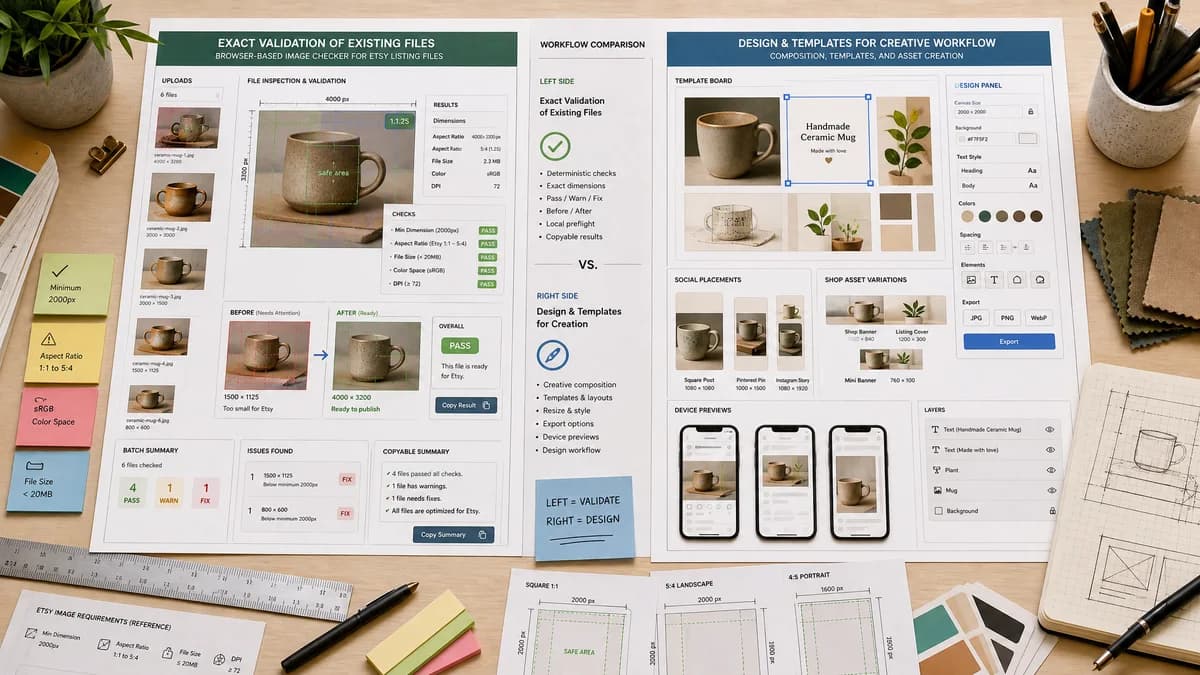
Use Canva for creative design and templates. Use TextFaker when the job is to check existing files locally and get exact pass, warning, and fix messages that can be copied or tested.
How Etsy Listing Image Checker fits
Etsy Listing Image Checker would focus on local preflight validation: upload one or more listing images, measure them in the browser, and return deterministic Etsy readiness statuses before the seller edits or uploads elsewhere.
How Canva Etsy Size Guide and Image Resizer fits
Canva is strongest when the user wants to design an Etsy image or shop asset from a template, resize within a full editor, and export a finished graphic.
Side-by-side comparison
| Decision point | Etsy Listing Image Checker | Canva Etsy Size Guide and Image Resizer | Takeaway |
|---|---|---|---|
| Primary workflow | Our workflowPreflight checker for existing Etsy listing image files. | Competitor workflowDesign and resize environment with Etsy size guidance. | The tools are complementary, but TextFaker should own deterministic validation. |
| Local browser processing | Our workflowCan be designed to inspect image headers, dimensions, canvas output, transparency, and filenames in the browser without upload. | Competitor workflowCanva is a hosted design platform where uploaded assets enter the editor workflow. | TextFaker has a clearer privacy and speed story for sellers checking product photos. |
| Etsy rule coverage | Our workflowCan explicitly report Etsy-supported extensions, 2000px recommendation, 635px first-image threshold, 1MB upload warning, landscape or square first-image status, and transparent PNG warning. | Competitor workflowCanva provides size guidance but is not primarily a rule-by-rule listing preflight report. | A validation matrix is more testable than a template guide. |
| Outputs | Our workflowStatus table, validation messages, dimensions, byte size, ratio, orientation, proposed filenames, CSV or JSON report, and optional corrected downloads. | Competitor workflowDesigned image exports and templates. | TextFaker outputs can be verified without judging visual quality. |
| Batch listing set review | Our workflowCan show image 1 special checks and consistency checks across a listing gallery. | Competitor workflowCanva can manage multiple designs, but listing-set validation is not the main surface. | The first-photo distinction is a useful product-specific differentiator. |
| Mobile use | Our workflowA compact upload-and-check interface can work well from a phone camera roll. | Competitor workflowCanva mobile is powerful but heavier because it opens a full editor. | Fast mobile checks can reduce friction before listing creation. |
Use Etsy Listing Image Checker when
- Checking existing listing photos without starting a design project
- Validating width, height, file size, type, transparency, orientation, and first-image rules locally
- Producing deterministic report rows and proposed filenames for automated tests
- Mobile-friendly quick checks before uploading to Etsy
Use Canva Etsy Size Guide and Image Resizer when
- Creating Etsy cover photos, shop icons, or listing graphics from templates
- Adding text, brand elements, and layouts
- Users already managing content inside Canva
- Creative editing beyond validation
Detailed comparison
Demand Signal
Public seller threads show recurring uncertainty about exact Etsy listing image sizing, thumbnails, and blurry previews. Sellers do not only need a design canvas; they need to know whether the file they already have is acceptable.
- Support discussions mention exact pixel configurations, Etsy acceptance, and thumbnails being cut off.
- A checker can answer these questions without requiring a new design project.
Product Gap
Canva is a broad creative tool. The TextFaker opportunity is a narrower diagnostic workflow that reports objective facts about files and Etsy-specific statuses.
- Measure first image separately from supporting images.
- Flag transparent PNG risk and CMYK or non-sRGB risk when detectable.
- Return copy-ready validation messages.
Implementation Path
The browser can decode common image files, inspect file metadata where possible, and compute deterministic measurements without server upload.
- Use File API for name, extension, MIME, and byte size.
- Use image decode or createImageBitmap for pixel dimensions.
- Use canvas sampling to detect alpha presence for browser-decodable images.
- Produce a stable JSON-like report for tests.
Positioning
Position TextFaker as a quick Etsy image preflight checker, not as a replacement for a creative editor.
- Best message: check before uploading to Etsy.
- Avoid subjective promises about beauty or conversion.
- Emphasize privacy, deterministic checks, and downloadable reports.
Research notes
- Canva's official Etsy size guide states that an item listing photo should be at least 1000 pixels wide, while Etsy Help currently recommends 2000 pixels in both width and height; TextFaker should cite Etsy Help as the validation baseline and explain any stricter or softer warnings.
- Public discussions show sellers using Canva for Etsy sizing, but still asking whether square or landscape images will crop correctly.
- The comparison should avoid claiming Canva validates Etsy upload acceptance unless that feature is verified in the product.
Official source
The only outbound competitor link on this page is placed here for source checking after the comparison.
Official Canva Etsy Size Guide and Image Resizer source