
GPS Coordinates from Video vs Dashcam Viewer
GPS Coordinates from Video is the baseline in this comparison: Read GPS and location metadata from MOV, MP4, M4V, 3GP, AVI, MKV, WebM, MPEG, TS, and related videos in the browser, then copy coordinates and map links.
Dashcam video player that synchronizes footage with route maps, vehicle metrics, geotags, and GPS export.
Quick verdict
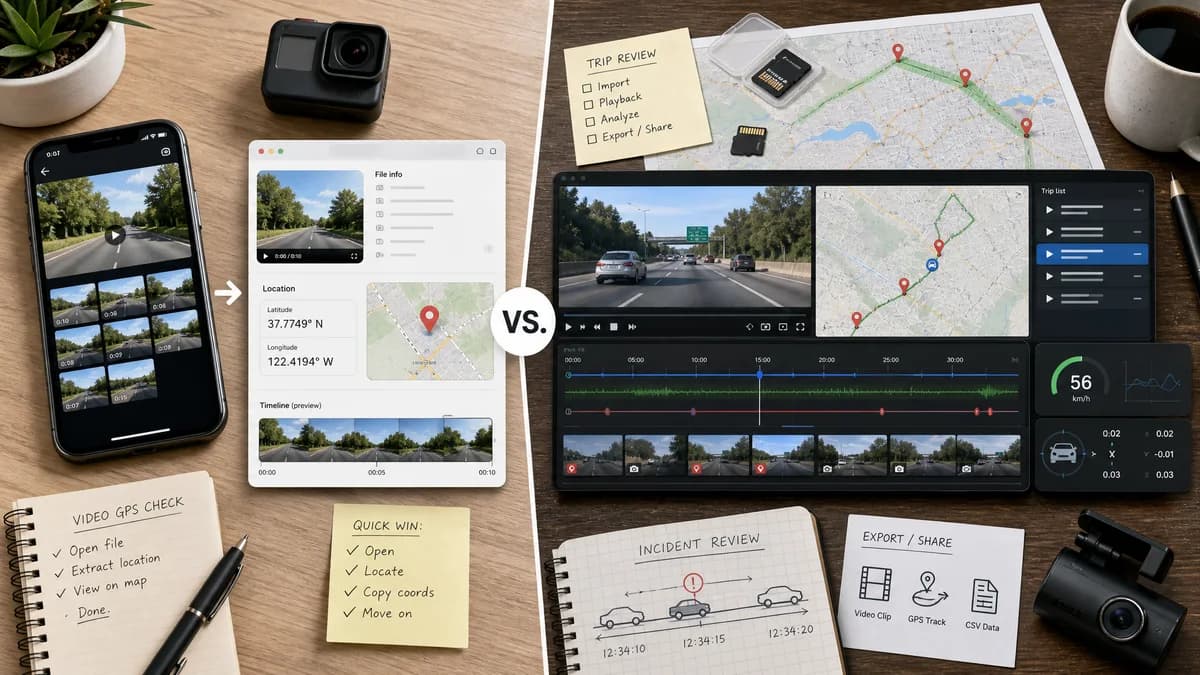
Dashcam Viewer is better for route playback and incident review from supported dashcams. TextFaker is better for quick GPS-coordinate checks on ordinary phone or camera videos without installing a desktop app.
How GPS Coordinates from Video fits
GPS Coordinates from Video is a browser-local metadata viewer for extracting a video location coordinate from common phone and camera files.
How Dashcam Viewer fits
Dashcam Viewer is specialized for dashcam footage. Its official page describes map displays for routes, vehicle metrics while video plays, GPS data export, geotag markers, trip lists, and dashcam-oriented review features.
Side-by-side comparison
| Decision point | GPS Coordinates from Video | Dashcam Viewer | Takeaway |
|---|---|---|---|
| Video domain | Our workflowGeneral phone and camera videos with embedded location metadata. | Competitor workflowDashcam and driving footage with GPS, speed, route, and trip context. | Dashcam Viewer is specialized for vehicle video workflows. |
| GPS model | Our workflowFocused on extracting coordinates from video metadata and showing map links. | Competitor workflowDisplays route maps and current vehicle position while the video plays. | Dashcam Viewer is stronger for GPS tracks; TextFaker is simpler for single-location checks. |
| Installation | Our workflowRuns in the browser with no desktop app install. | Competitor workflowDesktop software workflow with try and buy paths on the official site. | TextFaker has lower setup friction. |
| Output | Our workflowLatitude, longitude, source tag, and map links. | Competitor workflowAnimated maps, route lines, geotags, trip lists, and GPS export formats. | Dashcam Viewer offers richer trip analysis. |
| Privacy model | Our workflowLocal browser parsing with no upload. | Competitor workflowDesktop app workflow keeps source videos local unless the user uses external services or sharing separately. | Both can avoid uploading, but TextFaker is lighter. |
| Missing GPS | Our workflowExplains missing metadata and common causes for phone, camera, edited, and shared videos. | Competitor workflowIf dashcam GPS data is absent or unsupported, map and route features may not be useful. | TextFaker can be clearer for general video users. |
| Best workflow | Our workflowOpen one personal video and check whether it contains location. | Competitor workflowLoad multiple driving clips and review an event or trip with route data. | Dashcam Viewer is not a replacement for a simple GPS-from-video web tool. |
Use GPS Coordinates from Video when
- Checking a single MOV, MP4, M4V, or 3GP video for embedded location.
- Copying coordinates and opening a map link quickly.
- Privacy review before sharing a non-dashcam video.
Use Dashcam Viewer when
- Reviewing dashcam trips with synchronized route maps.
- Exporting GPS tracks and using geotag markers.
- Analyzing driving footage with speed, route, event, and trip context.
Detailed comparison
Workflow Fit
Dashcam Viewer is adjacent because it visualizes GPS from video, but it solves a different problem: route playback and driving analysis. TextFaker should remain a quick metadata check for ordinary video files.
GPS Tracks
Dashcam footage often contains continuous route data. A TextFaker GPS coordinates tool can acknowledge that some videos have timed GPS tracks while focusing on extracting the practical coordinate fields it supports.
Output Difference
Dashcam Viewer turns GPS into a trip experience with route maps and geotags. TextFaker should turn GPS into a concise privacy answer: coordinates, map link, and whether sharing the video may reveal a place.
Audience
Drivers, insurers, and incident reviewers may prefer Dashcam Viewer. Users checking whether a personal clip exposes a location should not need a full dashcam analysis suite.
- Dashcam Viewer: route analysis.
- TextFaker: coordinate lookup and privacy check.
Research notes
- Dashcam Viewer describes map display for route and current position while viewing footage.
- Dashcam Viewer supports GPS export and geotag markers according to the official page.
- Dashcam Viewer is specialized for driving footage, not generic phone video metadata lookup.
Official source
The only outbound competitor link on this page is placed here for source checking after the comparison.
Official Dashcam Viewer source