
GPS Coordinates from Video vs EXIF.pro
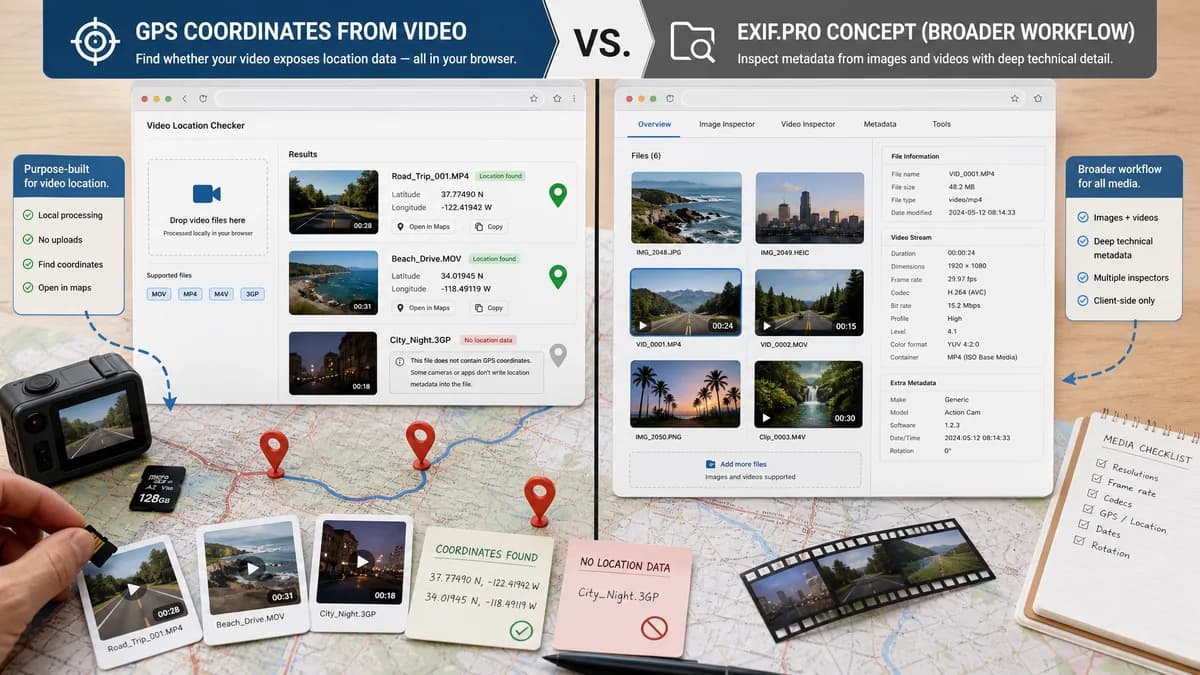
GPS Coordinates from Video is the baseline in this comparison: Read GPS and location metadata from MOV, MP4, M4V, 3GP, AVI, MKV, WebM, MPEG, TS, and related videos in the browser, then copy coordinates and map links.
Client-side EXIF and video metadata viewer for mixed image and video inspection.
Quick verdict
Use GPS Coordinates from Video when the job is specifically to check whether a video exposes location coordinates. Use EXIF.pro when the user wants a broader mixed-media metadata viewer in a similar no-upload browser workflow.
How GPS Coordinates from Video fits
GPS Coordinates from Video is focused on reading video location metadata locally in the browser, then presenting latitude, longitude, map links, and missing-location explanations for MOV, MP4, M4V, 3GP, and similar files.
How EXIF.pro fits
EXIF.pro is a broader client-side metadata viewer for images and videos. Its public page emphasizes no uploads, common image formats, common video formats, and video technical metadata such as duration, dimensions, frame rate, codecs, and container details.
Side-by-side comparison
| Decision point | GPS Coordinates from Video | EXIF.pro | Takeaway |
|---|---|---|---|
| Privacy model | Our workflowBrowser-local video metadata reading with no upload required. | Competitor workflowOfficial page states files never leave the device and processing is client-side. | Both fit privacy-sensitive local inspection workflows. |
| Primary focus | Our workflowPurpose-built for video GPS and location coordinates. | Competitor workflowGeneral EXIF and video metadata viewer for images and videos. | TextFaker can be more direct for location checks. |
| Video formats | Our workflowTargets phone and camera videos such as MOV, MP4, M4V, 3GP, and similar QuickTime or ISO media files. | Competitor workflowLists MP4, MOV, AVI, WebM, MKV, and FLV among video formats. | EXIF.pro has broader container variety, while TextFaker can optimize for mobile GPS metadata. |
| GPS presentation | Our workflowShows latitude, longitude, and map links when a location tag is present. | Competitor workflowPublic copy highlights GPS for image metadata and video technical metadata, but not a dedicated video GPS map workflow. | TextFaker should win when the output must be coordinates and maps. |
| Missing metadata guidance | Our workflowCan explain disabled camera location, stripped exports, social app removal, or unsupported timed GPS tracks. | Competitor workflowShows extracted metadata but is not positioned around missing video GPS diagnosis. | A GPS-specific explanation layer is a useful differentiator. |
| Output style | Our workflowCoordinate-first output with copyable values and links. | Competitor workflowMetadata-first report style for broad inspection. | TextFaker is simpler for non-technical users who only need the location. |
| Best workflow | Our workflowOne-off privacy and location checks before sending or publishing a video. | Competitor workflowGeneral media metadata review across photos and videos. | The tools overlap technically, but serve different intent. |
Use GPS Coordinates from Video when
- Checking video GPS coordinates before sharing a phone or camera clip.
- Opening map links from extracted latitude and longitude.
- Explaining why a video has no usable GPS metadata.
Use EXIF.pro when
- Inspecting general metadata across both photos and videos.
- Checking video technical details such as codec, duration, and frame rate.
- A client-side metadata workflow that is not limited to location.
Detailed comparison
Workflow Fit
EXIF.pro is one of the closest browser-local alternatives because it avoids uploads and supports video files. The difference is intent: it is a broad metadata inspector, while GPS Coordinates from Video should reduce the workflow to location detection, map links, and plain-English status.
- Choose TextFaker for a fast video location answer.
- Choose EXIF.pro for mixed media metadata browsing.
Privacy
Both tools are compatible with sensitive files because the official EXIF.pro page claims local browser processing. TextFaker should make the same privacy model prominent and tie it directly to location privacy risk.
Video GPS Coverage
The research sources show that video location may live in QuickTime metadata keys or ISO 6709 style values. TextFaker can be more opinionated by translating those raw values into coordinates and maps instead of simply listing metadata fields.
User Clarity
A dedicated TextFaker page can avoid showing a large metadata table first. That matters because many users only need to know whether a video contains a location and what that location is.
- Show coordinates first.
- Keep raw metadata secondary.
- Explain absent GPS clearly.
Research notes
- EXIF.pro states that processing happens locally in the browser and files never leave the device.
- EXIF.pro lists MP4, MOV, AVI, WebM, MKV, and FLV among supported video formats.
- Apple and ExifTool references show that QuickTime video location can be stored in specific metadata keys rather than classic image EXIF fields.
Official source
The only outbound competitor link on this page is placed here for source checking after the comparison.
Official EXIF.pro source