
GPS Coordinates from Video vs ExifMeta
GPS Coordinates from Video is the baseline in this comparison: Read GPS and location metadata from MOV, MP4, M4V, 3GP, AVI, MKV, WebM, MPEG, TS, and related videos in the browser, then copy coordinates and map links.
Free online metadata viewer for photos, videos, audio, and documents with broad format support.
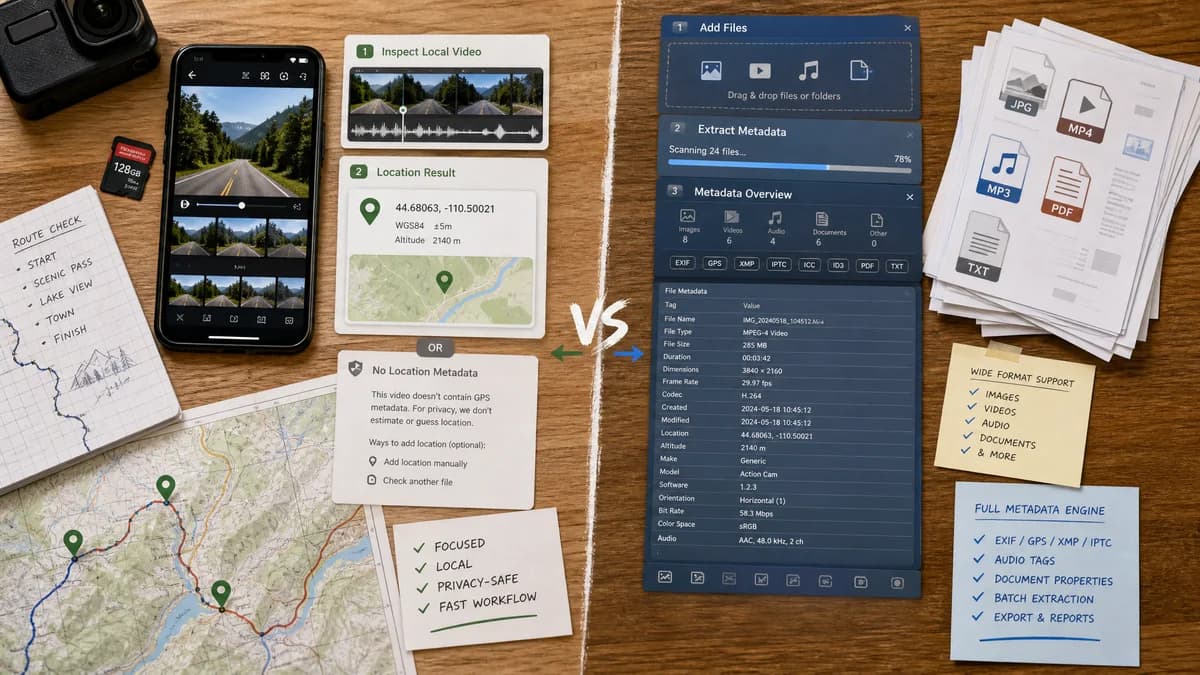
Quick verdict
ExifMeta is stronger for broad metadata extraction across file types. TextFaker is stronger for private, location-first video checks where the user does not need a full ExifTool-style report.
How GPS Coordinates from Video fits
GPS Coordinates from Video is intentionally narrower: local video file inspection, GPS coordinates, map links, and privacy-safe guidance for missing video location metadata.
How ExifMeta fits
ExifMeta describes itself as a free EXIF metadata viewer for photos, videos, audio, and documents. Its public page lists 50 plus file formats, video support including MP4, AVI, MOV, MKV, WMV, FLV, 3GP, WebM, and MPEG, and says it is powered by ExifTool.
Side-by-side comparison
| Decision point | GPS Coordinates from Video | ExifMeta | Takeaway |
|---|---|---|---|
| Processing model | Our workflowBrowser-local video inspection with no upload. | Competitor workflowPublic page presents upload and URL extraction workflows and says SSL encrypted and no file storage. | TextFaker has a simpler privacy story for sensitive video locations. |
| Metadata engine | Our workflowCan use targeted browser parsing for QuickTime and ISO video location fields. | Competitor workflowStates it is powered by ExifTool, a very broad metadata engine. | ExifMeta likely has broader metadata coverage; TextFaker can be easier to use. |
| File type scope | Our workflowVideo files only. | Competitor workflowPhotos, videos, audio files, and documents. | ExifMeta is broader; TextFaker is more focused. |
| Video formats | Our workflowTargets MOV, MP4, M4V, 3GP, and similar camera videos. | Competitor workflowLists MP4, AVI, MOV, MKV, WMV, FLV, 3GP, WebM, and MPEG. | ExifMeta covers more containers, while TextFaker can focus on location-bearing mobile formats. |
| Location output | Our workflowCoordinates, map links, and missing-GPS explanation are core outputs. | Competitor workflowMentions GPS coordinates as part of metadata extraction, but the product is not specifically a video GPS map tool. | TextFaker should be more direct for location extraction. |
| User skill | Our workflowDesigned for non-technical users who do not know metadata tag names. | Competitor workflowGeneral metadata output may expose many fields across many formats. | TextFaker can reduce cognitive load. |
| Best workflow | Our workflowBefore sharing a video, check whether it leaks a location. | Competitor workflowAudit all available metadata in many file types. | Different intent despite overlapping extraction capability. |
Use GPS Coordinates from Video when
- Checking a personal video for embedded GPS without upload.
- Seeing coordinates and map links immediately.
- Diagnosing absent video location data in plain English.
Use ExifMeta when
- Broad ExifTool-backed metadata extraction in a web interface.
- Mixed batches of images, videos, audio files, and documents.
- Users who want a general metadata viewer instead of a single-purpose location tool.
Detailed comparison
Workflow Fit
ExifMeta is relevant because it combines web access, broad format support, and ExifTool-backed extraction. TextFaker should compete by being narrower and more understandable for the single video GPS task.
Privacy
ExifMeta claims SSL encryption and no file storage, but the user still interacts with an upload or URL extraction flow. TextFaker should emphasize that the selected video remains local.
Coverage
ExifTool-backed extraction can be very broad, which is useful for advanced users. The TextFaker page should focus on the tags that produce a location result and hide irrelevant metadata unless it helps explain failure.
Result Design
A good TextFaker result should not make users search through raw ExifTool groups. It should display the detected source, normalized coordinates, and direct map actions.
- Detected tag family.
- Latitude and longitude.
- Map actions.
- No-location reason.
Research notes
- ExifMeta states support for 50 plus file formats and lists multiple video containers.
- ExifMeta says it is powered by ExifTool.
- ExifMeta presents upload and URL extraction options, while the proposed TextFaker tool is browser-local.
Official source
The only outbound competitor link on this page is placed here for source checking after the comparison.
Official ExifMeta source