
GPS Coordinates from Video vs MediaInfo
GPS Coordinates from Video is the baseline in this comparison: Read GPS and location metadata from MOV, MP4, M4V, 3GP, AVI, MKV, WebM, MPEG, TS, and related videos in the browser, then copy coordinates and map links.
Cross-platform media inspector for technical and tag data in video and audio files.
Quick verdict
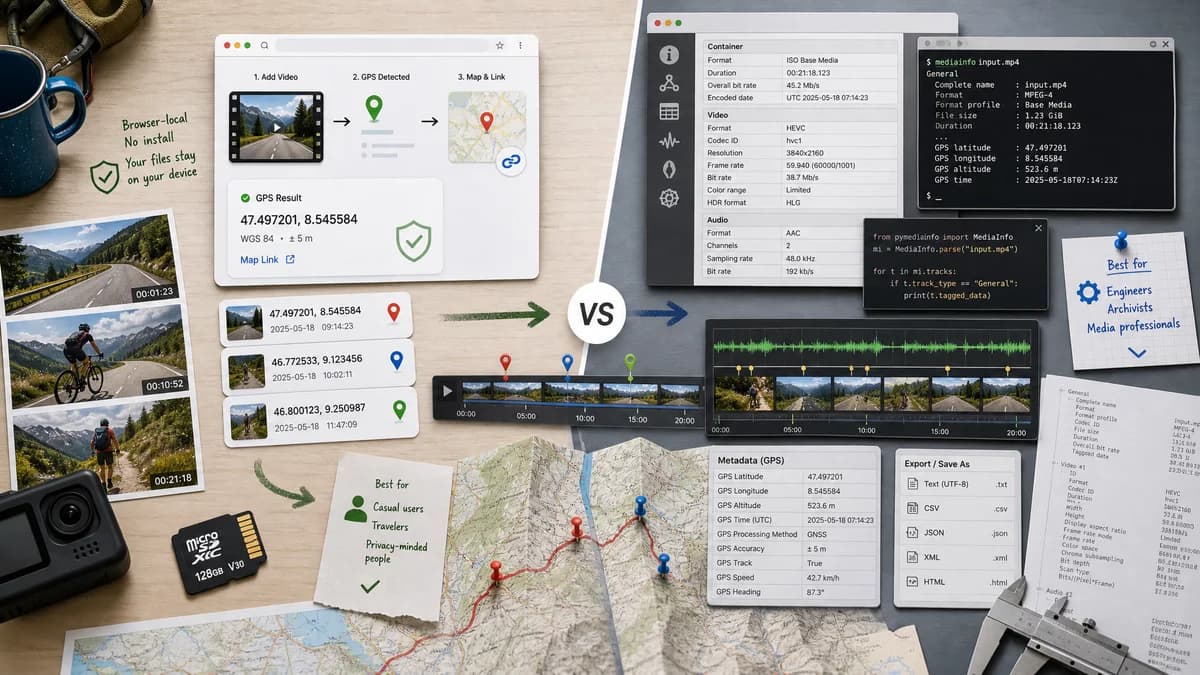
MediaInfo is better for engineers, archivists, and media professionals checking codec and container details. TextFaker is better for casual or privacy-focused users who only need video GPS coordinates and map links.
How GPS Coordinates from Video fits
GPS Coordinates from Video offers a browser-local, no-install way to extract and interpret video location coordinates with map links.
How MediaInfo fits
MediaInfo is an open-source tool from MediaArea that displays technical and tag data for video and audio files. Its official page lists GUI, command-line, and library versions, multiple export formats, and support for many containers including MPEG-4 and QuickTime.
Side-by-side comparison
| Decision point | GPS Coordinates from Video | MediaInfo | Takeaway |
|---|---|---|---|
| Installation | Our workflowRuns in a browser without installing software. | Competitor workflowAvailable as desktop GUI, command-line tool, library, and online test option. | TextFaker has lower setup friction for one-off checks. |
| Privacy model | Our workflowLocal browser parsing with no upload. | Competitor workflowDesktop and CLI use can be local; online test workflows may differ. | Both can support local workflows, but TextFaker does so without install. |
| Primary focus | Our workflowGPS coordinates from video metadata. | Competitor workflowTechnical and tag data for audio and video files. | MediaInfo is broader and more technical. |
| Format coverage | Our workflowCommon phone and camera video formats with likely location tags. | Competitor workflowOfficial page lists many containers including MPEG-4, QuickTime, Matroska, AVI, MPEG-TS, MXF, WMV, and FLV. | MediaInfo has much wider media coverage. |
| Location output | Our workflowCoordinates and direct map links. | Competitor workflowCan display available tag data, but is not designed as a map-link GPS viewer. | TextFaker is more actionable for location. |
| Export | Our workflowCopyable coordinates and links are likely enough for the task. | Competitor workflowExports information as text, CSV, HTML, and other formats. | MediaInfo is stronger for reporting. |
| Best workflow | Our workflowA non-technical user checking one video for location leakage. | Competitor workflowA technical user diagnosing containers, streams, bitrates, codecs, and tags. | The tools are complementary rather than interchangeable. |
Use GPS Coordinates from Video when
- No-install browser checks for video location.
- Users who need coordinates rather than full stream diagnostics.
- Quick privacy review before sharing a video.
Use MediaInfo when
- Detailed media technical inspection.
- Exporting structured reports for media operations or archives.
- Desktop or CLI workflows with many audio and video containers.
Detailed comparison
Workflow Fit
MediaInfo is a mature media-inspection tool, but its strength is technical breadth. TextFaker should avoid a codec-inspector interface and present the GPS answer directly.
Local Processing
MediaInfo can be fully local when installed, which is good for privacy. TextFaker can offer a local workflow without asking users to install a desktop utility.
Metadata Depth
MediaInfo is valuable when users need bitrate, stream, subtitle, chapter, and container details. Those fields are usually secondary for a location privacy check.
Audience
A video engineer may prefer MediaInfo. A person checking whether a phone clip includes home or travel coordinates is better served by a specialized web page.
- TextFaker audience: privacy checkers and casual users.
- MediaInfo audience: technical media users and archivists.
Research notes
- MediaInfo describes itself as a unified display of technical and tag data for video and audio files.
- MediaInfo offers GUI, command-line, and library versions.
- MediaInfo supports many containers, including MPEG-4 and QuickTime.
Official source
The only outbound competitor link on this page is placed here for source checking after the comparison.
Official MediaInfo source