
GPS Coordinates from Video vs Metadata2Go
GPS Coordinates from Video is the baseline in this comparison: Read GPS and location metadata from MOV, MP4, M4V, 3GP, AVI, MKV, WebM, MPEG, TS, and related videos in the browser, then copy coordinates and map links.
Online metadata viewer for many file types, including video, audio, documents, images, and e-books.
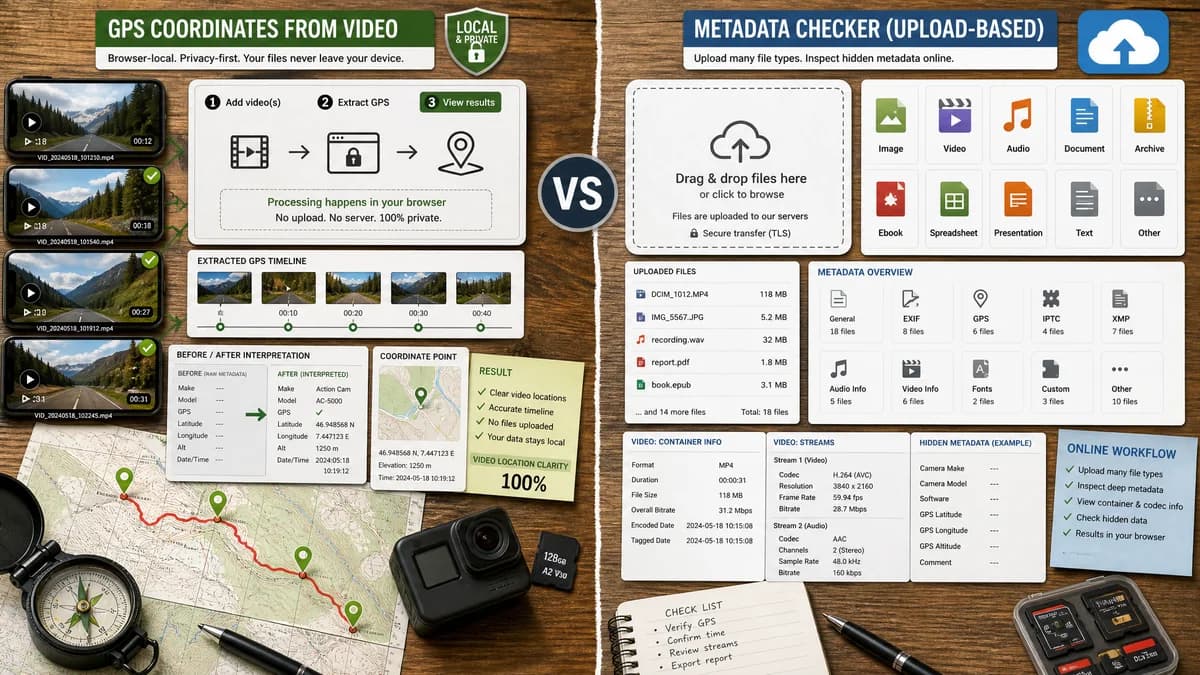
Quick verdict
Use TextFaker when privacy and video location clarity matter most. Use Metadata2Go when the user wants a general online metadata checker for many file types and accepts an upload workflow.
How GPS Coordinates from Video fits
GPS Coordinates from Video is a browser-local tool focused on extracting and interpreting video GPS metadata without uploading the file.
How Metadata2Go fits
Metadata2Go lets users drag and drop or upload many file types and displays hidden metadata. Its page notes that videos can contain location metadata and that containers such as AVI and MP4 include codec and stream metadata.
Side-by-side comparison
| Decision point | GPS Coordinates from Video | Metadata2Go | Takeaway |
|---|---|---|---|
| Privacy model | Our workflowReads the selected video in the browser without uploading it. | Competitor workflowUses an upload or drag-and-drop workflow and states files are handled securely. | TextFaker is better aligned with location-sensitive files. |
| Primary scope | Our workflowVideo GPS and location coordinates. | Competitor workflowGeneral metadata viewing across images, documents, video, audio, and e-books. | Metadata2Go is broader, but less targeted. |
| Video metadata | Our workflowInterprets location tags and turns them into usable coordinate output. | Competitor workflowPublic page says videos may contain location information plus codec and stream metadata. | Both address video metadata, but TextFaker should make location the main result. |
| Map output | Our workflowDesigned to show map links when coordinates exist. | Competitor workflowGeneral metadata display; map-link behavior is not the core page promise. | TextFaker can be more actionable for GPS. |
| Missing GPS | Our workflowCan explain that many exported, edited, messaged, or downloaded videos no longer contain location tags. | Competitor workflowShows what metadata exists, but is not positioned as a missing-location diagnostic tool. | TextFaker can reduce false expectations. |
| Installation | Our workflowNo installation and no account required for local browser use. | Competitor workflowNo software installation required, but uses an online upload workflow. | Both are easy to access; privacy tradeoffs differ. |
| Best workflow | Our workflowA quick local check before sharing a personal video. | Competitor workflowA broad online file metadata audit. | TextFaker should avoid competing on all file types and focus on video location. |
Use GPS Coordinates from Video when
- Checking sensitive video location data locally.
- Getting a coordinate and map link without uploading a clip.
- Explaining missing or stripped video GPS metadata.
Use Metadata2Go when
- Viewing broad metadata for many file types in one web service.
- Checking non-video documents, audio files, e-books, and images.
- Users comfortable with uploading files to an online service.
Detailed comparison
Workflow Fit
Metadata2Go is a well-matched adjacent online metadata viewer because it explicitly includes video files and video location metadata. The main separation is that TextFaker should not need the user to upload a private video.
Privacy
Location metadata is often sensitive because it can reveal home, work, or travel locations. A browser-local TextFaker tool has a clear privacy advantage over a general upload flow for users checking personal clips.
Metadata Depth
Metadata2Go is useful for a broad file audit. TextFaker should be intentionally narrower, translating QuickTime or ISO location values into a result that non-technical users understand.
- Latitude and longitude.
- Map links.
- Missing metadata reason.
Product Fit
The TextFaker page should avoid looking like a generic file analyzer. The stronger user intent is to answer one question: does this video include GPS coordinates, and where do they point?
Research notes
- Metadata2Go states that users can upload video files and view hidden metadata.
- Metadata2Go notes that videos can contain location metadata and that MP4 and AVI containers include technical stream metadata.
- The upload workflow makes Metadata2Go less directly comparable to a browser-local privacy tool.
Official source
The only outbound competitor link on this page is placed here for source checking after the comparison.
Official Metadata2Go source