
GPS Coordinates from Video vs MetadataG
GPS Coordinates from Video is the baseline in this comparison: Read GPS and location metadata from MOV, MP4, M4V, 3GP, AVI, MKV, WebM, MPEG, TS, and related videos in the browser, then copy coordinates and map links.
Browser-local file metadata extractor for images, audio, video, PDFs, and documents.
Quick verdict
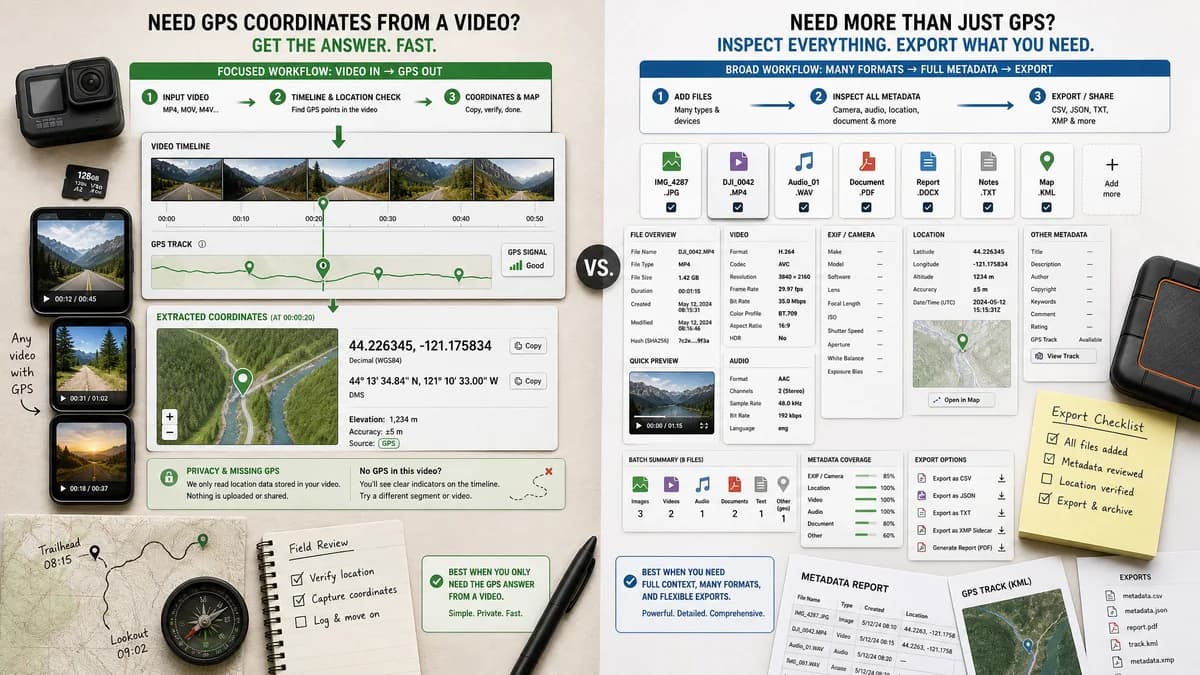
MetadataG is broader and more export-oriented. TextFaker should be better for users who do not want to inspect every metadata field and only need the GPS answer from a video.
How GPS Coordinates from Video fits
GPS Coordinates from Video narrows the experience to video location metadata, coordinates, maps, privacy, and missing-GPS explanations.
How MetadataG fits
MetadataG is a broad local-browser metadata viewer. Its page says files are not uploaded, supports video formats including MP4, M4V, MOV, MKV, AVI, WebM, MPEG, 3GP, WMV, FLV, TS, MTS, M2TS, and OGV, and offers metadata export formats.
Side-by-side comparison
| Decision point | GPS Coordinates from Video | MetadataG | Takeaway |
|---|---|---|---|
| Privacy model | Our workflowBrowser-local reading for location metadata. | Competitor workflowOfficial page states extraction happens directly in the browser and files are not uploaded. | Both can be positioned for private local inspection. |
| Scope | Our workflowVideo GPS coordinates and map links only. | Competitor workflowImages, audio, video, PDFs, and documents. | MetadataG is broader; TextFaker can be faster for one task. |
| Video format list | Our workflowCommon phone and camera video containers, especially MOV, MP4, M4V, and 3GP. | Competitor workflowLists MP4, M4V, MOV, MKV, AVI, WebM, MPEG, 3GP, WMV, FLV, TS, MTS, M2TS, and OGV. | MetadataG has wider format breadth, while TextFaker can tune for location-bearing mobile videos. |
| GPS output | Our workflowCoordinates, map links, and privacy interpretation are the main output. | Competitor workflowPublic page emphasizes codec, resolution, frame rate, duration, and general embedded details for video. | TextFaker should make GPS easier to find. |
| Export | Our workflowLikely copyable coordinate and map output, not a full metadata report. | Competitor workflowOffers metadata export as PDF, JSON, HTML, or TXT. | MetadataG is stronger for documentation; TextFaker is stronger for quick decisions. |
| Missing metadata | Our workflowExplains absent coordinates and common causes. | Competitor workflowGeneral metadata viewer behavior, not a video GPS diagnosis tool. | TextFaker can reduce confusion when no location exists. |
| Best workflow | Our workflowOpen a local video, check location, copy coordinates or map link. | Competitor workflowOpen almost any file and browse or export many metadata fields. | The right choice depends on whether the user wants one answer or a full report. |
Use GPS Coordinates from Video when
- Reading video GPS coordinates without a large general metadata interface.
- Getting map links from a MOV, MP4, M4V, or 3GP video.
- Understanding whether missing location is normal for a copied, edited, or shared video.
Use MetadataG when
- Inspecting metadata across many file types in one page.
- Exporting metadata reports to formats such as JSON, PDF, HTML, or TXT.
- Checking broad technical metadata beyond location.
Detailed comparison
Workflow Fit
MetadataG is a strong adjacent tool because it is also browser-local. Its broader design means it is more useful for users who need a general metadata report, while TextFaker can specialize in a single video location question.
Output
MetadataG supports export formats that are useful for documentation. TextFaker should instead prioritize immediately usable coordinate output: decimal latitude and longitude, map links, and a simple privacy status.
- TextFaker should keep location fields at the top.
- Raw metadata can remain secondary.
Format Coverage
MetadataG lists more video containers than the proposed TextFaker scope. TextFaker can still compete by handling the most common phone and camera containers well and by explaining unsupported or non-location-bearing files.
Positioning
The most defensible TextFaker angle is not broader metadata coverage. It is the clarity of a dedicated GPS-from-video tool with no upload, no install, and no need to understand metadata tag names.
Research notes
- MetadataG claims local browser processing and no upload.
- MetadataG lists a broad video format set including MP4, M4V, MOV, and 3GP.
- MetadataG emphasizes metadata exports, which makes it more report-oriented than a simple coordinates tool.
Official source
The only outbound competitor link on this page is placed here for source checking after the comparison.
Official MetadataG source