
GPS Coordinates from Video vs MetaDataView Video Metadata Viewer
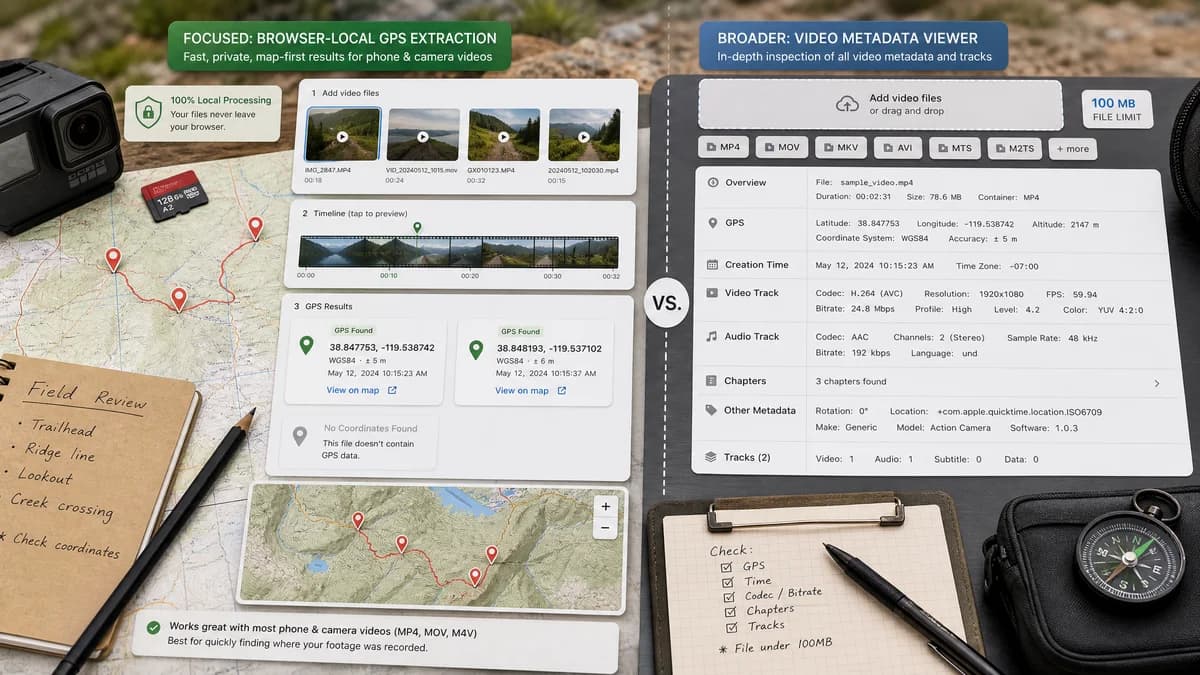
GPS Coordinates from Video is the baseline in this comparison: Read GPS and location metadata from MOV, MP4, M4V, 3GP, AVI, MKV, WebM, MPEG, TS, and related videos in the browser, then copy coordinates and map links.
Dedicated online video metadata viewer for GPS, creation time, codec, bitrate, chapters, and track data.
Quick verdict
MetaDataView is a strong direct competitor for video metadata inspection. TextFaker can differentiate through a no-upload privacy promise, GPS-first layout, and simpler map-focused output.
How GPS Coordinates from Video fits
GPS Coordinates from Video should provide a focused browser-local GPS result for common phone and camera videos, with map links and clear messaging when no coordinates exist.
How MetaDataView Video Metadata Viewer fits
MetaDataView has a dedicated video metadata page that explicitly lists GPS, creation time, codec, bitrate, chapters, and track data for MP4, MOV, MKV, WebM, AVI, FLV, and M4V files, with a stated 100 MB file size limit.
Side-by-side comparison
| Decision point | GPS Coordinates from Video | MetaDataView Video Metadata Viewer | Takeaway |
|---|---|---|---|
| Video focus | Our workflowFocused specifically on GPS coordinates from video. | Competitor workflowFocused on video metadata broadly, including GPS and technical fields. | MetaDataView is direct competition, but broader. |
| Privacy model | Our workflowBrowser-local file reading is central to the tool concept. | Competitor workflowOfficial page presents a web upload/select workflow and a 100 MB maximum; no-upload wording is not the headline. | TextFaker can lead with privacy for sensitive location data. |
| GPS handling | Our workflowShows latitude, longitude, map links, and privacy meaning. | Competitor workflowExplicitly lists GPS as a metadata category to inspect. | Both cover GPS; TextFaker should be more action-oriented after extraction. |
| Technical metadata | Our workflowKeeps codec and track details secondary unless needed to explain GPS support. | Competitor workflowLists creation time, codec, bitrate, chapters, and track data as core features. | MetaDataView is better for full video metadata analysis. |
| Supported containers | Our workflowTargets MOV, MP4, M4V, 3GP, and similar phone or camera video files. | Competitor workflowLists MP4, MOV, MKV, WebM, AVI, FLV, and M4V. | MetaDataView covers more general web video containers; TextFaker should cover mobile location containers deeply. |
| Missing metadata | Our workflowExplains when no GPS tag exists, when social platforms stripped it, or when only non-location metadata remains. | Competitor workflowGeneral metadata viewer output may show absence but is not framed as GPS troubleshooting. | TextFaker can provide clearer guidance for ordinary users. |
| Output | Our workflowCoordinate-first result with map links and copy controls. | Competitor workflowMetadata report style across many fields. | TextFaker can reduce steps for GPS-specific tasks. |
Use GPS Coordinates from Video when
- Location-first checks on phone and camera videos.
- Users who want coordinates and map links without browsing many technical fields.
- Private video review where local processing matters.
Use MetaDataView Video Metadata Viewer when
- Inspecting several categories of video metadata in one report.
- Checking codec, bitrate, chapters, and track fields alongside GPS.
- Users whose files fit the stated web-app limit and who want a video-specific metadata report.
Detailed comparison
Workflow Fit
MetaDataView is the most direct web competitor because it has a video-specific page and explicitly includes GPS. TextFaker should not try to outdo every technical field; it should make the location answer easier and more private.
Privacy
The official MetaDataView page states a maximum file size and a file selection flow. TextFaker can create stronger trust by making local processing visible before the user selects a video.
GPS Output
For GPS tasks, users usually need coordinates, a map, and confidence about whether the result came from embedded metadata. A dedicated TextFaker interface can make those elements the complete first screen.
- Decimal coordinates.
- Map links.
- Missing-data explanation.
Coverage Tradeoff
MetaDataView is better for users who also need chapters, bitrate, and track data. TextFaker is better when showing those fields would distract from the location privacy check.
Research notes
- MetaDataView explicitly says its video viewer inspects GPS and creation time.
- MetaDataView lists MP4, MOV, MKV, WebM, AVI, FLV, and M4V support.
- MetaDataView states a 100 MB maximum file size on the video metadata page.
Official source
The only outbound competitor link on this page is placed here for source checking after the comparison.
Official MetaDataView Video Metadata Viewer source