
Open Source Alternatives to Dashcam Viewer
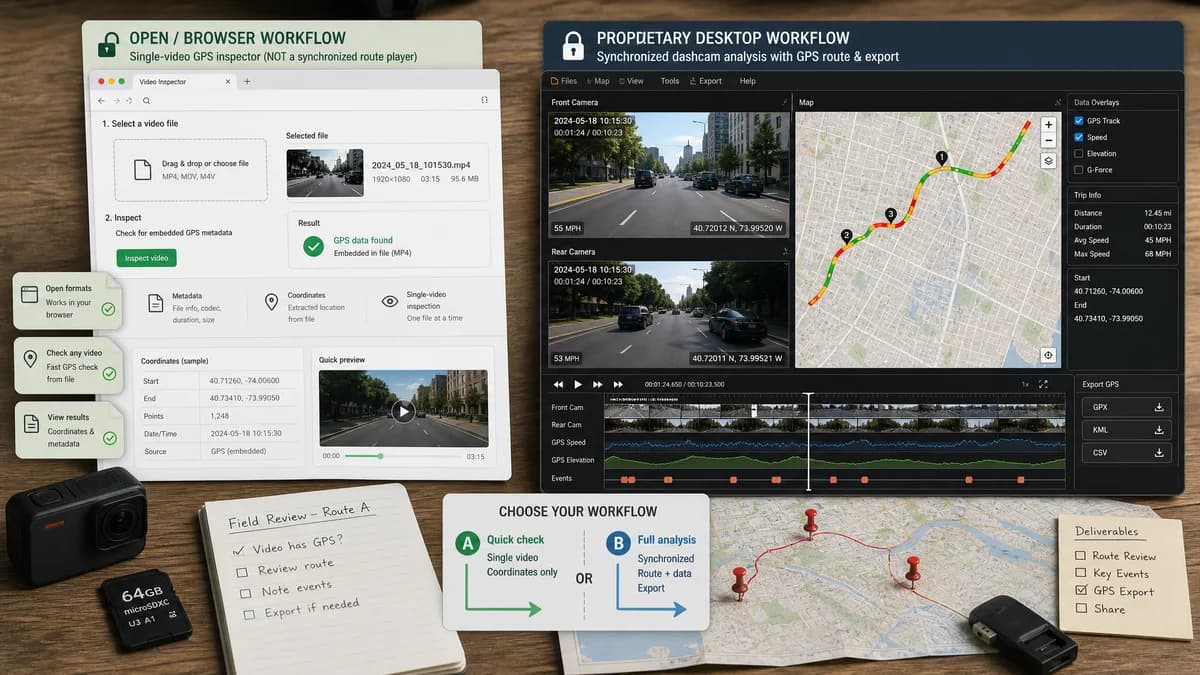
GPS Coordinates from Video is a browser-based alternative for users who need this focused result without installing a proprietary desktop app or entering a larger hosted workflow.
This research compares that workflow with Dashcam Viewer while keeping the outbound source link at the bottom after the analysis.
Why GPS Coordinates from Video fits
GPS Coordinates from Video can answer whether a selected video has embedded GPS coordinates, but it is not a synchronized dashcam route player.
What Dashcam Viewer offers
Dashcam Viewer synchronizes dashcam footage with route maps, speed, geotags, and GPS export workflows for dashcam analysis.
Open alternative signals
Source and openness
GPS Coordinates from VideoBrowser-based video GPS viewer with no public-source claim.
Dashcam ViewerProprietary desktop dashcam application.
Deployment
GPS Coordinates from VideoNo install and one selected video file.
Dashcam ViewerInstalled desktop workflow for dashcam sequences.
Pricing shape
GPS Coordinates from VideoFree successful uses and one all-tools lifetime unlock.
Dashcam ViewerTry-and-buy style desktop product; current pricing should be verified on the official site.
Data control
GPS Coordinates from VideoLocal browser check for one clip.
Dashcam ViewerLocal desktop processing for route playback and dashcam analysis.
Decision guide
Use GPS Coordinates from Video when the user only needs to know whether one video contains coordinates and where they point.
Use Dashcam Viewer when the user needs route playback, speed charts, geotag markers, multiple clips, or dashcam-specific GPS export.
Side-by-side open source alternative comparison
| Decision point | GPS Coordinates from Video | Dashcam Viewer | Takeaway |
|---|---|---|---|
| Alternative fit | Our workflowQuick check for embedded coordinates in one video. | Proprietary workflowDashcam route playback and GPS telemetry analysis. | Our tool is not a full dashcam player. |
| Source model | Our workflowOpen-standard-focused browser workflow. | Proprietary workflowProprietary desktop application. | The alternative claim should focus on lightweight access. |
| Setup and deployment | Our workflowOpen a web page and choose a video. | Proprietary workflowInstall software and load dashcam files or sequences. | Our tool wins on setup for one-off checks. |
| Feature parity | Our workflowCoordinates and map links. | Proprietary workflowRoute map, speed, geotags, playback synchronization, exports, and multiple clips. | Dashcam Viewer wins for full trip analysis. |
| Editing and export parity | Our workflowCopy coordinates and open maps. | Proprietary workflowExport route/GPS data and work with geotag markers. | Use Dashcam Viewer when telemetry export matters. |
| Migration path | Our workflowUse as a pre-check or quick privacy/location check. | Proprietary workflowKeep for serious dashcam analysis. | This is a companion alternative, not a complete replacement. |
Detailed research
Open-Source Alternative Fit
Users looking for alternatives to Dashcam Viewer may want a simpler way to inspect whether a clip contains GPS data. GPS Coordinates from Video can satisfy that first question.
It should not promise synchronized route playback, speed charts, or dashcam telemetry visualization.
Feature Parity and Limits
Dashcam Viewer is purpose-built for playback plus route and telemetry context. GPS Coordinates from Video should focus only on metadata extraction and map links.
The limitation is important because dashcam GPS can be stored in proprietary tracks or sidecar files that a simple metadata viewer may not parse.
Data, Control, and Setup
Both workflows can keep files local, but setup differs. A browser check is faster for one file, while the desktop tool is better for route playback and longer trips.
Practical Migration Guidance
Use GPS Coordinates from Video to check one file quickly. Use Dashcam Viewer when the task includes route playback, speed analysis, geotag markers, exported tracks, or multiple dashcam clips.
Research notes
- Dashcam Viewer's official feature page describes synchronized route maps, speed, geotags, and export workflows.
- Its workflow is route and playback oriented, not just metadata inspection.
- Our tool should be positioned as a quick coordinate check before or outside a full dashcam analysis workflow.
Official source
The proprietary product link is included once here for source checking after the alternative analysis.
Official Dashcam Viewer source