
Open Source Alternatives to EXIF.pro
GPS Coordinates from Video is a browser-based alternative for users who need this focused result without installing a proprietary desktop app or entering a larger hosted workflow.
This research compares that workflow with EXIF.pro while keeping the outbound source link at the bottom after the analysis.
Why GPS Coordinates from Video fits
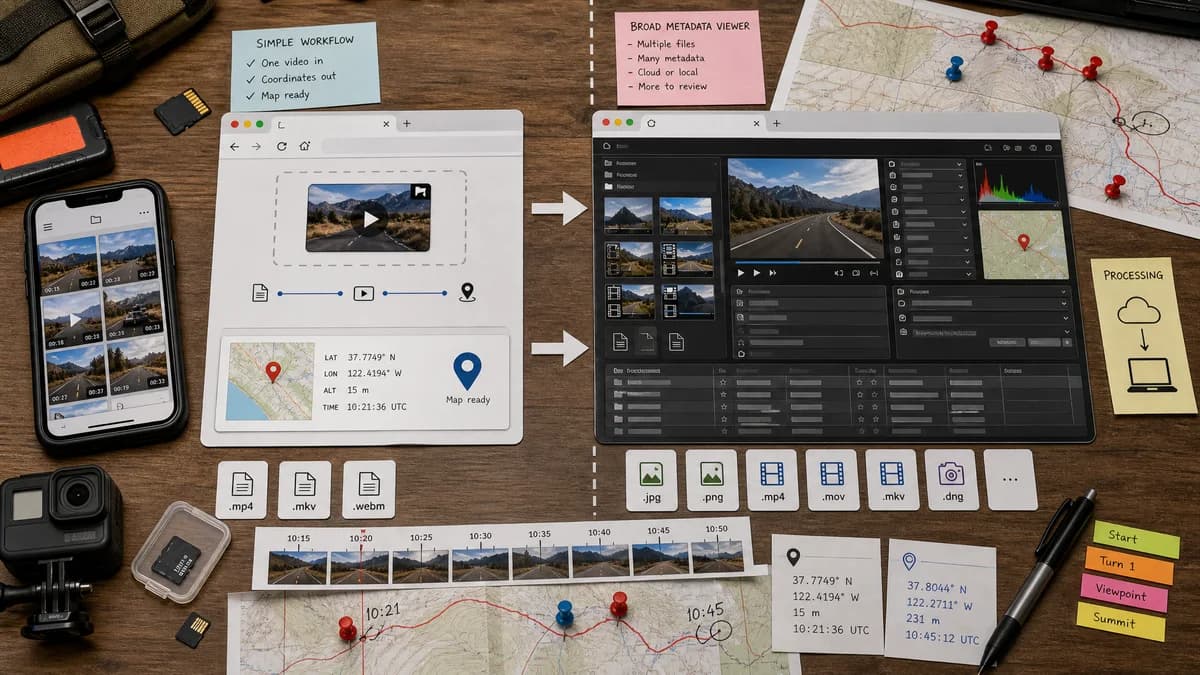
GPS Coordinates from Video is a focused browser workflow for selecting one video, reading embedded location metadata when it exists, and showing map-ready coordinates without asking users to scan a full technical metadata report.
What EXIF.pro offers
EXIF.pro is a hosted metadata viewer for images and videos that emphasizes client-side processing, broad media support, and general metadata analysis for photographers, developers, and investigators.
Open alternative signals
Source and openness
GPS Coordinates from VideoBrowser-based and open-standard-focused; public source status is not claimed.
EXIF.proHosted product page with private implementation details.
Deployment
GPS Coordinates from VideoRuns as a focused web tool for one video location check.
EXIF.proRuns as a broader hosted browser metadata viewer.
Pricing shape
GPS Coordinates from VideoFree successful uses, then one lifetime unlock for all TextFaker tools.
EXIF.proOfficial page presents the viewer as free at the time of research.
Data control
GPS Coordinates from VideoDesigned for browser-local file reading and no server upload requirement for the GPS check.
EXIF.proOfficial page also emphasizes client-side processing for selected files.
Decision guide
Use GPS Coordinates from Video when the job is one video file and the user only needs GPS coordinates, coordinate formats, map links, and a clear missing-location explanation.
Use EXIF.pro when the user wants a wider image-and-video metadata report with camera details, timestamps, codecs, dimensions, and broader file analysis.
Side-by-side open source alternative comparison
| Decision point | GPS Coordinates from Video | EXIF.pro | Takeaway |
|---|---|---|---|
| Alternative fit | Our workflowBest as a direct coordinate viewer for one video file. | Proprietary workflowBest as a broad image and video metadata analyzer. | The open alternative angle is focus, not breadth. |
| Source model | Our workflowOpen-standard-focused workflow without a public-source claim. | Proprietary workflowHosted product with implementation details controlled by the service owner. | Be precise: browser-based is not the same as open source. |
| Setup and deployment | Our workflowOpen the page, choose a video, and read the location result. | Proprietary workflowOpen the hosted app and use the larger metadata viewer. | Both avoid desktop installation; our page should be faster for the single GPS question. |
| Feature parity | Our workflowCoordinates, DMS formatting, altitude when present, and map links. | Proprietary workflowVideo metadata, image metadata, codec details, dimensions, timestamps, and file properties. | Use the broader viewer when non-location metadata matters. |
| Editing and export parity | Our workflowRead-only coordinate inspection; no rewrite or metadata cleaning. | Proprietary workflowPrimarily viewer-oriented metadata inspection, not a dedicated GPS rewriting workflow. | Neither replaces a full metadata editor when coordinates must be written back. |
| Migration path | Our workflowUse our tool for recurring video GPS checks and quick map handoff. | Proprietary workflowKeep EXIF.pro for broader file audits across media types. | A partial migration is the practical recommendation. |
Detailed research
Open-Source Alternative Fit
GPS Coordinates from Video fits users who search for an open-source alternative because they often want less setup, fewer uploads, and a clearer data-control story. The honest positioning is browser-based and open-standard-focused, not a claim that TextFaker publishes this tool as open source.
Compared with EXIF.pro, the page should make the narrow job obvious: find location metadata in a video and turn it into coordinates and map links.
Feature Parity and Limits
EXIF.pro covers broad image and video metadata inspection. GPS Coordinates from Video should not try to match every codec, container, camera, or forensic field.
The useful parity is the location layer: GPS coordinates, altitude if present, coordinate formatting, and a normal explanation when a video has no readable location metadata.
Data, Setup, and Pricing
Both workflows can avoid installing desktop software. Our value is the smaller result surface and the shared lifetime unlock model across TextFaker tools.
For sensitive original videos, the page should continue to explain that browser-local reading is preferable to uploading files when location metadata may reveal home, workplace, school, or travel routes.
Practical Migration Guidance
Use GPS Coordinates from Video as the everyday check when the question is only whether a clip has location coordinates. Keep EXIF.pro or a similar broad viewer for fuller metadata audits across photos, videos, and technical file details.
Research notes
- EXIF.pro states that image and video files are processed locally in the browser and lists MP4, MOV, AVI, WebM, MKV, and FLV-style video support.
- Its page emphasizes broad metadata analysis, while our tool should keep the result centered on video location metadata and map actions.
- This alternative page should not claim TextFaker is open source; the correct claim is browser-based, open-standard-focused, and intentionally narrower.
Official source
The proprietary product link is included once here for source checking after the alternative analysis.
Official EXIF.pro source