
Open Source Alternatives to FrameToolkit Metadata Viewer
GPS Coordinates from Video is a browser-based alternative for users who need this focused result without installing a proprietary desktop app or entering a larger hosted workflow.
This research compares that workflow with FrameToolkit Metadata Viewer while keeping the outbound source link at the bottom after the analysis.
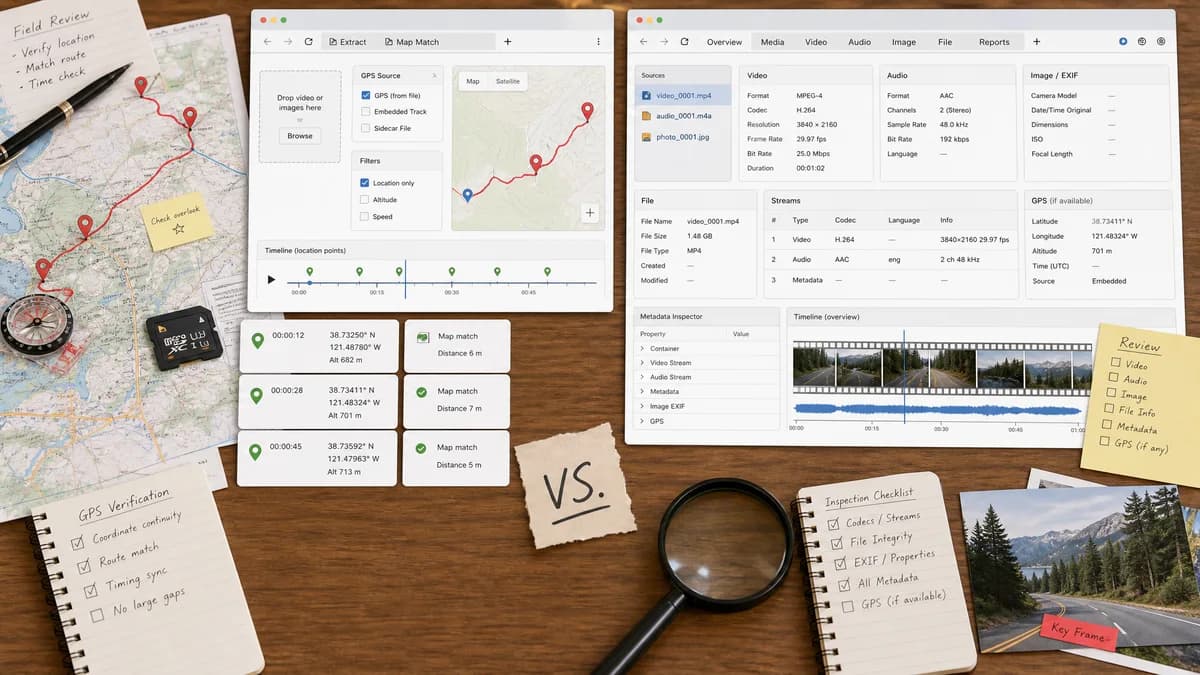
Why GPS Coordinates from Video fits
GPS Coordinates from Video narrows browser-local metadata inspection to the location fields users need for map verification.
What FrameToolkit Metadata Viewer offers
FrameToolkit Metadata Viewer inspects video, audio, and image metadata in the browser, including codecs, streams, EXIF data, file properties, and GPS location where supported.
Open alternative signals
Source and openness
GPS Coordinates from VideoBrowser-based and standards-focused; no open-source license claim.
FrameToolkit Metadata ViewerHosted product with private implementation.
Deployment
GPS Coordinates from VideoFocused web page for video GPS.
FrameToolkit Metadata ViewerHosted browser-local metadata viewer across media types.
Pricing shape
GPS Coordinates from VideoShared all-tools lifetime unlock after free successful uses.
FrameToolkit Metadata ViewerOfficial page presents a free tool; any current limits should be verified.
Data control
GPS Coordinates from VideoBrowser-local file reading for the GPS result.
FrameToolkit Metadata ViewerOfficial page emphasizes that files stay in the browser.
Decision guide
Use GPS Coordinates from Video when a map-ready location result matters more than codec or stream details.
Use FrameToolkit Metadata Viewer when the user needs general media metadata such as streams, codecs, duration, audio tracks, and file properties.
Side-by-side open source alternative comparison
| Decision point | GPS Coordinates from Video | FrameToolkit Metadata Viewer | Takeaway |
|---|---|---|---|
| Alternative fit | Our workflowAlternative for location-first video checks. | Proprietary workflowGeneral metadata viewer for media files. | Both can be browser-local; our advantage is result focus. |
| Source model | Our workflowNo public-source claim; built around open browser/media metadata concepts. | Proprietary workflowPrivately operated hosted tool. | The alternative framing must stay honest. |
| Setup and deployment | Our workflowChoose a video and get coordinate-specific output. | Proprietary workflowChoose a media file and inspect a broader report. | Setup is similar but outputs differ. |
| Feature parity | Our workflowCoordinates, DMS, altitude, and map buttons. | Proprietary workflowCodec, stream, file, audio, image, and GPS fields. | FrameToolkit is broader; our tool is easier for the GPS task. |
| Editing and export parity | Our workflowRead-only; copy and map actions only. | Proprietary workflowMetadata viewer with export-style workflow for reports. | Neither should be treated as a full geotag writer. |
| Migration path | Our workflowUse when GPS coordinate lookup is repeated. | Proprietary workflowKeep for media QA and technical metadata checks. | Use each tool for its strongest output. |
Detailed research
Open-Source Alternative Fit
FrameToolkit is already browser-local, so GPS Coordinates from Video should not pretend the main benefit is local processing alone. The benefit is a narrower, map-ready result.
That is still a valid alternative for users who do not want a full media inspection page.
Feature Parity and Limits
FrameToolkit covers many media metadata fields. Our tool should focus on location extraction and avoid exposing codec and stream details unless they help explain why location could not be found.
Data, Control, and Setup
Both workflows can be light and browser-based. The user-facing difference is that GPS Coordinates from Video should go straight to latitude, longitude, DMS, altitude, and map links.
Practical Migration Guidance
Use GPS Coordinates from Video for location privacy checks and map handoff. Keep FrameToolkit available for broader media quality, codec, and file-property investigations.
Research notes
- FrameToolkit states that media files are processed in the browser and lists MP4, WebM, MOV, MP3, WAV, JPEG, PNG, and WebP support.
- It includes GPS location in its metadata table, but the page also emphasizes video, audio, and image technical fields.
- Our tool should differentiate through coordinate formatting, map actions, and missing-location explanations.
Official source
The proprietary product link is included once here for source checking after the alternative analysis.
Official FrameToolkit Metadata Viewer source