
HEIC to JPG Converter vs CloudConvert HEIC to JPG
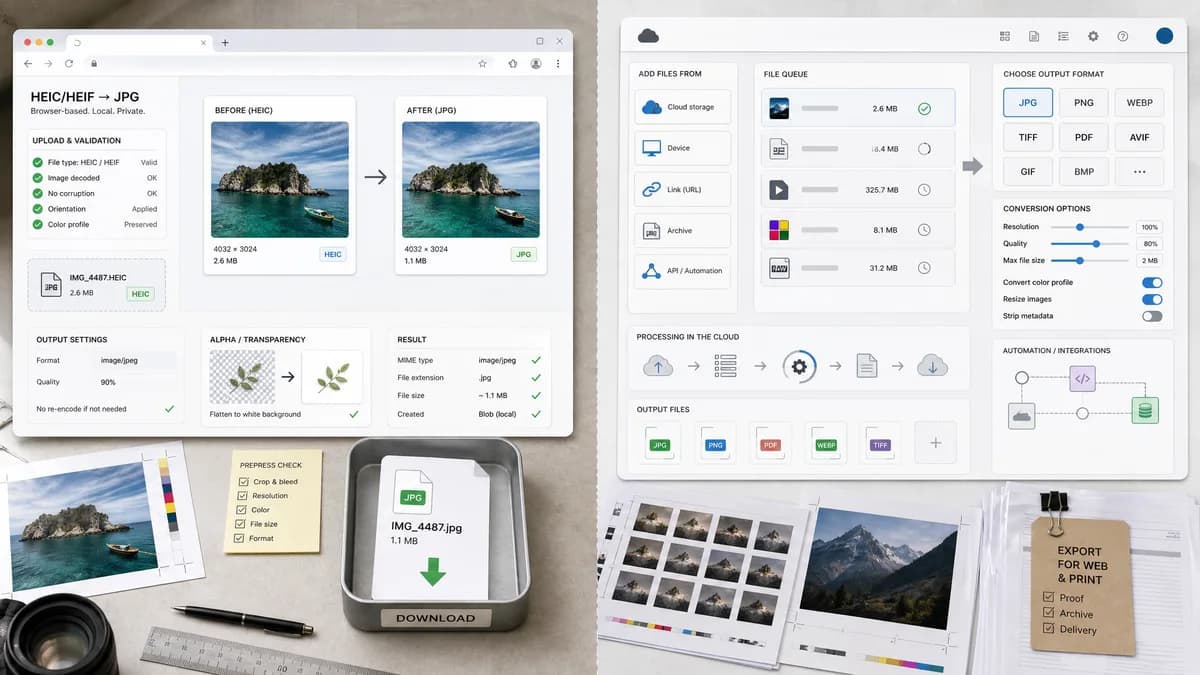
HEIC to JPG Converter is the baseline in this comparison: Convert HEIC and HEIF photos to JPG locally in your browser, then verify the image/jpeg MIME type, .jpg filename, dimensions, Blob output, quality setting, and transparency flattening behavior.
CloudConvert converts HEIC images to JPG online with options for resolution, quality, and file size.
Quick verdict
TextFaker competes by being simpler, local-first, and explicit about the generated JPEG result rather than acting as a general hosted file conversion platform.
How HEIC to JPG Converter fits
TextFaker positions this tool as a narrow, browser-local HEIC/HEIF to JPG converter with visible validation for accepted input types, output MIME, .jpg filename, Blob creation, and alpha flattening behavior.
How CloudConvert HEIC to JPG fits
CloudConvert is a broad file-conversion service with many supported formats and conversion options. It is better suited to users who need a hosted workflow, cloud file sources, or API-style conversion beyond HEIC to JPG.
Side-by-side comparison
| Decision point | HEIC to JPG Converter | CloudConvert HEIC to JPG | Takeaway |
|---|---|---|---|
| Processing model | Our workflowBrowser-local when heic2any can decode the file | Competitor workflowHosted online conversion service | TextFaker has the stronger privacy message for ordinary HEIC photos. |
| Input scope | Our workflowDedicated .heic, .heif, image/heic, and image/heif inputs | Competitor workflowHEIC plus many other input formats across the CloudConvert platform | CloudConvert is broader; TextFaker is more precise. |
| Output validation | Our workflowShows image/jpeg, .jpg filename, dimensions, file size, and generated Blob status | Competitor workflowReturns downloadable JPG after conversion | TextFaker makes conversion QA more transparent. |
| Quality behavior | Our workflowExposes JPEG quality if supported by the conversion path | Competitor workflowAdvertises quality, resolution, and file-size controls | CloudConvert has mature conversion controls; TextFaker documents browser-supported quality limits. |
| Alpha behavior | Our workflowFlattens transparent pixels over a matte because JPEG has no alpha channel | Competitor workflowThe page does not foreground transparent HEIC handling in the visible summary | Explicit alpha messaging is a useful differentiator. |
| Best page angle | Our workflowHEIC/HEIF to JPG/JPEG only | Competitor workflowPart of a broad converter catalog | TextFaker avoids generic converter copy and focus on the exact file pair. |
Use HEIC to JPG Converter when
- Private iPhone photo conversion in the browser
- Users who only need HEIC or HEIF to JPG
- Clear output checks for MIME type, extension, and Blob creation
- SEO page focused only on HEIC/HEIF to JPG/JPEG
Use CloudConvert HEIC to JPG when
- Broad file conversion beyond images
- Cloud storage import workflows
- Users needing resolution and file-size options across many formats
- Automation or API-oriented conversion needs
Detailed comparison
Privacy Positioning
CloudConvert is a hosted converter, so the user experience depends on uploading files to a third-party service. TextFaker should emphasize that conversion happens in the browser when heic2any can decode the HEIC or HEIF file.
Validation Opportunity
Most conversion pages show a successful download but do not expose the technical checks that developers and QA users want. TextFaker displays output MIME, extension, dimensions, Blob size, and copy/download text deterministically.
Quality Controls
CloudConvert advertises image options. TextFaker includes a JPEG quality slider only if the implemented path applies it reliably to image/jpeg output, and the UI should say when the browser encoder determines the final result.
Alpha Handling
JPEG cannot preserve alpha. The TextFaker page makes the matte color behavior explicit before download for HEIC sources that decode with transparency.
Research notes
- CloudConvert supports HEIC and JPG among many formats.
- The page advertises options controlling resolution, quality, and file size.
- Use CloudConvert as the primary broad cloud-converter comparison.
- Do not claim CloudConvert is browser-local.
Official source
The only outbound competitor link on this page is placed here for source checking after the comparison.
Official CloudConvert HEIC to JPG source