
HEIC to JPG Converter vs Convertio HEIC to JPG
HEIC to JPG Converter is the baseline in this comparison: Convert HEIC and HEIF photos to JPG locally in your browser, then verify the image/jpeg MIME type, .jpg filename, dimensions, Blob output, quality setting, and transparency flattening behavior.
Convertio converts Apple HEIC photos to JPG online and describes compatibility, batch conversion, and metadata preservation in its FAQ.
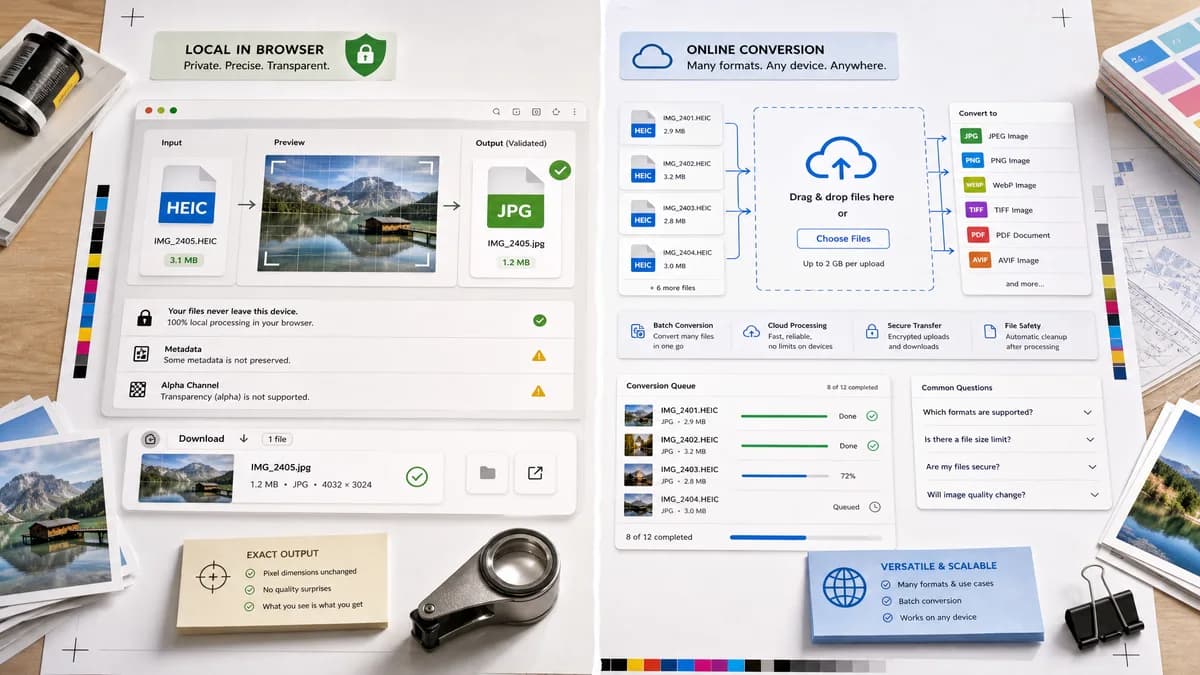
Quick verdict
TextFaker should compete on privacy, exact output validation, and transparent limits around metadata and alpha rather than broad converter breadth.
How HEIC to JPG Converter fits
TextFaker avoids broad metadata preservation promises and instead state what the browser-local JPEG export does and does not preserve.
How Convertio HEIC to JPG fits
Convertio offers a polished online converter with broad format coverage and FAQ content aimed at compatibility. It is stronger for users who want many conversion paths in one hosted service.
Side-by-side comparison
| Decision point | HEIC to JPG Converter | Convertio HEIC to JPG | Takeaway |
|---|---|---|---|
| Format scope | Our workflowOnly HEIC/HEIF to JPG/JPEG | Competitor workflowHEIC to JPG plus many related conversions | Convertio is broader; TextFaker is more focused. |
| Metadata claims | Our workflowShould clearly state whether canvas/JPEG export strips or changes metadata | Competitor workflowVisible FAQ claims EXIF metadata such as camera and GPS can be preserved | TextFaker is conservative and test-backed. |
| Batch behavior | Our workflowCan support multiple files if implemented locally without upload | Competitor workflowFAQ says multiple HEIC photos can be uploaded together | Batch conversion is table-stakes for comparison, but local batch matters. |
| Output type | Our workflowValidate image/jpeg and .jpg filename | Competitor workflowDownloads JPEG-compatible output | TextFaker exposes the technical outcome. |
| Quality | Our workflowExpose a measurable JPEG quality setting if supported | Competitor workflowFAQ discusses high-quality output settings | Both should discuss quality, but TextFaker avoids vague claims. |
| Alpha | Our workflowFlatten alpha to matte with a warning | Competitor workflowNo visible FAQ focus on alpha conversion to JPEG | TextFaker can answer a rare but important image-format edge case. |
Use HEIC to JPG Converter when
- Users who want local conversion for privacy
- Developers checking output MIME and file extension
- Users who prefer narrow HEIC/HEIF to JPG only
- Clear warnings about metadata and alpha changes
Use Convertio HEIC to JPG when
- Users needing many target formats
- Batch conversion through an online service
- Users who want hosted convenience
- General format-compatibility questions
Detailed comparison
Metadata Risk
Browser canvas conversion often creates a fresh image file and may not carry original HEIC metadata. The TextFaker page should not imply EXIF preservation unless the implementation deliberately copies it and tests prove it.
Compatibility Message
Convertio correctly frames JPG as broadly compatible. TextFaker can use the same compatibility intent while keeping the copy tied to local conversion and verified output.
Batch Scope
If TextFaker supports batch conversion, the UI shows one result row per file with independent status, filename, output MIME, size, and download action.
SEO Focus
Use HEIC, HEIF, JPG, and JPEG in title and description, but avoid promising conversion to PNG, WebP, PDF, or other formats on this dedicated page.
Research notes
- Convertio's HEIC to JPG page includes compatibility and batch conversion FAQ copy.
- The page claims metadata preservation; TextFaker should not copy that claim without implementation support.
- Use Convertio as the comparison for SEO-rich converter pages.
Official source
The only outbound competitor link on this page is placed here for source checking after the comparison.
Official Convertio HEIC to JPG source