
HEIC to JPG Converter vs HEIC.online
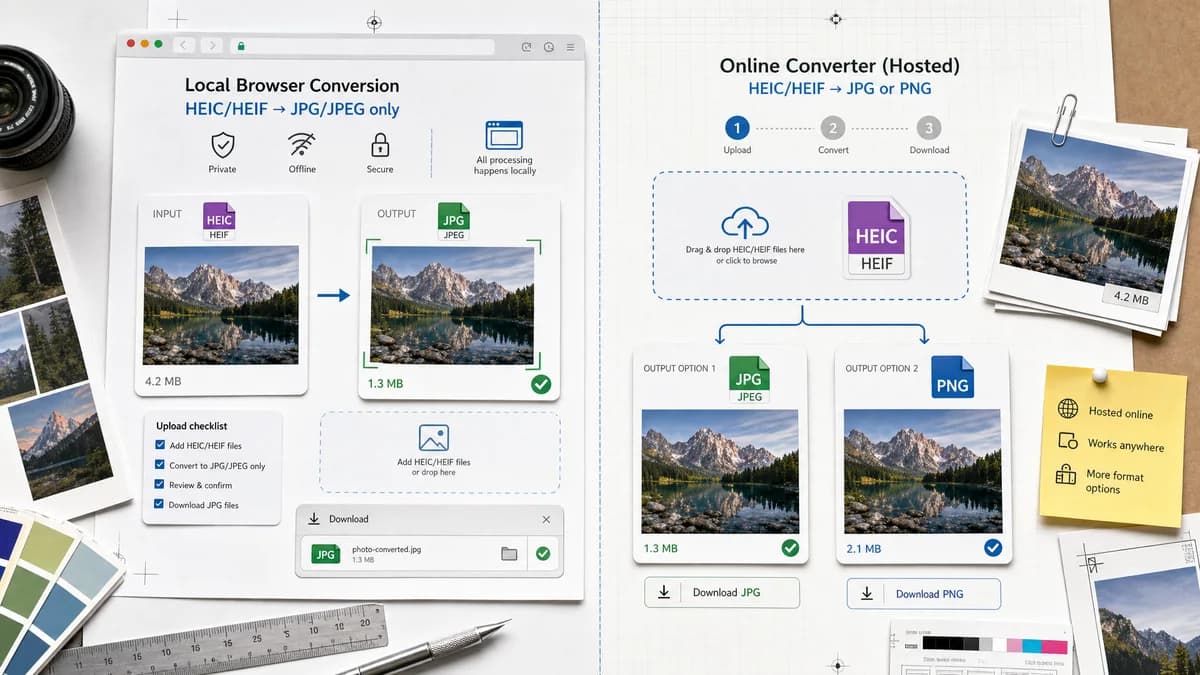
HEIC to JPG Converter is the baseline in this comparison: Convert HEIC and HEIF photos to JPG locally in your browser, then verify the image/jpeg MIME type, .jpg filename, dimensions, Blob output, quality setting, and transparency flattening behavior.
HEIC.online converts HEIC and HEIF files to JPG or PNG and supports a step-by-step drag-and-drop workflow.
Quick verdict
TextFaker should not broaden this page to PNG; its advantage is a precise HEIC/HEIF to JPG task with explicit JPEG constraints.
How HEIC to JPG Converter fits
TextFaker is narrower than HEIC.online by offering only JPG/JPEG output on this page, while being clearer about local browser processing and output checks.
How HEIC.online fits
HEIC.online is a dedicated HEIC/HEIF converter with JPG and PNG output options. It suits users who want a simple hosted converter and may want PNG instead of JPEG.
Side-by-side comparison
| Decision point | HEIC to JPG Converter | HEIC.online | Takeaway |
|---|---|---|---|
| Input coverage | Our workflowHEIC and HEIF should both be accepted and tested | Competitor workflowVisible copy mentions .heic and .heif files | Both should cover HEIF, not only HEIC. |
| Output scope | Our workflowJPG/JPEG only for this dedicated page | Competitor workflowJPG or PNG output options | TextFaker should stay narrower for SEO and test clarity. |
| Processing location | Our workflowBrowser-local when heic2any decodes the file | Competitor workflowOnline converter workflow | Local processing is the differentiator. |
| Download behavior | Our workflowGenerated image/jpeg Blob with .jpg filename | Competitor workflowDownload converted files or save to cloud storage | HEIC.online has cloud convenience; TextFaker has local verification. |
| Alpha behavior | Our workflowJPEG output flattens alpha, with matte selection or warning | Competitor workflowPNG option may be more appropriate for transparency, but the page's JPG path is not described in visible alpha terms | TextFaker should explain when users should prefer PNG elsewhere. |
| User guidance | Our workflowDedicated text for HEIC/HEIF to JPEG compatibility | Competitor workflowGeneral HEIC to JPG or PNG instructions | TextFaker can be more specific about JPEG output. |
Use HEIC to JPG Converter when
- JPG-only conversion pages
- Browser-local conversion where supported
- Users who need output proof
- Transparent alpha flattening behavior
Use HEIC.online when
- Users choosing between JPG and PNG
- Hosted HEIC/HEIF conversion
- Users who want cloud-storage save options
- Simple drag-and-drop conversion
Detailed comparison
Narrow SEO
Even though HEIC.online offers PNG, TextFaker should keep this page dedicated to JPG/JPEG only and cross-link other conversion tools only where relevant.
HEIF Acceptance
The page includes .heif examples and test fixtures. Many tools say HEIC but support HEIF, and TextFaker makes that explicit.
Alpha Tradeoff
If a decoded source has alpha, JPEG is the wrong format for preserving it. The UI should offer matte flattening and explain that PNG is the alpha-preserving alternative, without turning this page into a PNG converter.
Cloud Convenience
HEIC.online offers cloud-storage style convenience. TextFaker should not chase that; it should keep files local and downloads direct.
Research notes
- HEIC.online visibly supports HEIC/HEIF input and JPG/PNG output.
- The TextFaker page is more specialized than HEIC.online.
- Use this comparison for HEIF wording and output-scope decisions.
Official source
The only outbound competitor link on this page is placed here for source checking after the comparison.
Official HEIC.online source