
HEIC to JPG Converter vs HEICtoJPG.com
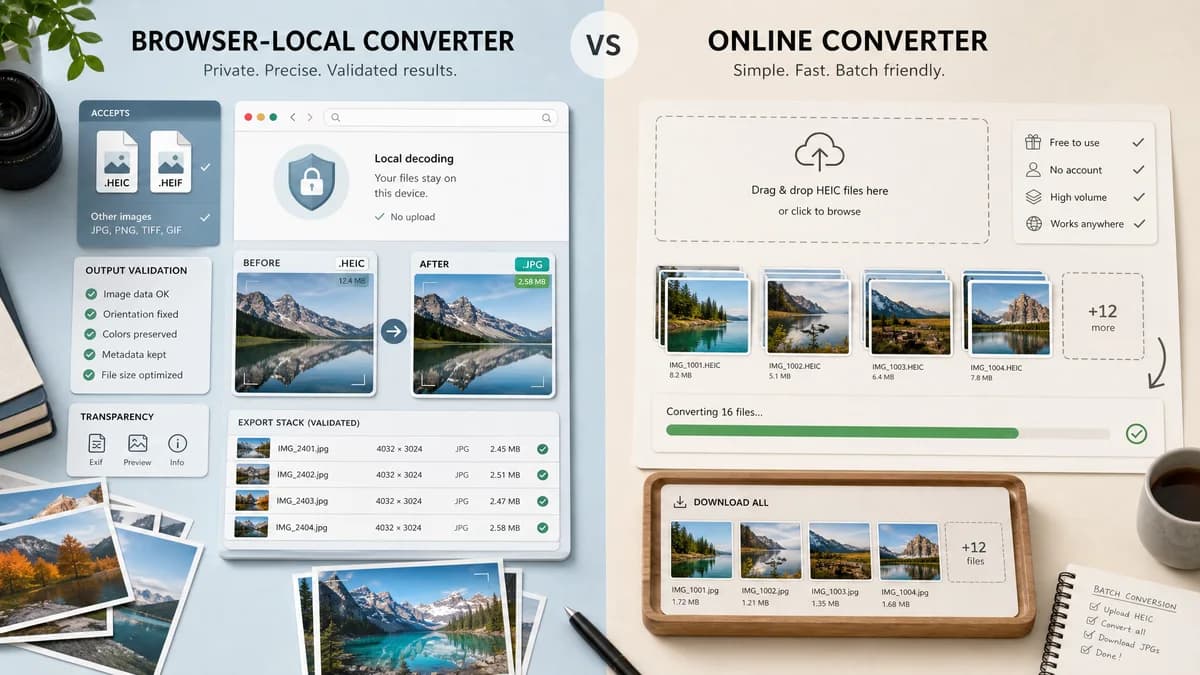
HEIC to JPG Converter is the baseline in this comparison: Convert HEIC and HEIF photos to JPG locally in your browser, then verify the image/jpeg MIME type, .jpg filename, dimensions, Blob output, quality setting, and transparency flattening behavior.
HEICtoJPG.com is a dedicated HEIC to JPG converter that emphasizes free, instant conversion and large photo batches.
Quick verdict
This is one of the closest direct competitors; TextFaker needs to win on browser-local privacy, HEIF acceptance, and technical result transparency.
How HEIC to JPG Converter fits
TextFaker should match the dedicated-page clarity while adding HEIF coverage, local decoding where possible, and explicit output validation.
How HEICtoJPG.com fits
HEICtoJPG.com is narrowly focused and easy to understand. Its visible positioning emphasizes free conversion, no account, and high-volume HEIC photo uploads.
Side-by-side comparison
| Decision point | HEIC to JPG Converter | HEICtoJPG.com | Takeaway |
|---|---|---|---|
| Directness | Our workflowDedicated HEIC/HEIF to JPG/JPEG page | Competitor workflowDedicated HEIC to JPG page | Both are focused; TextFaker includes HEIF explicitly. |
| Batch scale | Our workflowCan support local multi-file conversion subject to browser memory | Competitor workflowVisible copy references up to 200 photos | HEICtoJPG.com has a strong batch message. |
| Processing | Our workflowBrowser-local with heic2any where possible | Competitor workflowOnline conversion page | TextFaker makes the privacy model the key distinction. |
| Output validation | Our workflowShow image/jpeg, .jpg, Blob, dimensions, and size | Competitor workflowFocuses on upload and converted download | TextFaker can be more transparent for QA users. |
| Quality claim | Our workflowJPEG quality control is precise and test-backed | Competitor workflowVisible copy claims high quality and file-size shrinkage | TextFaker avoids overclaiming quality or losslessness. |
| Alpha handling | Our workflowMatte flattening because JPEG has no alpha channel | Competitor workflowNo prominent alpha behavior in visible page summary | TextFaker should own transparent-source behavior. |
Use HEIC to JPG Converter when
- Local conversion without server upload when supported
- HEIC and HEIF input validation
- Output MIME and Blob checks
- Alpha flattening disclosure
Use HEICtoJPG.com when
- Users wanting a very simple dedicated HEIC to JPG website
- Large batches on a hosted converter
- People familiar with JPEGmini-related tooling
- No-install conversion with minimal settings
Detailed comparison
Closest Competitor
HEICtoJPG.com is the cleanest dedicated competitor. TextFaker's page is equally direct but more transparent about where conversion happens and what output is generated.
Batch Positioning
If TextFaker supports batches, mention practical browser limits honestly. Local conversion can be private but memory-bound, especially with many iPhone originals.
Quality Language
Avoid claims like zero quality loss for HEIC to JPEG. Use quality slider, selected value, and output byte size as concrete facts.
Preview Pattern
Reuse the existing HEIC preview pattern from the GPS photo metadata tool so users can confirm the decoded source before exporting.
Research notes
- HEICtoJPG.com is dedicated to this exact conversion intent.
- Visible copy mentions free, instant conversion and up to 200 photos.
- Use this comparison to validate that TextFaker needs a dedicated SEO page, not only a generic format converter.
Official source
The only outbound competitor link on this page is placed here for source checking after the comparison.
Official HEICtoJPG.com source