
HEIC to JPG Converter vs iLoveIMG HEIC to JPG
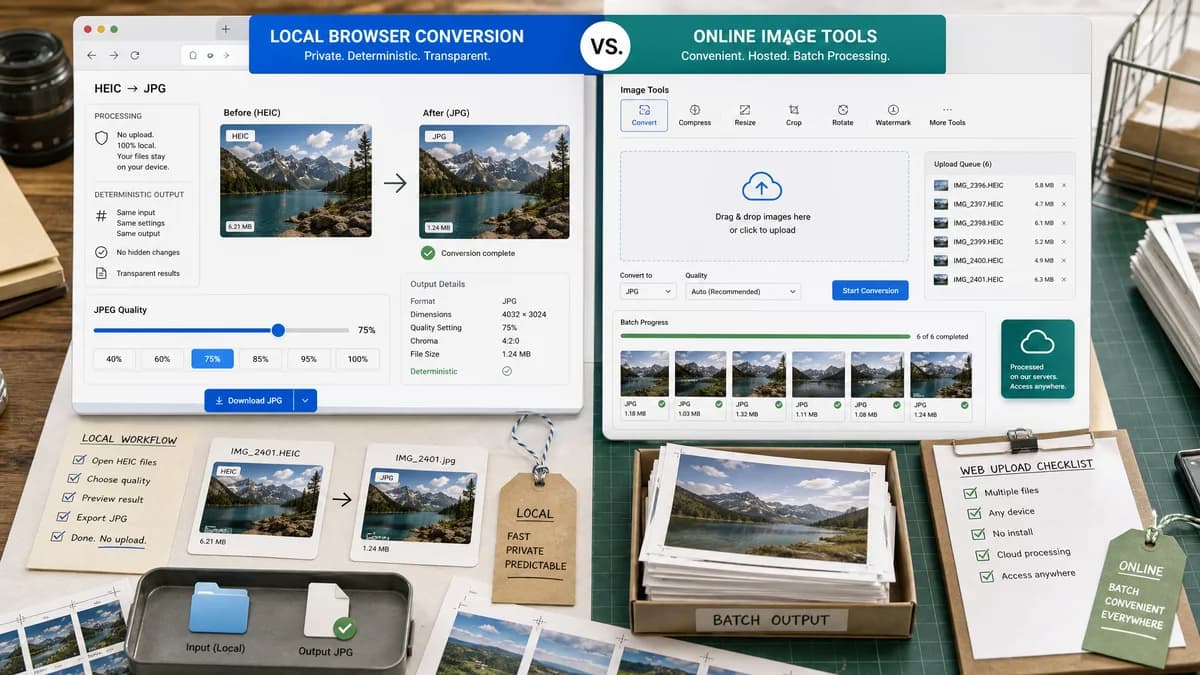
HEIC to JPG Converter is the baseline in this comparison: Convert HEIC and HEIF photos to JPG locally in your browser, then verify the image/jpeg MIME type, .jpg filename, dimensions, Blob output, quality setting, and transparency flattening behavior.
iLoveIMG converts multiple HEIC images to JPG online and offers recommended quality plus a premium high-quality option.
Quick verdict
TextFaker should emphasize no-upload local processing, deterministic output details, and honest JPEG quality controls.
How HEIC to JPG Converter fits
TextFaker should provide transparent local conversion and make quality behavior explicit rather than separating key quality choices behind account or premium flows.
How iLoveIMG HEIC to JPG fits
iLoveIMG is a popular online image utility suite with a direct HEIC to JPG page. It is well suited for users who need batch web tools and do not mind hosted processing.
Side-by-side comparison
| Decision point | HEIC to JPG Converter | iLoveIMG HEIC to JPG | Takeaway |
|---|---|---|---|
| Quality tiers | Our workflowSingle transparent quality control if supported | Competitor workflowRecommended quality with high quality shown as premium in visible page text | TextFaker can avoid ambiguity by explaining the encoder setting. |
| Batch conversion | Our workflowSupports multiple local files if built consistently with other image converters | Competitor workflowAdvertises converting multiple HEIC images at once | Batch conversion is important for iPhone photo workflows. |
| File locality | Our workflowBrowser-local when decoded by heic2any | Competitor workflowOnline upload and conversion page | Local processing is TextFaker's main advantage. |
| Output format | Our workflowDedicated JPG/JPEG output only | Competitor workflowAll images on this page are converted to JPG | Both are clear on target format. |
| Validation details | Our workflowExpose MIME, extension, Blob, dimensions, and file size | Competitor workflowFocuses on upload and convert action | TextFaker can appeal to users who inspect file outputs. |
| Alpha handling | Our workflowExplicit matte flattening warning for alpha sources | Competitor workflowNo prominent visible alpha behavior in the page summary | TextFaker documents alpha loss clearly. |
Use HEIC to JPG Converter when
- Private local conversion
- Exact output file validation
- Users who want quality behavior explained
- Alpha-aware HEIC to JPG export
Use iLoveIMG HEIC to JPG when
- Users already using iLoveIMG tools
- Online batch conversion
- Simple conversion from computer or drag-and-drop
- People who want a broader image utility suite
Detailed comparison
Batch Need
HEIC conversion often comes from iPhone photo batches. TextFaker should consider multi-file queues even if the first implementation keeps the UI compact.
Quality Transparency
A JPEG quality slider shows the selected value and estimated output size after conversion. The label should say JPEG quality, not HEIC quality.
Local Trust
The page should state that photos stay in the browser when decoding succeeds. Error states should explain when the browser-local decoder cannot read a specific HEIC variant.
Result Copy
Copy buttons should use deterministic text such as output filename, MIME, dimensions, and size so tests can assert stable output.
Research notes
- iLoveIMG advertises multiple HEIC to JPG conversion.
- Visible page copy includes recommended quality and premium high-quality wording.
- Use this comparison for batch and quality-tier positioning.
Official source
The only outbound competitor link on this page is placed here for source checking after the comparison.
Official iLoveIMG HEIC to JPG source