
HEIC to JPG Converter vs Zamzar HEIC Converter
HEIC to JPG Converter is the baseline in this comparison: Convert HEIC and HEIF photos to JPG locally in your browser, then verify the image/jpeg MIME type, .jpg filename, dimensions, Blob output, quality setting, and transparency flattening behavior.
Zamzar lists HEIC conversion to JPG and many other formats as part of a broad file conversion platform.
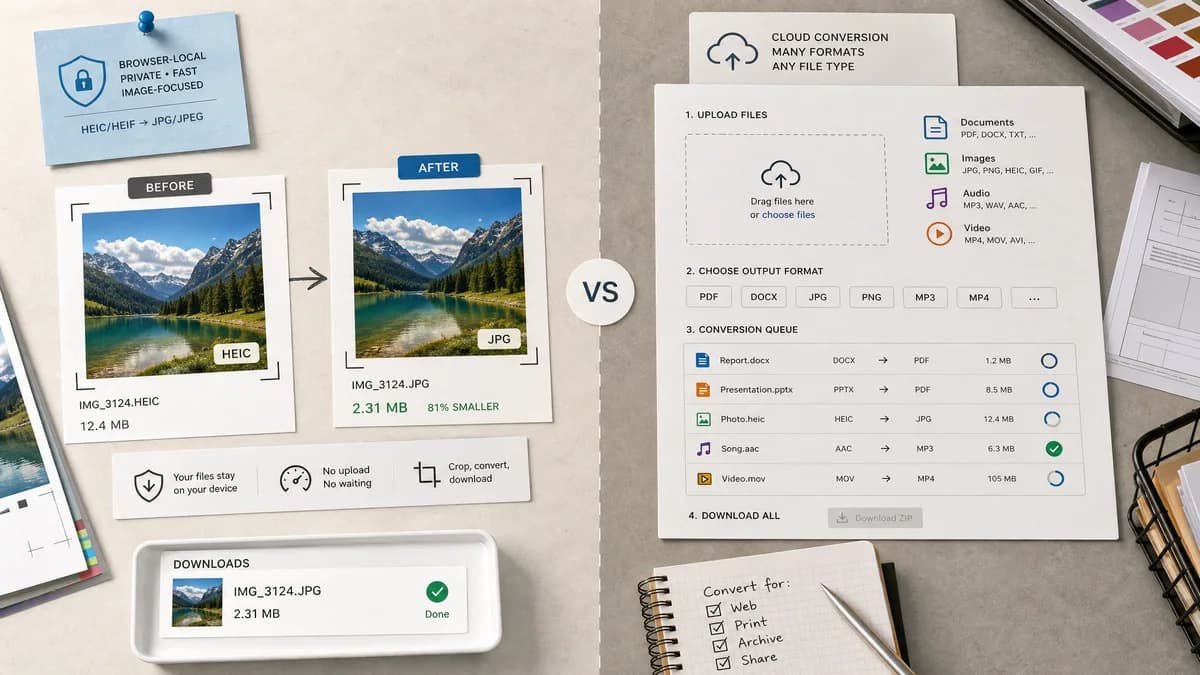
Quick verdict
TextFaker can win for users who want a private, focused, browser-local image task rather than a broad cloud conversion workflow.
How HEIC to JPG Converter fits
TextFaker is a purpose-built local image tool, not a universal file converter, and makes no claims beyond HEIC/HEIF to JPG/JPEG.
How Zamzar HEIC Converter fits
Zamzar is a long-running general converter for documents, images, video, audio, and more. It is useful when the user needs many target formats or a familiar upload-based service.
Side-by-side comparison
| Decision point | HEIC to JPG Converter | Zamzar HEIC Converter | Takeaway |
|---|---|---|---|
| Scope | Our workflowSingle-purpose HEIC/HEIF to JPG/JPEG | Competitor workflowHEIC to many image and document-like outputs within a broad converter catalog | TextFaker should stay narrow. |
| Processing model | Our workflowBrowser-local with heic2any when possible | Competitor workflowCloud upload conversion | Privacy-sensitive users should prefer local processing. |
| Input validation | Our workflowExtension and MIME checks for .heic/.heif/image/heic/image/heif | Competitor workflowHEIC file converter page | TextFaker documents accepted inputs precisely. |
| Output proof | Our workflowimage/jpeg MIME, .jpg filename, Blob generated | Competitor workflowChosen output format download | TextFaker can provide a stronger verification panel. |
| Quality control | Our workflowJPEG quality behavior is visible if supported | Competitor workflowGeneral conversion flow rather than page-visible granular image settings | TextFaker can be more image-specific. |
| Transparency | Our workflowExplicit flattening because JPG cannot preserve alpha | Competitor workflowNo prominent alpha handling in visible HEIC converter summary | TextFaker should address alpha in the tool and SEO content. |
Use HEIC to JPG Converter when
- Focused HEIC/HEIF photo conversion
- No-upload workflow when supported
- Output file validation
- Users avoiding general file converter pages
Use Zamzar HEIC Converter when
- Many output formats
- Non-image file conversion
- Users already using Zamzar
- Hosted conversion across different file categories
Detailed comparison
Broad Platform Contrast
Zamzar is a general-purpose converter. TextFaker should not copy broad platform language; it should answer one photo conversion problem thoroughly.
Accepted Inputs
The drop zone should mention both extensions and MIME types in user-facing validation errors so unusual HEIF files are not rejected silently.
Output Contract
A generated JPEG should always have a .jpg filename. If the user uploads example.heif, a stable output like example.jpg is easier to test and understand.
Server Avoidance
The strongest contrast is not feature breadth but avoiding upload for files the browser decoder supports.
Research notes
- Zamzar lists HEIC to JPG and several other output formats.
- Use this comparison to keep the TextFaker page from becoming a generic converter page.
- Zamzar is a hosted service, so do not describe it as local.
Official source
The only outbound competitor link on this page is placed here for source checking after the comparison.
Official Zamzar HEIC Converter source