
Open Source Alternatives to CloudConvert
HEIC to JPG Converter is a browser-based alternative for users who need this focused result without installing a proprietary desktop app or entering a larger hosted workflow.
This research compares that workflow with CloudConvert while keeping the outbound source link at the bottom after the analysis.
Why HEIC to JPG Converter fits
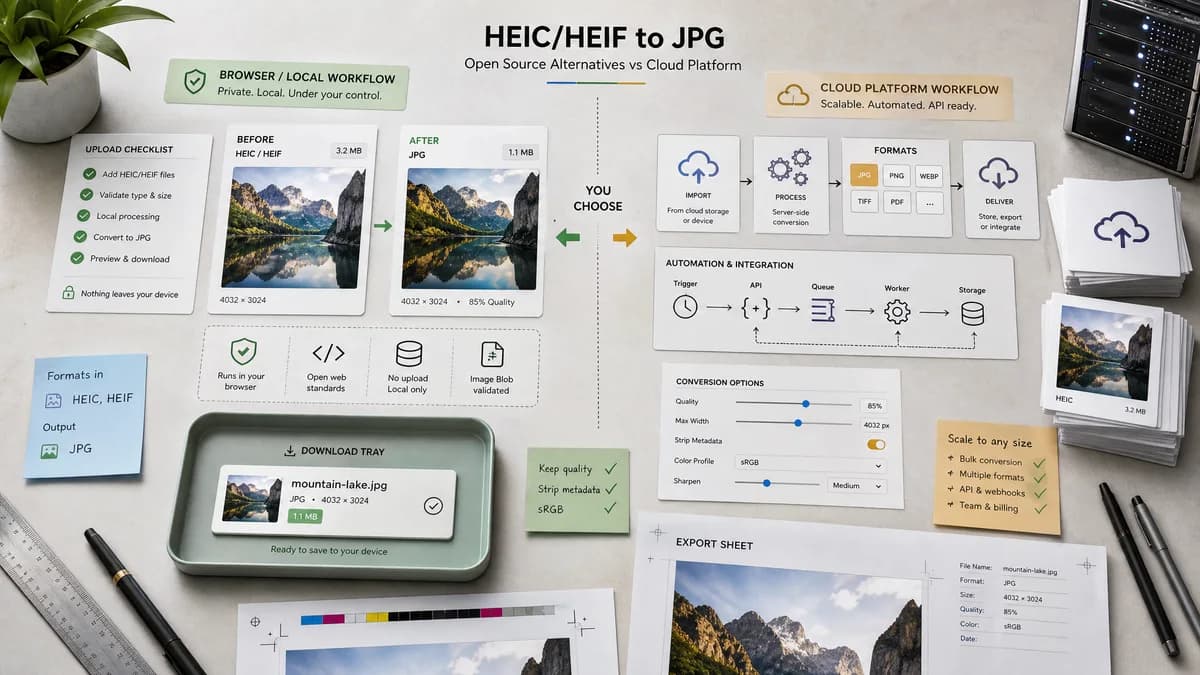
TextFaker can offer a narrower HEIC/HEIF to JPG tool that runs in the browser with heic2any, validates the generated image/jpeg Blob, and returns a .jpg download without sending compatible files to a conversion server.
What CloudConvert offers
CloudConvert is broader and more automation-friendly, especially for users who need many formats, API workflows, cloud storage import, or server-side processing.
Open alternative signals
Processing location
HEIC to JPG ConverterBrowser-local when heic2any decodes the file
CloudConvertCloud conversion service
Primary scope
HEIC to JPG ConverterHEIC/HEIF to JPG/JPEG only
CloudConvertMany file formats and conversion routes
Output validation
HEIC to JPG ConverterExposes image/jpeg Blob, .jpg filename, dimensions, and copy/download state
CloudConvertDownload-focused conversion result
Dependency strategy
HEIC to JPG ConverterReuse existing heic2any dependency
CloudConvertHosted proprietary conversion stack
Decision guide
Users who want a private, single-purpose HEIC or HEIF to JPG conversion page with transparent output checks and no server upload when local decoding works.
Teams that need cloud conversion APIs, bulk format coverage beyond images, account-level workflows, and hosted processing.
Side-by-side open source alternative comparison
| Decision point | HEIC to JPG Converter | CloudConvert | Takeaway |
|---|---|---|---|
| Privacy model | Our workflowCompatible files can stay in the user's browser. | Proprietary workflowFiles are uploaded for cloud processing. | Lead with browser-local privacy for personal photos and location-sensitive images. |
| Format scope | Our workflowFocused HEIC and HEIF input to JPG/JPEG output. | Proprietary workflowBroad converter across documents, media, archives, and images. | TextFaker is simpler and easier to verify for one conversion job. |
| Quality behavior | Our workflowExpose JPEG quality behavior if supported by heic2any and canvas export. | Proprietary workflowOffers quality, size, and resolution options. | Quality control is table stakes for this comparison page. |
| Alpha handling | Our workflowFlatten transparent HEIC sources over an explicit matte because JPEG has no alpha channel. | Proprietary workflowAlpha behavior may not be prominent in the conversion flow. | Make transparency loss visible and testable. |
| Developer fit | Our workflowBetter for browser-local UX and deterministic tests. | Proprietary workflowBetter for API and server-side automation. | Position TextFaker as a local tool, not an API replacement. |
| Trust signal | Our workflowOpen-source-powered decoder with clear client-side behavior. | Proprietary workflowEstablished commercial conversion brand. | Use implementation transparency as the differentiator. |
Detailed research
Why users compare them
CloudConvert is a familiar choice for people who need HEIC photos converted quickly, especially when they already use cloud conversion tools. The TextFaker page should compete by being narrower, more transparent, and locally testable.
- Mention .heic and .heif acceptance explicitly.
- Show output MIME as image/jpeg and output extension as .jpg.
- Avoid implying TextFaker has CloudConvert-style API coverage.
Open-source-powered angle
The open-source-powered alternative story is heic2any in the browser: decode the HEIC or HEIF file locally where supported, create a JPEG Blob, and make the user-visible result verifiable.
- Reuse the existing heic2any dependency.
- Use a deterministic download label such as Download JPG.
- Add copy text for filename, MIME, dimensions, and size.
SEO page focus
The page should target HEIC to JPG and HEIF to JPG only, with comparison copy that separates local browser conversion from cloud conversion.
- Include HEIC, HEIF, JPG, JPEG, iPhone photo, and browser-local terms.
- Do not broaden the page into generic image conversion.
- Include a transparent-source warning because JPEG cannot preserve alpha.
Generated image brief
Use a clean product screenshot style image showing an HEIC file card, a browser-local conversion status, and a verified JPG output card.
- No cloud upload icon in the TextFaker side.
- Use a neutral photo thumbnail, not private personal imagery.
- Include visual checks for MIME, extension, and Blob generated.
Research notes
- Official page says CloudConvert supports HEIC and JPG and offers options for resolution, quality, and file size.
- heic2any documentation supports browser-side HEIC/HEIF conversion to image/jpeg and returns a Blob.
- Research note: describe TextFaker as browser-based or open-source-powered, not open source unless repository licensing is proven.
- Generated image direction: side-by-side privacy comparison showing a local browser canvas converting an iPhone HEIC photo into a JPG file.
Official source
The proprietary product link is included once here for source checking after the alternative analysis.
Official CloudConvert source