
Open Source Alternatives to Convertio
HEIC to JPG Converter is a browser-based alternative for users who need this focused result without installing a proprietary desktop app or entering a larger hosted workflow.
This research compares that workflow with Convertio while keeping the outbound source link at the bottom after the analysis.
Why HEIC to JPG Converter fits
TextFaker can provide a browser-based HEIC to JPG path that keeps files local when decoding succeeds, with explicit acceptance for image/heic, image/heif, .heic, and .heif inputs.
What Convertio offers
Convertio is useful for users who want an established multi-format online converter with batch uploads and paid capacity for larger workloads.
Open alternative signals
Upload model
HEIC to JPG ConverterBrowser-local conversion target
ConvertioOnline upload-based conversion
Accepted inputs
HEIC to JPG Converter.heic, .heif, image/heic, image/heif
ConvertioHEIC upload flow
Output guarantee
HEIC to JPG Converterimage/jpeg Blob and .jpg filename is asserted
ConvertioJPG download from hosted service
Pricing posture
HEIC to JPG ConverterFree browser tool page
ConvertioFreemium with premium limits
Decision guide
Privacy-sensitive iPhone photo conversion, local validation, and users who only need JPG output.
Users who need many conversion formats, batch jobs, and cloud-hosted conversion without relying on browser decoding support.
Side-by-side open source alternative comparison
| Decision point | HEIC to JPG Converter | Convertio | Takeaway |
|---|---|---|---|
| Batch conversion | Our workflowCan support multiple files if implemented, but should validate each output independently. | Proprietary workflowAdvertises multiple HEIC photos in one session. | If batch is included, make per-file status and failure handling explicit. |
| Quality | Our workflowAdd a JPEG quality slider when supported and document the default. | Proprietary workflowMentions high quality output. | Quality needs both UI control and test coverage. |
| Metadata | Our workflowNew JPG export is treated as a fresh browser-generated image unless metadata preservation is intentionally implemented. | Proprietary workflowFAQ discusses whether metadata survives. | Be explicit about metadata behavior instead of leaving users guessing. |
| Privacy | Our workflowFiles stay local where heic2any can decode. | Proprietary workflowFiles are processed through Convertio's online service. | Privacy is the clearest alternative-page differentiator. |
| Compatibility | Our workflowFocused on JPG for broad compatibility. | Proprietary workflowBroadly positions JPG as universally viewable. | Both pages can address the same user intent; TextFaker is more technical and verifiable. |
| Failure mode | Our workflowShow a clear unsupported HEIC/HEIF decode error without uploading fallback by default. | Proprietary workflowServer-side conversion may handle cases the browser library cannot. | Acknowledge browser decoder limits honestly. |
Detailed research
User intent
Convertio users are usually trying to make iPhone HEIC photos work on non-Apple systems or web forms. TextFaker should answer that same need with local processing and more visible technical checks.
- Use the phrase HEIC to JPG converter naturally.
- Mention HEIF as a sibling input format.
- Show when the output file is ready and exactly what was generated.
Implementation notes
The tool should reject unrelated files early, then pass accepted HEIC/HEIF Blobs to heic2any with image/jpeg output. If quality is exposed, the UI shows that it affects JPEG compression, not original HEIC decoding.
- Accept both extension and MIME matches.
- Normalize .jpeg input intent to .jpg output filename for this page.
- Keep conversion browser-local when possible.
Generated image brief
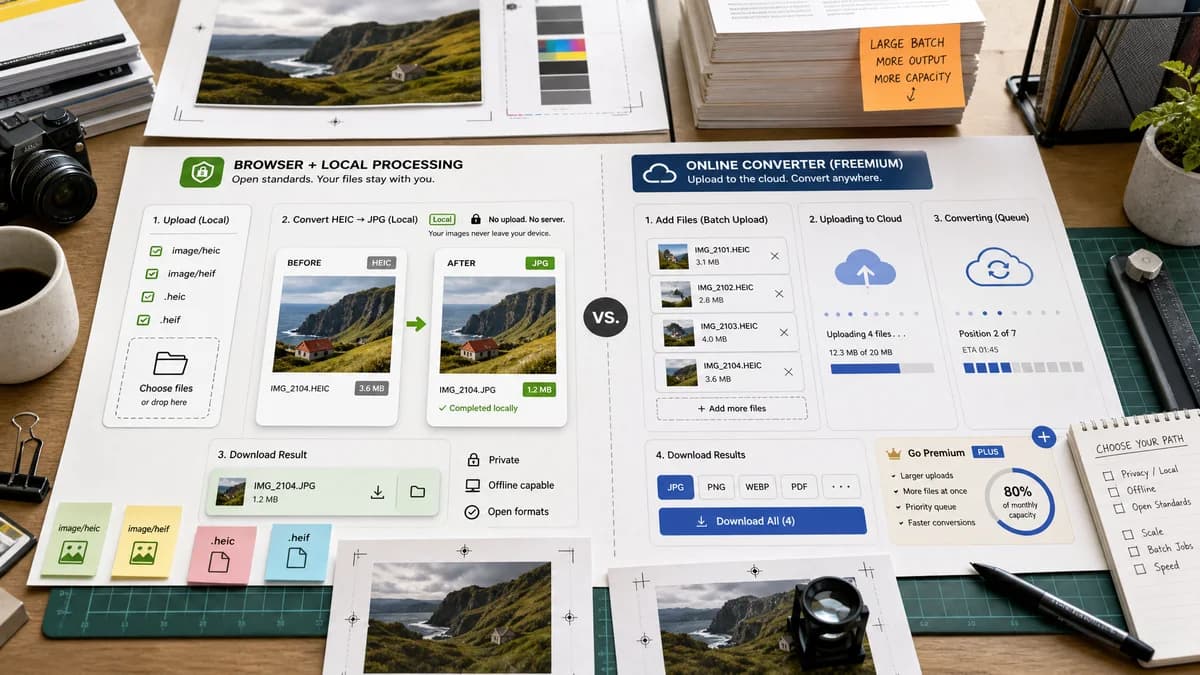
Create a comparison visual with Convertio-style cloud upload on one side and TextFaker-style local conversion checks on the other, without using competitor logos.
- Use generic cloud service imagery.
- Show a JPG output label and file-size delta.
- Avoid any real personal photos.
Content risks
Do not overclaim that browser conversion can decode every HEIC variant. Some newer or unusual HEIC files may fail depending on the decoder.
- Use careful wording such as when heic2any can decode the file.
- Do not claim lossless conversion to JPEG.
- Explain that JPEG is lossy and has no alpha channel.
Research notes
- Convertio's official HEIC to JPG page says JPG works broadly across devices and that batch conversion is available.
- Convertio notes basic conversions are free and premium plans unlock larger uploads and faster processing.
- Generated image direction: upload panel with HEIC file badges converting locally into JPEG cards with quality and matte controls.
Official source
The proprietary product link is included once here for source checking after the alternative analysis.
Official Convertio source