
Open Source Alternatives to HEICtoJPG.com
HEIC to JPG Converter is a browser-based alternative for users who need this focused result without installing a proprietary desktop app or entering a larger hosted workflow.
This research compares that workflow with HEICtoJPG.com while keeping the outbound source link at the bottom after the analysis.
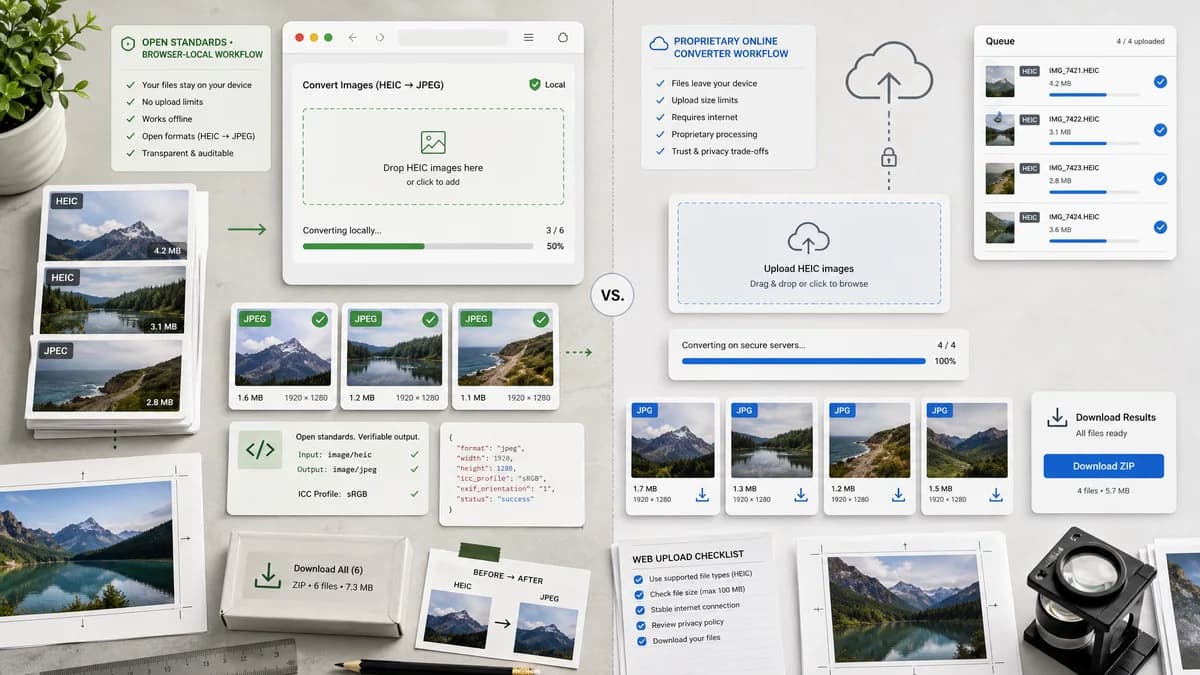
Why HEIC to JPG Converter fits
TextFaker can offer the same narrow conversion intent with a browser-local, heic2any-powered path and clearer technical validation for each generated JPEG.
What HEICtoJPG.com offers
HEICtoJPG.com is suited to users who want a purpose-built online HEIC converter and large simple batches without installing software.
Open alternative signals
Specialization
HEIC to JPG ConverterHEIC/HEIF to JPG only
HEICtoJPG.comDedicated HEIC to JPG site
Batch promise
HEIC to JPG ConverterImplement only if per-file local validation remains clear
HEICtoJPG.comAdvertises large batch conversion
Processing
HEIC to JPG ConverterBrowser-local when heic2any decodes
HEICtoJPG.comHosted conversion site
Technical clarity
HEIC to JPG ConverterBlob, MIME, filename, quality, alpha
HEICtoJPG.comFast converted download
Decision guide
Users who want local conversion, visible output MIME and filename checks, and explicit alpha flattening behavior.
Users who want a dedicated hosted converter with large advertised batch conversion capacity.
Side-by-side open source alternative comparison
| Decision point | HEIC to JPG Converter | HEICtoJPG.com | Takeaway |
|---|---|---|---|
| Narrowness | Our workflowEqually narrow, with HEIF included explicitly. | Proprietary workflowDedicated HEIC to JPG conversion. | TextFaker must win on privacy and verification, not breadth. |
| Batch handling | Our workflowShould avoid overpromising batch size unless tested. | Proprietary workflowPromotes large batch capacity. | Use measured, implemented batch claims only. |
| Quality | Our workflowQuality control is transparent and testable. | Proprietary workflowMarketing emphasizes quality and compression benefits. | Avoid impossible claims such as zero quality loss for JPEG recompression. |
| Alpha | Our workflowFlatten transparent inputs because JPEG cannot keep alpha. | Proprietary workflowNot central to the service pitch. | This edge-case note helps professional users. |
| Local processing | Our workflowFiles do not need to leave the browser when supported. | Proprietary workflowOnline conversion service. | Make local conversion visible in UI, not just in SEO copy. |
| Output naming | Our workflowDeterministically replace .heic or .heif with .jpg. | Proprietary workflowService-defined output naming. | Filename predictability supports tests and user trust. |
Detailed research
Direct competitor
This is one of the closest competitors because it is also narrow. The TextFaker page needs crisp product proof: accepted file types, browser-local processing, and verified JPEG output.
- Do not dilute the page with unrelated format outputs.
- Make HEIF support visible.
- Show privacy and output checks above the fold.
Quality copy
HEIC to JPG is a lossy-to-lossy conversion when using common iPhone HEIC sources and JPEG output. The page should offer quality control without promising lossless conversion.
- Use quality percentage or slider labels carefully.
- Show output size after conversion.
- Avoid zero-loss language for JPEG output.
Generated image brief
Generate a direct comparison image: a HEIC input stack, a local processing badge, and a completed JPG stack with file-size and MIME checks.
- Use generic converter UI.
- No competitor logo or copied layout.
- Show up to three files, not a huge batch.
Testing notes
Objective validation should cover extension, MIME type, Blob creation, copy/download labels, and alpha flattening when applicable.
- Test .heic and .heif extensions.
- Test image/heic and image/heif MIME values.
- Test output filename ends .jpg.
Research notes
- HEICtoJPG.com official page promotes fast HEIC to JPG conversion and upload-and-convert workflows.
- Search results for the official page mention conversion up to 200 images and JPEGmini-related messaging.
- Generated image direction: specialized HEIC converter screen with local validation cards and no server upload indicator.
Official source
The proprietary product link is included once here for source checking after the alternative analysis.
Official HEICtoJPG.com source