
Open Source Alternatives to iLoveIMG
HEIC to JPG Converter is a browser-based alternative for users who need this focused result without installing a proprietary desktop app or entering a larger hosted workflow.
This research compares that workflow with iLoveIMG while keeping the outbound source link at the bottom after the analysis.
Why HEIC to JPG Converter fits
TextFaker can provide a local, testable HEIC/HEIF to JPG converter with clear default JPEG quality and transparent-source flattening behavior.
What iLoveIMG offers
iLoveIMG is a broad online image utility suite for users who want batch processing and related image tools in a hosted workflow.
Open alternative signals
Batch posture
HEIC to JPG ConverterSupports clear per-file validation if batch is added
iLoveIMGMultiple HEIC images online at once
Quality modes
HEIC to JPG ConverterExplicit slider or default quality value
iLoveIMGRecommended quality and premium high quality
Privacy model
HEIC to JPG ConverterLocal where heic2any works
iLoveIMGOnline upload processing
Result details
HEIC to JPG ConverterVisible MIME, extension, dimensions, Blob
iLoveIMGConvert and download flow
Decision guide
Users who want to inspect exactly what JPG was generated and keep compatible photos in the browser.
Users who need a hosted image toolkit with multiple related operations and premium quality modes.
Side-by-side open source alternative comparison
| Decision point | HEIC to JPG Converter | iLoveIMG | Takeaway |
|---|---|---|---|
| Multiple files | Our workflowUseful if each HEIC has independent status and errors. | Proprietary workflowPromotes multi-image conversion. | Batch UX needs robust file-level reporting. |
| Quality controls | Our workflowQuality behavior is available and documented. | Proprietary workflowOffers recommended and high-quality modes. | Do not hide compression behavior. |
| Local privacy | Our workflowNo server transfer for compatible local conversions. | Proprietary workflowOnline image utility suite. | Privacy differentiates the TextFaker page. |
| Output certainty | Our workflowProve image/jpeg output and .jpg filename. | Proprietary workflowAll images are converted to JPG. | Objective validation is a strong page feature. |
| Alpha handling | Our workflowFlatten alpha before JPEG export and say so. | Proprietary workflowNot prominent on the page. | Make edge cases visible. |
| Tool ecosystem | Our workflowPart of TextFaker's browser-local image family. | Proprietary workflowPart of iLoveIMG's hosted utility suite. | Cross-link to related local image conversion tools without broadening the page intent. |
Detailed research
What to emulate
iLoveIMG sets expectations for multi-file conversion and quality choices. TextFaker should keep the interface concise but make the same core controls observable.
- Support drag and drop.
- Show progress and per-file result rows.
- Keep copy/download labels deterministic.
What to differentiate
Local decoding and output verification is the differentiator, not a larger feature list. The tool should explain that JPEG output cannot preserve alpha if a HEIC source contains transparency.
- Add alpha flattening message.
- Add a matte color control if the conversion path uses canvas compositing.
- Show final file size.
Generated image brief
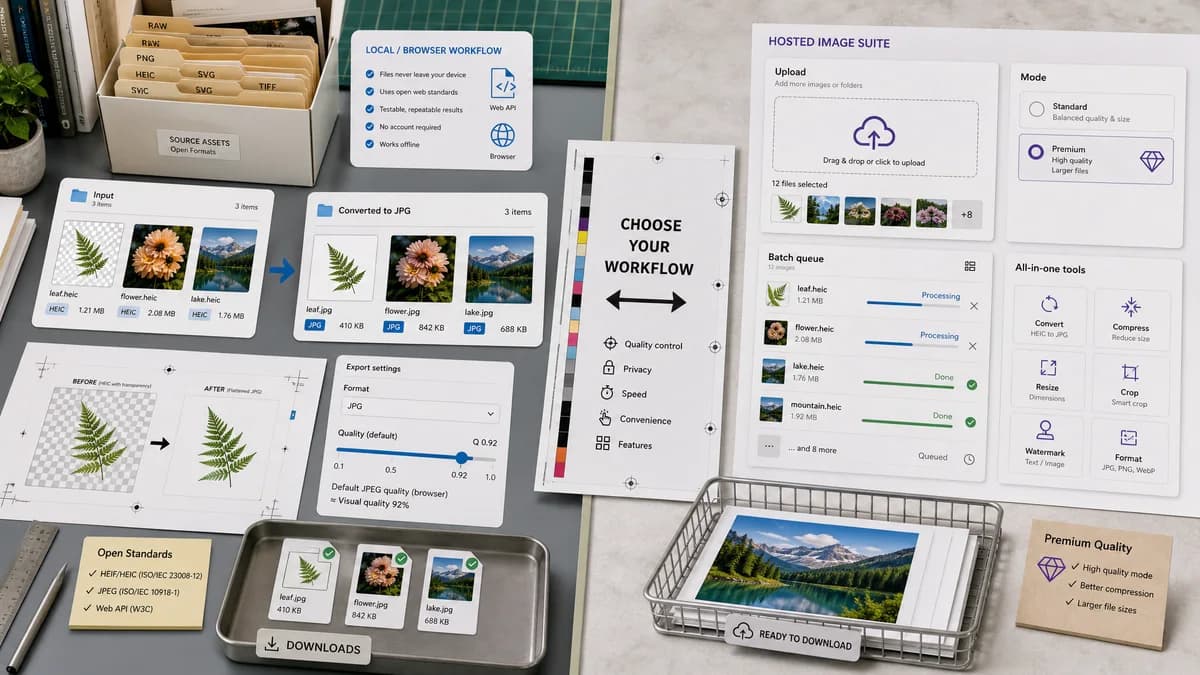
Generate a clean batch conversion image showing three HEIC files becoming three JPG files, each with MIME and extension checks.
- Use simple status dots.
- Avoid competitor branding.
- Show local browser processing cue.
SEO notes
The comparison page should answer searches for iLoveIMG alternatives while staying focused on HEIC to JPG rather than all image utilities.
- Include HEIC to JPG online alternative phrasing.
- Mention HEIF support as an advantage.
- Avoid claiming unlimited batch processing unless implemented.
Research notes
- iLoveIMG's official page says it converts multiple HEIC images to JPG online at once.
- The page shows recommended quality and a premium high-quality option.
- Generated image direction: batch HEIC rows with local status indicators and per-file JPG verification badges.
Official source
The proprietary product link is included once here for source checking after the alternative analysis.
Official iLoveIMG source