
Open Source Alternatives to iMazing Converter
HEIC to JPG Converter is a browser-based alternative for users who need this focused result without installing a proprietary desktop app or entering a larger hosted workflow.
This research compares that workflow with iMazing Converter while keeping the outbound source link at the bottom after the analysis.
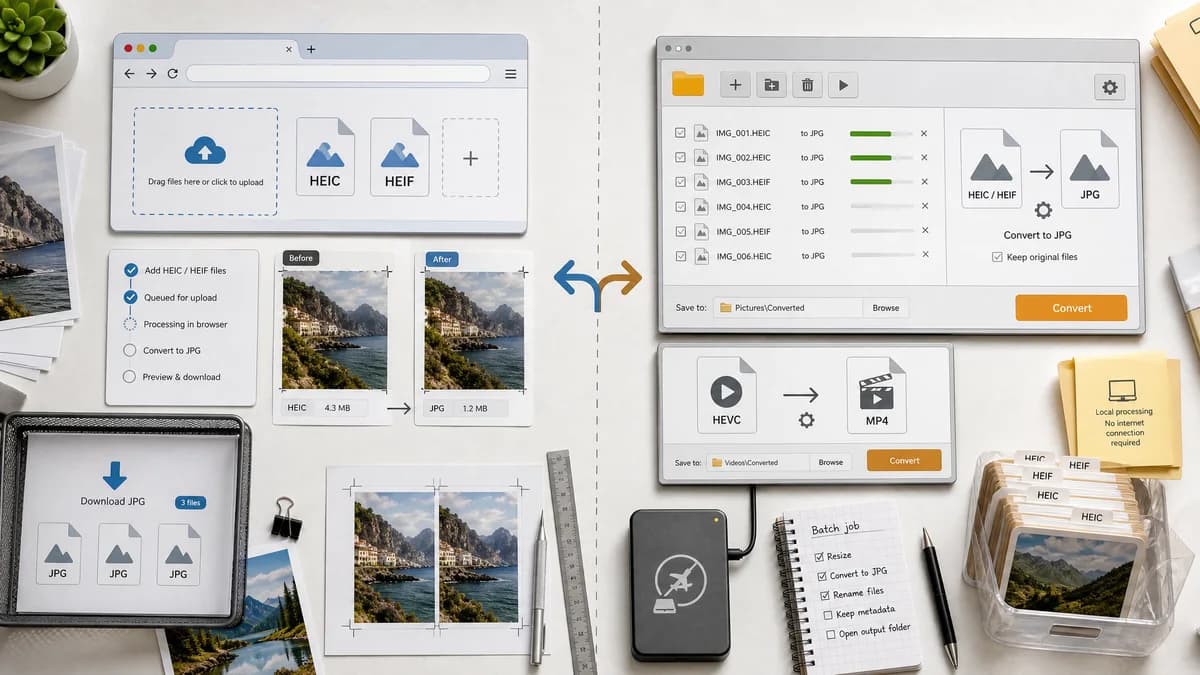
Why HEIC to JPG Converter fits
TextFaker can be a no-install browser alternative for HEIC/HEIF to JPG conversion, reusing heic2any and avoiding desktop app installation when the browser can decode the file.
What iMazing Converter offers
iMazing Converter is stronger for users who prefer a desktop app, need offline local batch conversion, or also need HEVC video conversion.
Open alternative signals
Install requirement
HEIC to JPG ConverterNo install beyond using a supported browser
iMazing ConverterDesktop app for Mac and PC
Locality
HEIC to JPG ConverterBrowser-local when supported
iMazing ConverterDesktop-local app
Formats
HEIC to JPG ConverterHEIC/HEIF to JPG only for this page
iMazing ConverterHEIC to JPEG/PNG and HEVC video to MP4
Open-source component
HEIC to JPG ConverterUses heic2any-style open-source-powered browser decoding
iMazing ConverterFree proprietary software
Decision guide
Users who want a browser page for quick HEIC/HEIF to JPG conversion without installing a desktop utility.
Users who want an installed Mac or Windows converter for photos and HEVC videos, especially offline batches.
Side-by-side open source alternative comparison
| Decision point | HEIC to JPG Converter | iMazing Converter | Takeaway |
|---|---|---|---|
| Installation | Our workflowRuns from the web page. | Proprietary workflowRequires downloading a Mac or PC app. | TextFaker is better for one-off no-install jobs. |
| Offline use | Our workflowNeeds the site loaded, then can process locally in browser. | Proprietary workflowDesktop app can be used offline after installation. | iMazing may be better for offline desktop workflows. |
| Video support | Our workflowNo HEVC video conversion on this JPG page. | Proprietary workflowConverts HEVC video to MP4 as well. | Do not compete on video features. |
| Output choices | Our workflowJPG/JPEG only. | Proprietary workflowJPEG or PNG for HEIC photos. | Dedicated SEO scope should stay JPG-only. |
| Alpha handling | Our workflowFlatten for JPEG and say so. | Proprietary workflowPNG option may preserve transparency depending on source and implementation. | If users need alpha, point them to PNG output tools rather than JPG. |
| Trust | Our workflowTrust from transparent browser workflow and open-source-powered decoder. | Proprietary workflowTrust from a known desktop utility publisher. | Use technical validation to build confidence. |
Detailed research
Desktop comparison
iMazing Converter is not a cloud service; it is a local desktop app. The TextFaker alternative angle is no-install browser conversion rather than local versus uploaded processing.
- Acknowledge iMazing's local desktop benefit.
- Do not imply all competitors upload files.
- Explain browser-local as a convenience model.
Scope boundary
iMazing handles HEVC video too, but this TextFaker tool should not. The SEO page is dedicated to HEIC and HEIF still images to JPG/JPEG only.
- Reject video inputs with a clear message.
- Avoid HEVC to MP4 copy.
- Keep output MIME image/jpeg.
Generated image brief
Create a two-panel image showing a laptop desktop app download path versus a browser tab converting a HEIC file into a verified JPG.
- No iMazing branding.
- Show no-install language visually.
- Show local result details.
Research note wording
If using the phrase proprietary software, use correct spelling and only to describe the comparison category. iMazing Converter is free but still not documented as open source in the official source used here.
- Do not call TextFaker open source.
- Do call the workflow open-source-powered.
- Use heic2any as the named open-source dependency when appropriate.
Research notes
- iMazing's official page describes a free Mac and PC app converting HEIC to JPEG or PNG and HEVC/H.265 to MP4/H.264.
- The iMazing download page lists licensing as 100% free and supports HEIC to JPEG or PNG.
- Generated image direction: browser-based no-install converter compared with a generic desktop utility window.
Official source
The proprietary product link is included once here for source checking after the alternative analysis.
Official iMazing Converter source