
Open Source Alternatives to Microsoft HEIF Image Extension
HEIC to JPG Converter is a browser-based alternative for users who need this focused result without installing a proprietary desktop app or entering a larger hosted workflow.
This research compares that workflow with Microsoft HEIF Image Extension while keeping the outbound source link at the bottom after the analysis.
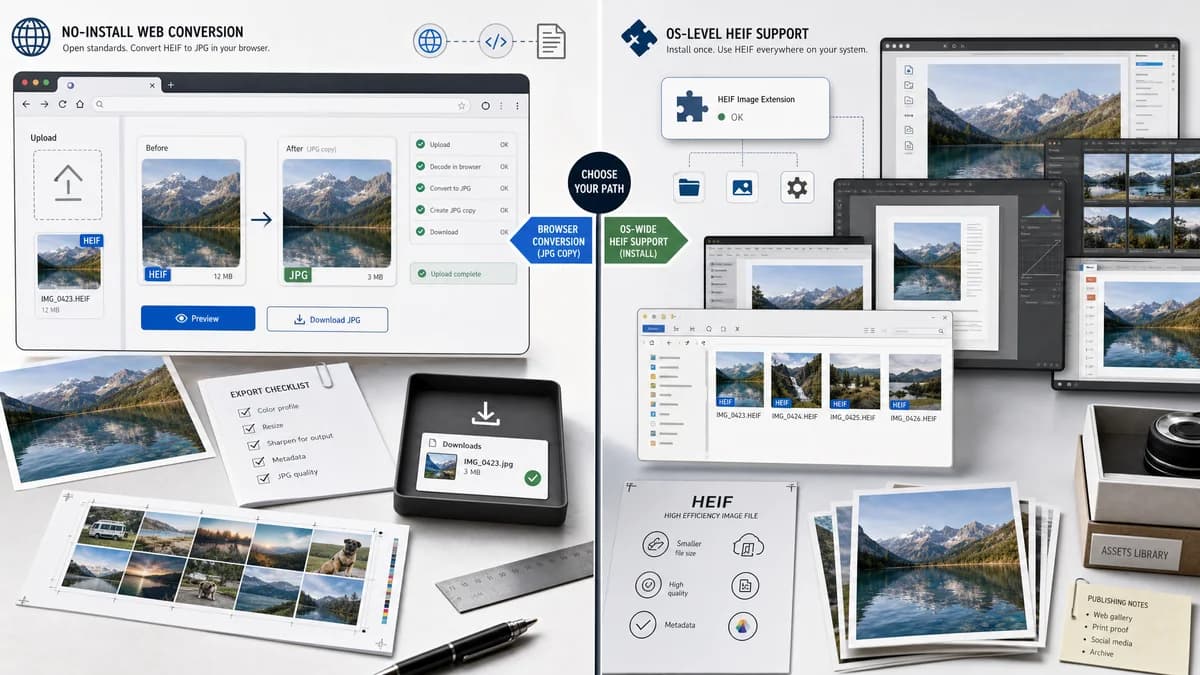
Why HEIC to JPG Converter fits
TextFaker can be a no-install browser conversion page for users who need a JPG copy rather than operating-system HEIF support, while still using open-source-powered browser decoding where possible.
What Microsoft HEIF Image Extension offers
Microsoft HEIF Image Extension is better for Windows users who want system-level HEIF compatibility across apps that rely on Windows imaging components.
Open alternative signals
Product type
HEIC to JPG ConverterWeb converter
Microsoft HEIF Image ExtensionWindows codec extension
Goal
HEIC to JPG ConverterCreate JPG output
Microsoft HEIF Image ExtensionEnable HEIF read/write support in Windows
Install
HEIC to JPG ConverterNo system codec install for compatible browser conversion
Microsoft HEIF Image ExtensionMicrosoft Store extension install
Output validation
HEIC to JPG Converterimage/jpeg Blob and .jpg filename
Microsoft HEIF Image ExtensionSystem-level HEIF handling, not a dedicated JPG result
Decision guide
Creating a compatible .jpg copy from an HEIC or HEIF file in the browser without changing system codecs.
Viewing or working with HEIF files directly in Windows apps that depend on the platform codec.
Side-by-side open source alternative comparison
| Decision point | HEIC to JPG Converter | Microsoft HEIF Image Extension | Takeaway |
|---|---|---|---|
| Problem solved | Our workflowProduces a JPG copy for compatibility. | Proprietary workflowAdds HEIF support to Windows. | These solve adjacent but different needs. |
| Installation | Our workflowUses a browser page. | Proprietary workflowRequires installing a Windows extension. | TextFaker is useful when users cannot or do not want to change system codecs. |
| Conversion output | Our workflowAlways targets JPG on this page. | Proprietary workflowCodec extension enables read/write support but is not itself a dedicated HEIC to JPG web tool. | Make the conversion outcome explicit. |
| Platform | Our workflowBrowser-dependent and potentially cross-platform. | Proprietary workflowWindows-specific. | TextFaker can serve non-Windows and locked-down-device users. |
| Alpha | Our workflowFlatten if exporting to JPEG. | Proprietary workflowHEIF itself can include auxiliary image data such as alpha planes, but JPEG cannot preserve that alpha. | Conversion and viewing have different transparency implications. |
| Codec coverage | Our workflowLimited by heic2any support and browser resources. | Proprietary workflowWindows imaging support may depend on installed extensions and HEVC codec availability. | Both paths have compatibility caveats worth explaining. |
Detailed research
Adjacent alternative
Microsoft HEIF Image Extension is not a direct converter like CloudConvert, but users compare it when trying to open or use HEIC files on Windows. TextFaker should frame itself as making a JPG copy rather than adding OS-level HEIF support.
- Use clear copy: convert, not install a codec.
- Avoid claiming to make Windows support HEIC globally.
- Include a Windows user scenario.
Technical distinction
A browser-generated JPEG copy is portable and broadly supported, but it can lose HEIF-specific features such as alpha and some metadata. The extension aims to support HEIF itself inside Windows.
- Document metadata behavior.
- Document alpha flattening.
- Explain that JPG compatibility comes with JPEG limitations.
Generated image brief
Create a visual with a Windows app-extension tile on one side and a browser output card labeled photo.jpg on the other.
- No Microsoft logo.
- Show system codec versus exported file distinction.
- Keep output card dominant.
SEO caution
This page can capture users searching for alternatives to installing a Windows HEIF extension, but it should not imply the TextFaker tool replaces codec support in every Windows app.
- Use narrower claims.
- Mention no system install for conversion.
- Include HEIC and HEIF spelling variations.
Research notes
- Microsoft Store page says HEIF Image Extension enables Windows to read and write files that use the HEIF format.
- Adobe's Photoshop codec guidance points Windows users to Microsoft HEIF and HEVC codecs for HEIC/HEVC support.
- Generated image direction: Windows codec install path compared with browser conversion to a portable JPG file.
Official source
The proprietary product link is included once here for source checking after the alternative analysis.
Official Microsoft HEIF Image Extension source