
ID Photo Print Sheet Maker vs 123PassportPhoto
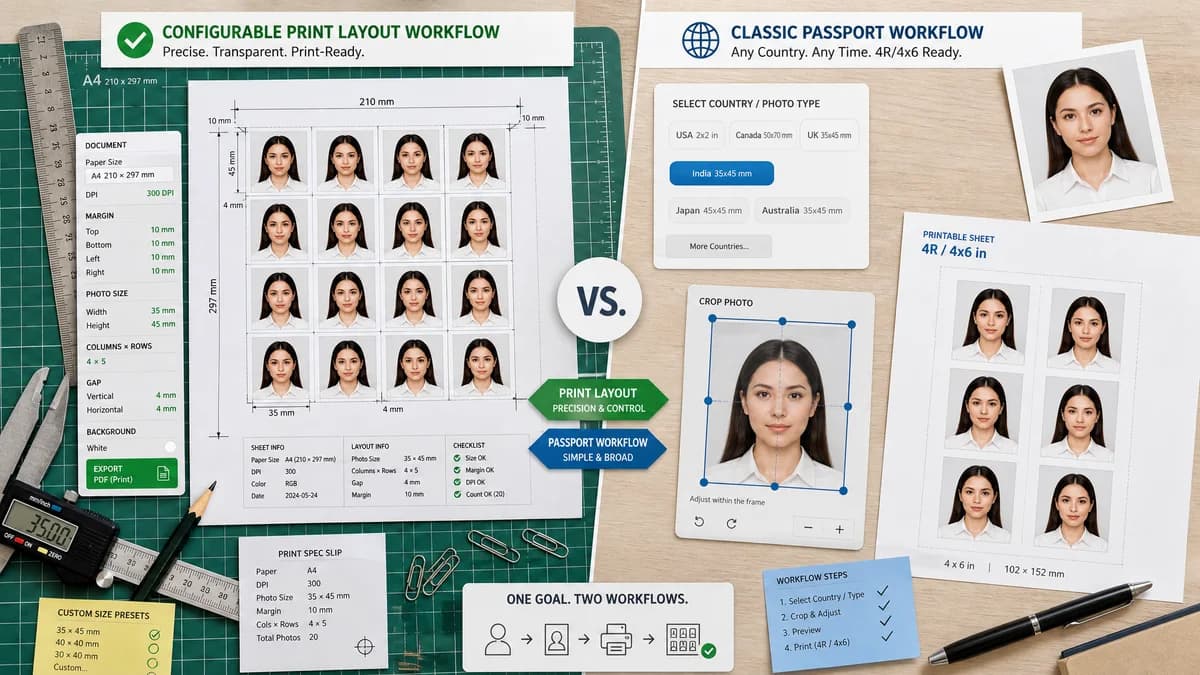
ID Photo Print Sheet Maker is the baseline in this comparison: Make a print-ready sheet of exact-size ID photos from one image, with measurable sheet geometry, cut guides, and PNG or PDF export generated locally.
123PassportPhoto guides users through selecting a country and photo type, cropping, then downloading a 4R or 4x6 printable sheet.
Quick verdict
123PassportPhoto covers the classic passport workflow; TextFaker can be stronger for users who need precise control, custom sizes, and deterministic export checks.
How ID Photo Print Sheet Maker fits
TextFaker should provide a more transparent and configurable print-layout tool with explicit DPI, margin, and sheet metadata.
How 123PassportPhoto fits
123PassportPhoto focuses on turning a source image into a printable passport picture suitable for 4R or 4x6 photo paper.
Side-by-side comparison
| Decision point | ID Photo Print Sheet Maker | 123PassportPhoto | Takeaway |
|---|---|---|---|
| Guided setup | Our workflowPreset picker plus manual dimension fields and live fit calculation. | Competitor workflowCountry and photo-type selection followed by crop and download. | TextFaker should support both quick presets and custom technical control. |
| Printable sheet | Our workflowShould calculate sheet geometry from physical units and selected DPI. | Competitor workflowOutputs a 4R or 4x6 printable picture. | Both address print sheets, but TextFaker should disclose more layout detail. |
| Custom dimensions | Our workflowShould allow arbitrary ID-photo width, height, margins, gaps, and copy count. | Competitor workflowTemplate-driven passport and visa dimensions. | Custom dimensions make TextFaker useful for school, work, permit, and badge photos. |
| Output validation | Our workflowShould show file MIME, pixel dimensions, physical dimensions, DPI assumption, and manifest. | Competitor workflowThe user downloads the printable sheet after crop. | TextFaker can reduce print-scale mistakes through measurable checks. |
| Local processing | Our workflowMust run in-browser and avoid uploads. | Competitor workflowOnline workflow; local-only behavior is not the main positioning. | TextFaker can appeal to privacy-conscious users handling identity photos. |
| Mobile UX | Our workflowShould be optimized for phone uploads and thumb-friendly sheet controls. | Competitor workflowTraditional web flow. | A modern responsive UI can improve same-day mobile printing workflows. |
Use ID Photo Print Sheet Maker when
- Exact 4x6, 5x7, A4, Letter, and custom sheets
- Users who need transparent calculations before printing
- Testable output for browser-local image tools
Use 123PassportPhoto when
- Users looking for a guided passport photo flow
- People who want a country/photo-type selection step
- Users comfortable with a simple crop-and-download process
Detailed comparison
Demand Signal
123PassportPhoto explicitly describes the path from crop to 4R sheet and printing at home or a photo center, matching the intended TextFaker workflow.
- Users want standard photo-paper output.
- Users want the cheapest path after preparing a photo.
- Users need printable multiples rather than a single digital file.
Product Gap
The main opportunity is not another generic passport maker, but a precise print imposition tool for identity photos.
- Add layout manifest download.
- Add printer scaling checklist.
- Add cut guides and optional crop marks as deterministic overlays.
Implementation Guidance
Treat every output as a layout problem. Given paper size, DPI, photo size, copy count, gap, and margin, the same input should always produce the same rectangles.
- Assert no slot exceeds the page boundary.
- Assert all generated slots have identical dimensions.
- Assert output file extension and MIME match the selected export.
Risk Notes
ID-photo acceptance depends on face position, background, expression, paper, and print settings. TextFaker should avoid implying that a correctly sized sheet guarantees official acceptance.
- Use official sources for requirements references.
- Warn users to disable fit-to-page scaling.
- Distinguish printable layout from biometric compliance.
Research notes
- 123PassportPhoto states that after crop the user gets a printable picture suitable for 4R or 4x6 photo paper.
- The competitor validates market demand for a simple browser sheet-generation flow.
- TextFaker can provide stronger machine-verifiable output by exposing the computed layout values.
Official source
The only outbound competitor link on this page is placed here for source checking after the comparison.
Official 123PassportPhoto source