
ID Photo Print Sheet Maker vs IDPhotoDIY
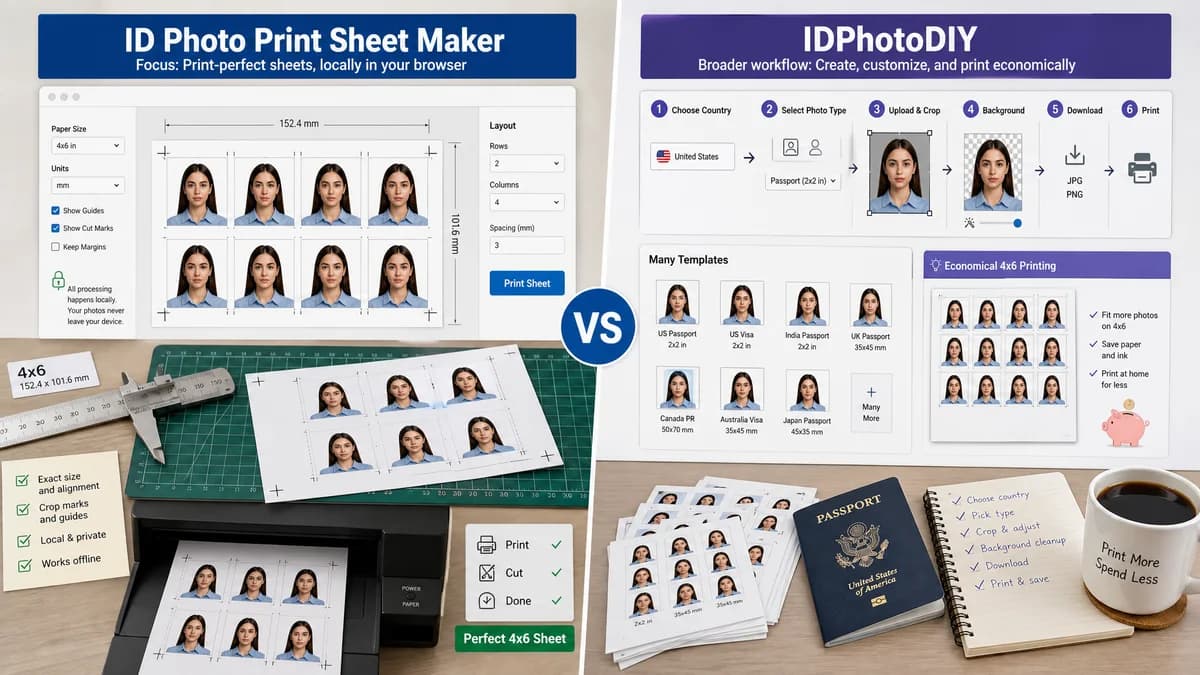
ID Photo Print Sheet Maker is the baseline in this comparison: Make a print-ready sheet of exact-size ID photos from one image, with measurable sheet geometry, cut guides, and PNG or PDF export generated locally.
IDPhotoDIY lets users choose a country and photo type, crop a photo, optionally handle the background, then download and print a passport or visa photo.
Quick verdict
IDPhotoDIY is useful for guided photo creation; TextFaker should serve users who want exact print layout, transparent measurements, and offline-friendly privacy.
How ID Photo Print Sheet Maker fits
TextFaker should focus on the downstream sheet-making problem: arranging one or more already prepared ID photos onto exact paper sizes locally in the browser.
How IDPhotoDIY fits
IDPhotoDIY positions itself around saving money and time by creating printable passport or visa photos with many templates and 4x6 print economics.
Side-by-side comparison
| Decision point | ID Photo Print Sheet Maker | IDPhotoDIY | Takeaway |
|---|---|---|---|
| Workflow stage | Our workflowPost-crop layout maker for printing. | Competitor workflowEnd-to-end photo creation, crop, enhancement, and print download. | TextFaker can be simpler and more precise by owning one stage well. |
| Template breadth | Our workflowCommon size presets plus custom dimensions. | Competitor workflowOver 50 templates and many country/visa pages. | Competitor is better for discovering requirements; TextFaker is better for exact custom layout. |
| Background handling | Our workflowCould include optional solid matte fill only when user selects it, but should not depend on AI. | Competitor workflowMentions removing or changing the background. | Avoiding AI makes TextFaker more deterministic and local. |
| Print economy | Our workflowShould calculate copies per sheet and show cost-saving print-ready summary. | Competitor workflowEmphasizes low-cost 4R or 4x6 printing. | Both appeal to price-sensitive users. |
| Privacy | Our workflowRuns locally in the browser. | Competitor workflowOnline system workflow. | Identity-photo privacy is a meaningful TextFaker differentiator. |
| Automation | Our workflowSupports tests for dimensions, slot count, file type, and layout JSON. | Competitor workflowHuman preview and final download are the practical checks. | TextFaker fits the existing deterministic TextFaker tool pattern better. |
Use ID Photo Print Sheet Maker when
- Users with an existing approved or prepared ID photo file
- People who need several exact-size copies on common paper
- Users who want no-upload browser-local processing
Use IDPhotoDIY when
- Users needing country and visa templates
- Users who want a guided crop and enhancement flow
- People preparing baby or family passport photos at home
Detailed comparison
Demand Signal
IDPhotoDIY's messaging around saving money, printing on 4R paper, and avoiding a studio aligns directly with user discussions about cheap passport photo printing.
- Users want to take photos at home.
- Users want multiple copies on one cheap print.
- Users care about baby and family use cases where retakes matter.
TextFaker Positioning
Position TextFaker as the print-sheet maker that does not judge face compliance. The user brings the image; the tool guarantees the math of the sheet.
- Exact photo slots in inches or millimeters.
- Optional cut lines and labels.
- Downloadable manifest for repeatable output.
Implementation Guidance
The tool should calculate maximum copies automatically but let users override rows and columns when possible.
- Show an error when requested rows and columns do not fit.
- Show unused paper area as a numeric value.
- Support portrait and landscape sheet orientation.
Testing Guidance
Use synthetic fixtures rather than face photos. A colored square or checkerboard can verify scaling, placement, and repeated rendering.
- Assert top-left pixel of each slot matches the input fixture.
- Assert white margins and cut-line color values at known coordinates.
- Assert PDF page size metadata when PDF export is implemented.
Research notes
- IDPhotoDIY lists home printing, thumb-drive photo-center printing, and online printing as user paths.
- Community posts show people are actively trying to avoid higher passport-photo prices by printing ordinary 4x6 sheets.
- TextFaker should make printer scaling warnings prominent because exact paper output is the key user risk.
Official source
The only outbound competitor link on this page is placed here for source checking after the comparison.
Official IDPhotoDIY source