
ID Photo Print Sheet Maker vs U.S. Department of State Photo Tool
ID Photo Print Sheet Maker is the baseline in this comparison: Make a print-ready sheet of exact-size ID photos from one image, with measurable sheet geometry, cut guides, and PNG or PDF export generated locally.
The U.S. Department of State Photo Tool helps users crop a passport photo for in-person or mail applications, but it is not a general multi-copy print sheet maker.
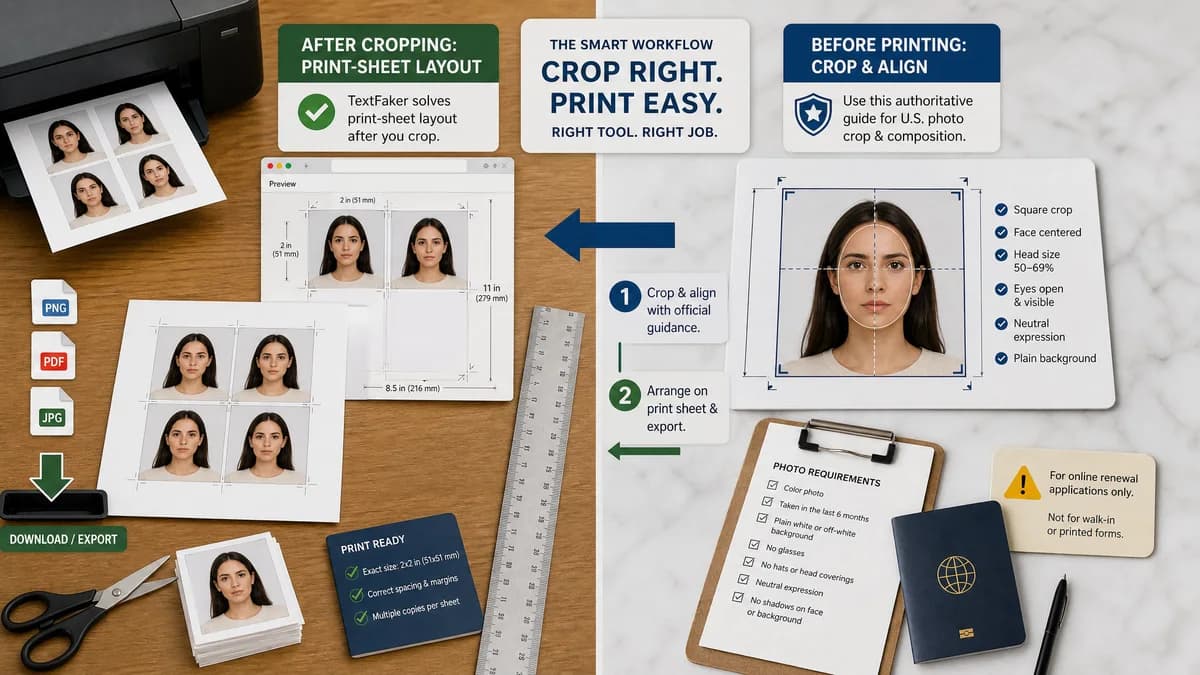
Quick verdict
The official tool is authoritative for U.S. crop guidance; TextFaker should avoid competing on official compliance and instead solve print-sheet layout after cropping.
How ID Photo Print Sheet Maker fits
TextFaker should complement official crop guidance by arranging a prepared 2x2 photo onto a printable sheet with exact dimensions and downloadable outputs.
How U.S. Department of State Photo Tool fits
The State Department tool is an official adjacent resource for cropping and passport photo guidance, with explicit limitations for online renewal use.
Side-by-side comparison
| Decision point | ID Photo Print Sheet Maker | U.S. Department of State Photo Tool | Takeaway |
|---|---|---|---|
| Authority | Our workflowUnofficial utility with links to official requirements. | Competitor workflowOfficial U.S. government tool and guidance. | TextFaker should defer requirement interpretation to official sources. |
| Core function | Our workflowPrint-sheet layout generation. | Competitor workflowPhoto cropping for certain U.S. passport workflows. | The tools are complementary. |
| Paper sheet output | Our workflowShould produce 4x6, Letter, A4, and custom sheets with multiple copies. | Competitor workflowDoes not focus on multi-copy print sheets. | TextFaker fills the downstream printing gap. |
| International support | Our workflowCan support multiple common ID sizes and custom dimensions. | Competitor workflowU.S. passport-focused. | TextFaker can serve broader identity-photo printing needs. |
| Compliance risk | Our workflowShould clearly state that exact sheet size does not guarantee official acceptance. | Competitor workflowOfficial guidance for U.S. passport photo requirements. | Use conservative copy and official sources. |
| Deterministic validation | Our workflowTests can assert file dimensions, slot rectangles, and guide coordinates. | Competitor workflowCropping guidance and user alignment are not the same as sheet-layout validation. | TextFaker's value is measurable print output. |
Use ID Photo Print Sheet Maker when
- Generating multi-copy print sheets from a prepared image
- Choosing paper size, DPI, margins, gaps, and cut guides
- Testing exact layout outputs without face-compliance judgment
Use U.S. Department of State Photo Tool when
- Users needing official U.S. passport crop guidance
- Users applying in person or by mail
- Users checking official photo requirement resources
Detailed comparison
Demand Signal
Public user discussions mention using official crop resources and then needing a separate grid or sheet tool for cheap 4x6 printing.
- Users trust official crop guidance.
- They still need a way to print multiple exact copies.
- They worry about retail lab acceptance and printer scaling.
Complementary Position
The TextFaker page should present official tools as requirement references and avoid implying government affiliation.
- Use wording like size preset and print sheet.
- Do not use official logos or marks.
- Tell users to confirm current requirements with the issuing authority.
Implementation Guidance
The tool can include a U.S. 2x2 preset based on official dimensions, but all layout outputs should be calculated from user-selectable physical size and DPI.
- Default U.S. preset: 2 x 2 inches.
- Default 4x6 sheet at 300 DPI: 1200 x 1800 pixels.
- Optional six-up grid with known 600 x 600 pixel slots.
Validation Guidance
Automated tests should prove that a selected official-size preset produces the expected physical dimensions in the output manifest.
- Do not test whether a portrait meets official face rules.
- Test preset values and conversion math.
- Test warnings when users select nonstandard scaling or low DPI.
Research notes
- The State Department page states U.S. printed passport photos are 2 x 2 inches and gives head-size guidance, making exact physical dimensions central to user success.
- The Photo Tool states it is intended for cropping for in-person or mail use, not for every passport workflow.
- TextFaker should use official dimensions as presets while making the print sheet a separate, unofficial utility.
Official source
The only outbound competitor link on this page is placed here for source checking after the comparison.
Official U.S. Department of State Photo Tool source