
Open Source Alternatives to CVS Passport Photos
ID Photo Print Sheet Maker is a browser-based alternative for users who need this focused result without installing a proprietary desktop app or entering a larger hosted workflow.
This research compares that workflow with CVS Passport Photos while keeping the outbound source link at the bottom after the analysis.
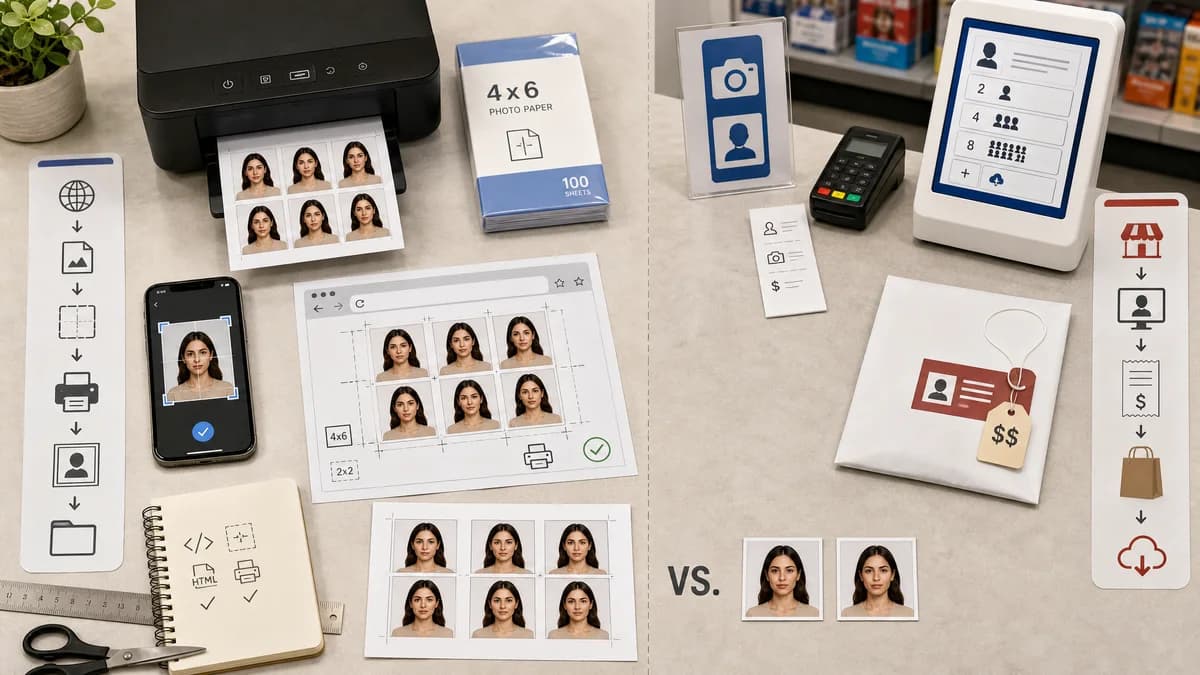
Why ID Photo Print Sheet Maker fits
TextFaker can be compared against retail passport photo services by solving the DIY sheet-preparation step. Users can create a 4 x 6 sheet locally and then print it as an ordinary photo where permitted.
What CVS Passport Photos offers
CVS Passport Photos is a retail service where customers receive two 2 x 2 inch ID prints for a listed price, with an optional digital photo add-on.
Open alternative signals
Service type
ID Photo Print Sheet MakerBrowser-local self-service sheet maker.
CVS Passport PhotosRetail photo capture and print service.
Price sensitivity
ID Photo Print Sheet MakerSupports the low-cost normal-photo-print workflow.
CVS Passport PhotosDedicated passport photo package pricing.
Staff assistance
ID Photo Print Sheet MakerNone; user controls the photo and sheet.
CVS Passport PhotosIn-store assistance may be available.
Output count
ID Photo Print Sheet MakerCan fit multiple copies per sheet depending on preset.
CVS Passport PhotosTwo ID prints in the standard offer described by the official page.
Decision guide
Cost-sensitive users who already have a suitable photo and want to prepare a standard print sheet themselves.
Users who want an in-store photo capture and print service with staff assistance.
Side-by-side open source alternative comparison
| Decision point | ID Photo Print Sheet Maker | CVS Passport Photos | Takeaway |
|---|---|---|---|
| Cost workflow | Our workflowPrepare one standard 4 x 6 sheet for normal photo printing. | Proprietary workflowBuy a passport photo package. | DIY users are motivated by price. |
| Convenience | Our workflowWorks from home if the user already has a photo. | Proprietary workflowConvenient for people near a store who want capture and print help. | Both workflows serve different urgency levels. |
| Privacy | Our workflowSensitive photo stays local during sheet creation. | Proprietary workflowPhoto is handled by the retail service workflow. | Local preparation can matter for identity photos. |
| Compliance confidence | Our workflowCan validate size and layout only. | Proprietary workflowRetail service may provide staff guidance but still depends on photo quality. | Do not imply guaranteed acceptance. |
| Output flexibility | Our workflowUser controls copy count, paper size, crop marks, and margins. | Proprietary workflowFixed retail package options. | Customization is a TextFaker advantage. |
| Testing | Our workflowGenerated sheet can be tested for dimensions and layout. | Proprietary workflowRetail service cannot be tested locally. | The tool can have strong regression coverage. |
Detailed research
Demand Evidence
Retail passport-photo prices are a repeated point of friction in public discussions. Users specifically describe printing a prepared 4 x 6 sheet at CVS, Walgreens, Walmart, or similar photo labs to save money.
- Make the default U.S. workflow obvious.
- Include a note that users must follow the print provider's rules.
- Avoid suggesting misuse of retail services.
Implementation Guidance
The most important test is that a 4 x 6 export is exactly the right image size for a standard photo print at the chosen DPI. Browser preview size should never determine final output size.
- Use 300 DPI default for 4 x 6 photo-lab output.
- Validate output dimensions independent of CSS layout.
- Provide a clear filename such as id-photo-sheet-4x6-300dpi.png.
Positioning
The page should frame TextFaker as a DIY preparation tool, not as a retail service replacement for everyone. Some users will still prefer staff capture and printing.
- Best when the user already has a good photo.
- Best for privacy and cost control.
- Not a guaranteed government approval service.
Risks
Some photo labs may reject passport-photo-like sheets or apply automatic scaling/cropping. The tool can reduce layout errors but cannot control external print-service policies.
- Tell users to print at actual size or upload as a full 4 x 6 image.
- Warn about kiosk auto-crop settings.
- Provide PDF for home printers and PNG for photo labs.
Research notes
- The official CVS page lists two 2 x 2 inch ID prints and a paid digital photo add-on, making it a clear retail comparison point.
- Reddit users explicitly compare pharmacy passport-photo pricing with cheap 4 x 6 photo prints and DIY sheet layouts.
- Reddit and Apple Support discussions show users trying to arrange multiple 2 x 2 photos on a 4 x 6 sheet before using local print services.
- Deterministic validation path: tests can generate a 4 x 6 photo-lab sheet and verify that the output is suitable as a normal image upload, with exact 1200 x 1800 px dimensions at 300 DPI.
Official source
The proprietary product link is included once here for source checking after the alternative analysis.
Official CVS Passport Photos source