
Open Source Alternatives to Passport Photo Online
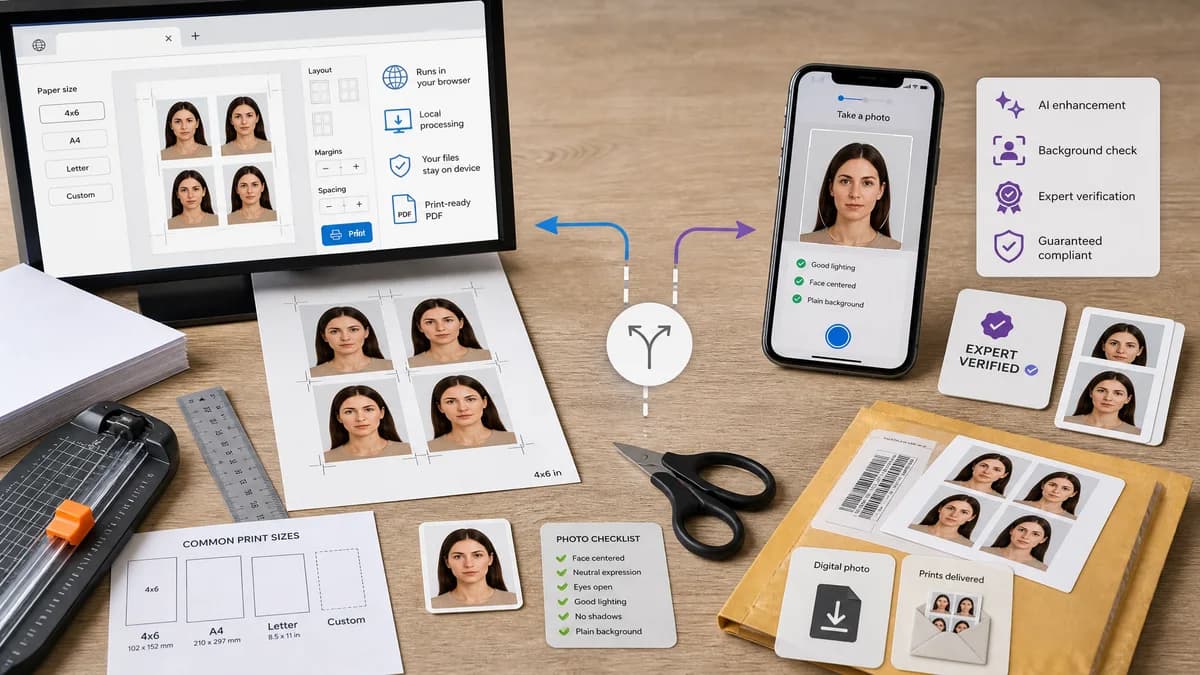
ID Photo Print Sheet Maker is a browser-based alternative for users who need this focused result without installing a proprietary desktop app or entering a larger hosted workflow.
This research compares that workflow with Passport Photo Online while keeping the outbound source link at the bottom after the analysis.
Why ID Photo Print Sheet Maker fits
TextFaker can cover the final printable-sheet workflow for users who do not need paid AI or expert verification. It can turn a prepared image into exact 4 x 6, A4, Letter, or custom print sheets using local browser rendering.
What Passport Photo Online offers
Passport Photo Online provides a guided passport photo app and website that creates official document photos with AI processing, expert verification, and digital or printed delivery options.
Open alternative signals
Local processing
ID Photo Print Sheet MakerDesigned to run in the browser with no upload after the app loads.
Passport Photo OnlineOnline service and app workflow processes uploaded photos.
Human or expert verification
ID Photo Print Sheet MakerNo; can show official-rule reminders and numeric layout checks only.
Passport Photo OnlineYes, the product markets AI plus expert verification.
Print sheet focus
ID Photo Print Sheet MakerPrimary workflow is making a deterministic sheet for home or lab printing.
Passport Photo OnlinePrint sheet is one output option within a broader compliance service.
Automated testability
ID Photo Print Sheet MakerHigh, because layout math is explicit and deterministic.
Passport Photo OnlineLow from TextFaker's perspective, because verification behavior is proprietary.
Decision guide
Users who need a fast local print sheet from a photo they have already checked or cropped.
Users who want the service to check compliance, adjust the image, and provide acceptance-focused support.
Side-by-side open source alternative comparison
| Decision point | ID Photo Print Sheet Maker | Passport Photo Online | Takeaway |
|---|---|---|---|
| User control | Our workflowUser chooses paper, DPI, count, spacing, margins, and crop marks directly. | Proprietary workflowService abstracts much of the process behind a guided passport-photo flow. | TextFaker fits users who want transparent output settings. |
| Privacy | Our workflowA local implementation avoids transmitting sensitive ID photos. | Proprietary workflowThe user uploads the photo to receive service output. | Sensitive ID imagery makes local processing especially valuable. |
| Compliance | Our workflowCan help with sizes and official links, but cannot guarantee acceptance. | Proprietary workflowMarkets acceptance and verification support. | The page should distinguish layout accuracy from biometric acceptance. |
| Mobile use | Our workflowCan be optimized for phone upload, preset selection, and file download to a local print lab app. | Proprietary workflowHas a mobile-first app and website. | Mobile usability is required to compete credibly. |
| Output metadata | Our workflowCan expose a JSON layout report for tests and user confidence. | Proprietary workflowTypically exposes a final image or order rather than full geometry data. | Transparent layout is a differentiator. |
| Cost | Our workflowUseful as a no-account browser tool for printable sheets. | Proprietary workflowDigital downloads or printed delivery may be paid. | Cost-sensitive users are a clear audience. |
Detailed research
Demand Evidence
Users in public forums describe having a digital passport image and needing to arrange or print it cheaply. The recurring phrase is essentially: make a 4 x 6 sheet with multiple 2 x 2 photos, then print it as a normal photo.
- Support repeated copies of one image.
- Support multiple different people on one sheet as a later enhancement.
- Show the exact printable dimensions before download.
Implementation Guidance
Keep the first version centered on deterministic output. A browser Canvas layout plus a PDF export path can be validated by reading output dimensions and layout metadata from generated fixtures.
- Preset: U.S. passport 2 x 2 inch at 300 DPI.
- Preset: 35 x 45 mm at 300 or 600 DPI.
- Assertions: output MIME, filename, page size, copy count, photo rectangle coordinates, crop mark positions.
Positioning
Frame TextFaker as the privacy-friendly print-sheet step, not a replacement for expert passport review. This is more defensible and easier to test.
- Say browser-based or open-source-powered.
- Do not say TextFaker is open source.
- Do not promise approval by government agencies.
Risks
A photo can be laid out perfectly and still fail official requirements for expression, lighting, background, recency, or head size. The UI needs warnings and links to official rules.
- Separate layout validity from document-photo validity.
- Avoid automatic face edits in the core feature.
- Let users download a layout report for records.
Research notes
- The official Passport Photo Online page describes taking or uploading a photo, AI checking, expert verification, and receiving a digital photo or printed copies.
- The Google Play listing includes user feedback about paying for a 4 x 6 download, printing it at a store, and having it accepted, which directly validates print-sheet demand.
- Reddit discussions show users seeking low-cost 4 x 6 print hacks instead of paying retail passport-photo prices.
- Deterministic validation path: fixture tests can choose U.S. 2 x 2 on 4 x 6 at 300 DPI, verify output dimensions of 1200 x 1800 px, and assert every photo placement rectangle is exactly 600 x 600 px.
Official source
The proprietary product link is included once here for source checking after the alternative analysis.
Official Passport Photo Online source