
Image Aspect Ratio Calculator vs AspectRatioCalculator.com
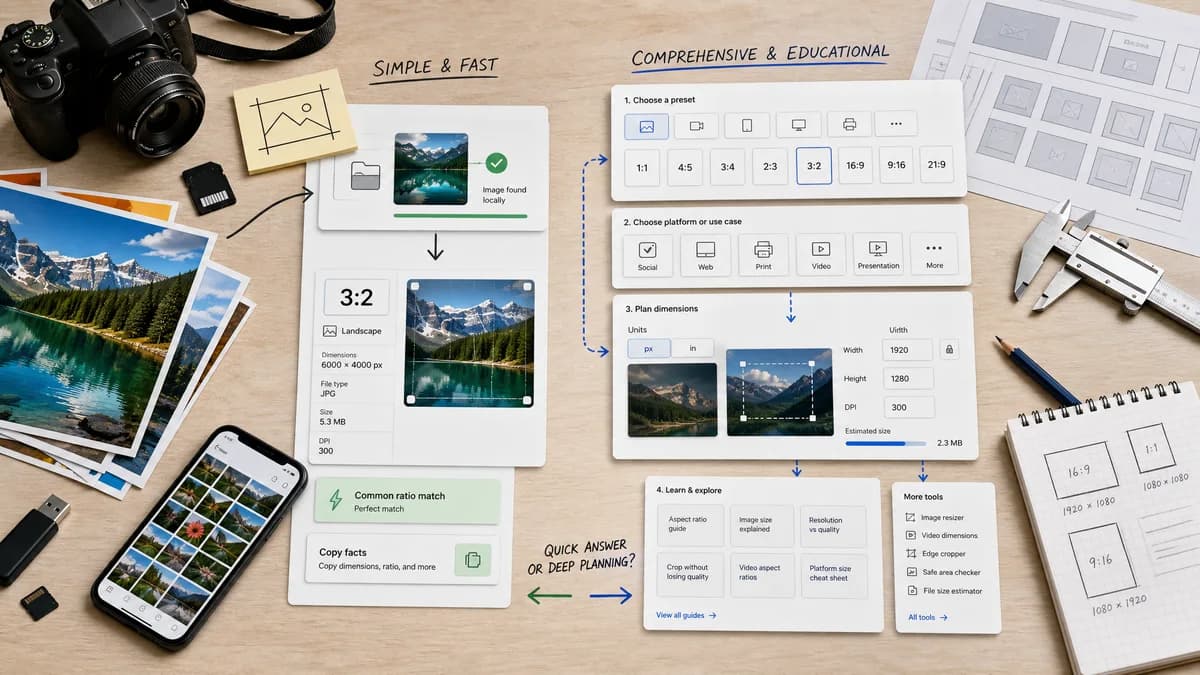
Image Aspect Ratio Calculator is the baseline in this comparison: Upload an image or type width and height to get the simplified aspect ratio, decimal value, orientation, and closest common match.
AspectRatioCalculator.com offers preset and custom ratio calculations, computed dimensions, total pixels, orientation mode, and related platform guides.
Quick verdict
TextFaker should compete on immediate local image detection and copyable facts; AspectRatioCalculator.com competes on preset breadth and educational guide coverage.
How Image Aspect Ratio Calculator fits
TextFaker should be leaner and image-file centered, using common-ratio matching without expanding into a large guide network.
How AspectRatioCalculator.com fits
AspectRatioCalculator.com is strong for manual preset selection, platform guides, and image or video dimension planning.
Side-by-side comparison
| Decision point | Image Aspect Ratio Calculator | AspectRatioCalculator.com | Takeaway |
|---|---|---|---|
| Preset breadth | Our workflowCommon-ratio match list optimized for image results. | Competitor workflowMany visible presets including 16:9, 4:3, 1:1, 9:16, 21:9, 3:2, 5:4, 2:1, and 32:9. | The competitor is stronger for preset exploration. |
| Actual image detection | Our workflowReads one uploaded image locally. | Competitor workflowManual ratio and dimension entry in researched content. | TextFaker should handle the uploaded-file use case better. |
| Orientation | Our workflowLandscape, portrait, or square label in details. | Competitor workflowThe page describes portrait and landscape mode based on measurements. | Both can report orientation; TextFaker should include square explicitly. |
| Output details | Our workflowReduced ratio, decimal ratio, width, height, orientation, common match. | Competitor workflowAspect ratio, new dimensions, and total pixels. | TextFaker's detail set should be tuned to identification rather than resizing. |
| Guide ecosystem | Our workflowFocused utility page inside TextFaker tools. | Competitor workflowLarge set of related ratio and platform pages. | The competitor has broader content coverage. |
| Copy action | Our workflowDedicated copy-all result icon. | Competitor workflowNo copy-all behavior was identified in researched content. | TextFaker can improve output handoff. |
Use Image Aspect Ratio Calculator when
- Checking the actual ratio of a selected image
- Reducing arbitrary dimensions from a real file
- Quick result copy for issue reports or specs
Use AspectRatioCalculator.com when
- Selecting from many common aspect ratio presets
- Planning dimensions for social, video, print, or presentation contexts
- Reading linked platform and ratio guides
Detailed comparison
Content Breadth
The competitor has many related calculators and guides. TextFaker should avoid trying to recreate that network for this initial tool and instead deliver a tighter image-ratio result.
Common Matching
The common-ratio match should include an exact or near label with a tolerance rule so 1920 by 1080 is 16:9 and 1000 by 667 is near 3:2 only if the tolerance allows it.
Manual Input
Manual width and height entry should be supported if it can be implemented without diluting the upload-first experience.
Verification
Add tests for orientation mode and common-ratio matching because those labels are easy to make inconsistent across tools.
Research notes
- The researched page shows multiple preset ratios and custom ratio entry.
- The page says it determines portrait or landscape mode from the measurements.
- The site links to many platform-specific and ratio-specific guides.
Official source
The only outbound competitor link on this page is placed here for source checking after the comparison.
Official AspectRatioCalculator.com source