
Image Aspect Ratio Calculator vs CalculateAspectRatio.com
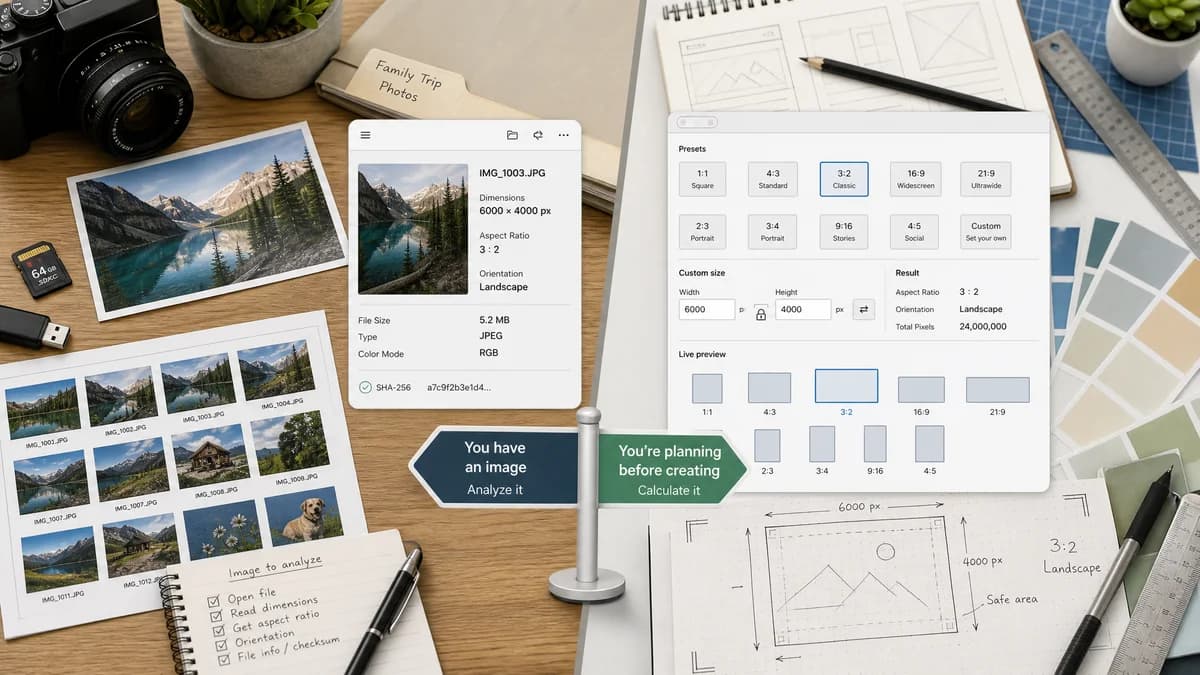
Image Aspect Ratio Calculator is the baseline in this comparison: Upload an image or type width and height to get the simplified aspect ratio, decimal value, orientation, and closest common match.
CalculateAspectRatio.com provides common presets, custom ratio and pixel fields, live shape visualization, and explanatory content for images, video, and design.
Quick verdict
TextFaker should serve users who already have an image; CalculateAspectRatio.com serves users planning a ratio or dimension before creating media.
How Image Aspect Ratio Calculator fits
TextFaker should prioritize file-based aspect ratio discovery and a compact factual output instead of visual ratio exploration.
How CalculateAspectRatio.com fits
CalculateAspectRatio.com is strong for manual preset workflows and visualizing ratio shapes before resizing or design work.
Side-by-side comparison
| Decision point | Image Aspect Ratio Calculator | CalculateAspectRatio.com | Takeaway |
|---|---|---|---|
| Primary workflow | Our workflowUpload image, see reduced ratio. | Competitor workflowPick or enter a ratio and dimension values. | TextFaker is better for existing assets. |
| Visualization | Our workflowResult facts, with optional image preview if shared helpers support it. | Competitor workflowLive shape visualizer. | The competitor is stronger for visual comparison. |
| Presets | Our workflowCommon-ratio match after calculation. | Competitor workflowPreset buttons for common ratios. | TextFaker should infer rather than require preset selection. |
| Image upload | Our workflowCore requirement for the tool. | Competitor workflowThe researched content focuses on entered fields, not uploaded images. | This is the main product gap. |
| Copyability | Our workflowCopy-all icon button for result details. | Competitor workflowNo copy-all result behavior was identified in researched content. | TextFaker can support direct workflow handoff. |
| Content risk | Our workflowKeep explanations accurate and concise. | Competitor workflowBroad educational content includes many examples and ratio guides. | TextFaker can be more focused and less noisy. |
Use Image Aspect Ratio Calculator when
- Finding a ratio from an existing image file
- Copying dimensions and ratio facts
- Local image checks without a design-planning interface
Use CalculateAspectRatio.com when
- Trying common presets like 16:9, 9:16, 21:9, 3:2, 4:3, and 1:1
- Visualizing shape proportions
- Learning basic aspect-ratio concepts
Detailed comparison
Planning vs Checking
The competitor is strongest when a user is planning dimensions. TextFaker should be strongest when a user is checking an existing file.
Result Copy
A predictable copied output is especially valuable for specs, issue comments, content QA, and social media asset reviews.
Common Ratios
The matching table should include common image and social ratios while making custom results feel first-class when no standard match applies.
Tests
Include exact-match tests for 16:9, 9:16, 21:9, 3:2, 4:3, and 1:1 plus a non-match test for arbitrary dimensions.
Research notes
- The page includes common preset ratios and custom ratio inputs.
- The researched page includes a live shape visualizer.
- The page explains ratio versus pixels and common use cases.
Official source
The only outbound competitor link on this page is placed here for source checking after the comparison.
Official CalculateAspectRatio.com source