
Image Aspect Ratio Calculator vs Have Camera Will Travel Aspect Ratio Calculator
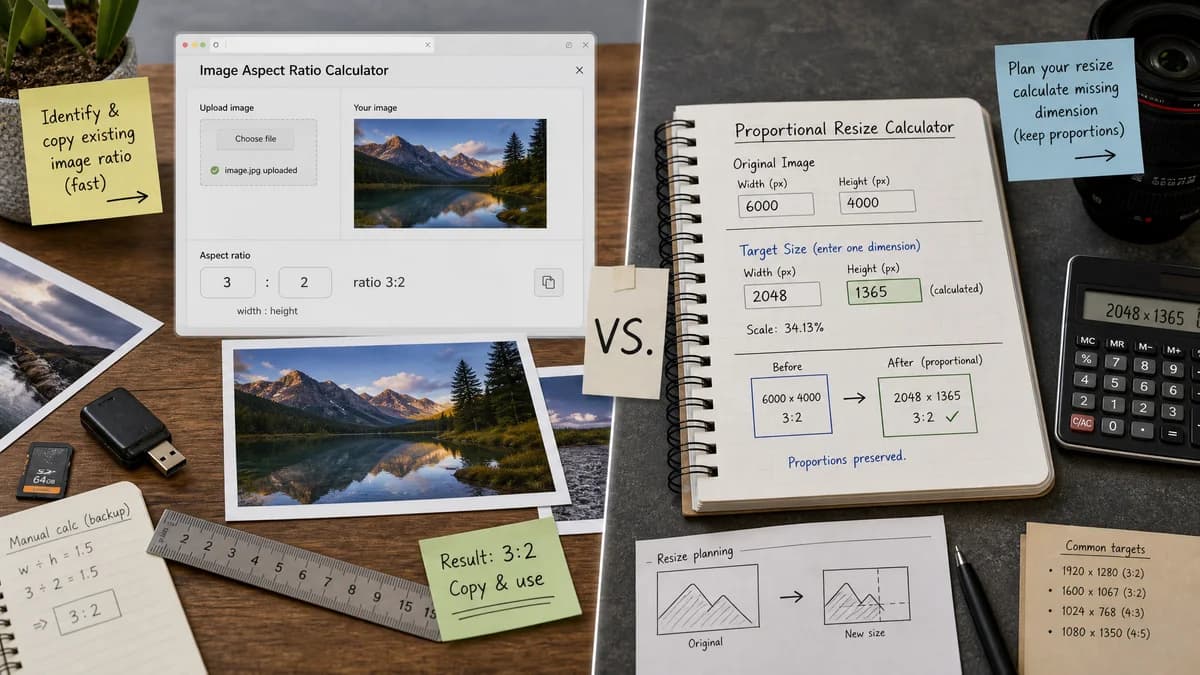
Image Aspect Ratio Calculator is the baseline in this comparison: Upload an image or type width and height to get the simplified aspect ratio, decimal value, orientation, and closest common match.
Have Camera Will Travel provides a photographer-oriented calculator where users enter original dimensions and one target dimension to calculate the missing proportional dimension.
Quick verdict
TextFaker should win for ratio identification; Have Camera Will Travel is more suitable for proportional resize planning.
How Image Aspect Ratio Calculator fits
TextFaker should stay focused on determining and copying an existing image's aspect ratio, with manual resizing calculations treated as secondary if included.
How Have Camera Will Travel Aspect Ratio Calculator fits
Have Camera Will Travel is strongest for photographers resizing an image while preserving proportions, not for inspecting an uploaded image file's ratio.
Side-by-side comparison
| Decision point | Image Aspect Ratio Calculator | Have Camera Will Travel Aspect Ratio Calculator | Takeaway |
|---|---|---|---|
| Main job | Our workflowIdentify and reduce an uploaded image's aspect ratio. | Competitor workflowCalculate target dimensions from original dimensions. | The tools solve related but different jobs. |
| Upload support | Our workflowPlanned uploaded-image detection. | Competitor workflowManual dimension entry based on the researched workflow. | TextFaker removes a step when the image file is available. |
| Audience | Our workflowGeneral image, web, social, and QA users. | Competitor workflowPhotographers and videographers. | TextFaker can use broader web utility language. |
| Output precision | Our workflowReduced ratio, decimal ratio, orientation, and match label. | Competitor workflowMissing target dimension rounded to the nearest whole number. | The competitor is resize-result oriented. |
| Copy behavior | Our workflowCopy-all result icon. | Competitor workflowNo copy-all behavior was identified in researched content. | TextFaker can better support handoff. |
| Common ratio | Our workflowCommon-ratio match should be explicit. | Competitor workflowFocused on preserving original proportions in target output. | TextFaker should explain what the existing ratio is, not only how to resize it. |
Use Image Aspect Ratio Calculator when
- Finding the ratio of an existing image
- Identifying orientation and common-ratio match
- Copying a concise image ratio report
Use Have Camera Will Travel Aspect Ratio Calculator when
- Photographers resizing from original to target dimensions
- Calculating a missing width or height
- Reading workflow guidance for crops and print or web use
Detailed comparison
Workflow Difference
The competitor is about resizing while preserving aspect ratio. TextFaker should be about discovering the image's ratio first, then optionally helping with manual width and height pairs.
Image Upload
Reading dimensions from an image file is the biggest workflow improvement over manual original-dimension entry.
Copy Text
The copy text should include the reduced ratio, source dimensions, decimal ratio, orientation, and common-ratio match in a predictable order.
Tests
If manual dimension input is implemented, tests should verify zero, blank, decimal, negative, and very large values fail gracefully or normalize consistently.
Research notes
- The researched page instructs users to enter original dimensions and one target dimension.
- The calculator rounds the missing dimension to the nearest whole number.
- The content is framed around photographers and videographers.
Official source
The only outbound competitor link on this page is placed here for source checking after the comparison.
Official Have Camera Will Travel Aspect Ratio Calculator source