
Image Aspect Ratio Calculator vs Image Aspect Ratio Resize Calculator Extension
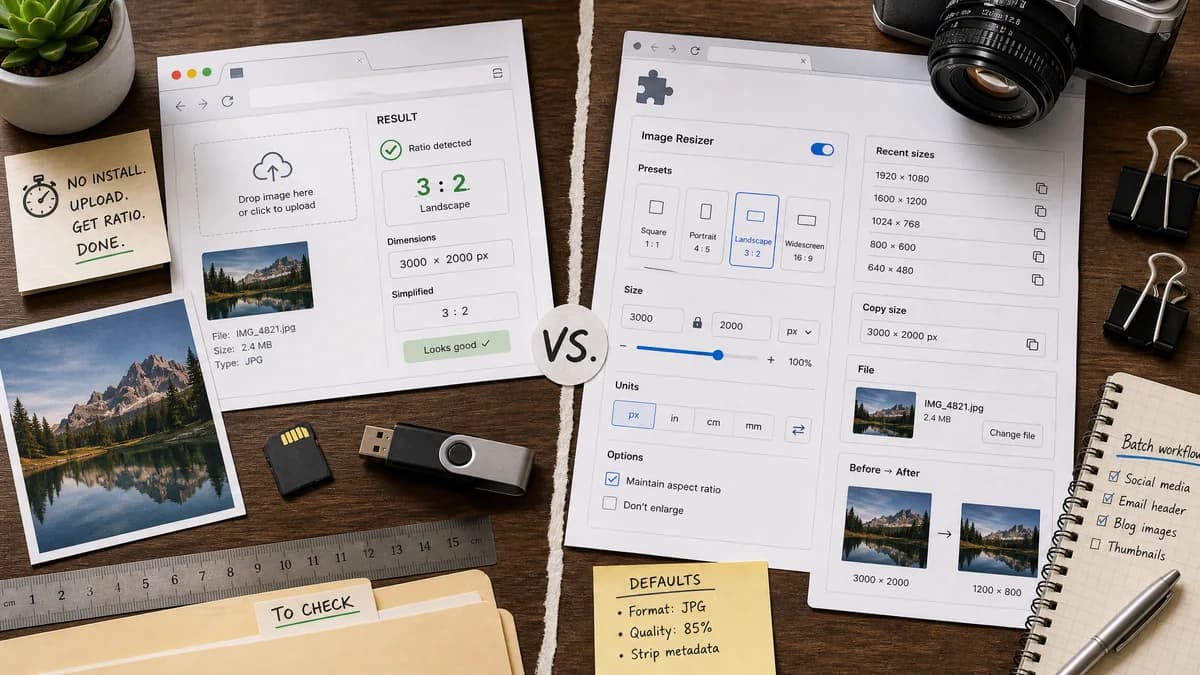
Image Aspect Ratio Calculator is the baseline in this comparison: Upload an image or type width and height to get the simplified aspect ratio, decimal value, orientation, and closest common match.
This Chrome extension calculates proportional image resize dimensions, stores recent or default dimensions, includes copy buttons, supports sliders and unit conversion, and can select an image file to read dimensions.
Quick verdict
TextFaker is better for immediate no-install checks; the extension is better for repeat resizing workflows inside Chrome.
How Image Aspect Ratio Calculator fits
TextFaker should deliver the core uploaded-image ratio check without requiring extension installation or broader resize controls.
How Image Aspect Ratio Resize Calculator Extension fits
The extension is feature-rich for resizing workflows and persistent defaults, but it has more setup and broader functionality than a quick web calculator.
Side-by-side comparison
| Decision point | Image Aspect Ratio Calculator | Image Aspect Ratio Resize Calculator Extension | Takeaway |
|---|---|---|---|
| Installation | Our workflowRuns as a web page. | Competitor workflowRequires Chrome extension installation. | TextFaker has lower friction for one-off use. |
| Image input | Our workflowUploaded image for dimensions and ratio. | Competitor workflowCan select an image file to get dimensions in pixels. | Both can support file-based dimension detection. |
| Main focus | Our workflowAspect ratio identification and copyable facts. | Competitor workflowProportional resizing and saving resized image output. | TextFaker should avoid becoming a resize editor. |
| Copy actions | Our workflowOne copy-all icon button for the ratio report. | Competitor workflowCopy buttons for resized dimensions. | Both support copy, but for different outputs. |
| Persistence | Our workflowNo persistence needed for privacy-first one-off checks. | Competitor workflowSaves defaults, last inputs, and custom dimension lists. | Persistence is useful for repeat users but unnecessary for the SEO page. |
| Units | Our workflowPixel dimensions and ratio facts. | Competitor workflowPixels, inches, and centimeters with conversion. | The extension is broader; TextFaker should stay image-pixel focused. |
Use Image Aspect Ratio Calculator when
- No-install browser-local ratio checking
- One-off image inspection
- SEO-accessible utility page
Use Image Aspect Ratio Resize Calculator Extension when
- Repeat Chrome-based resize calculations
- Saving default and custom dimension lists
- Using sliders, unit conversion, and extension popup workflows
Detailed comparison
No Install
The web-page version should emphasize that no extension or account is needed for a quick ratio check.
Scope Control
The extension includes many resizing features. TextFaker should remain a calculator, not an image resize tool.
Copy UX
Because the extension already has copy buttons, TextFaker's copy-all behavior needs to be crisp, visible, and test-covered.
Testing
Tests should verify that copy text does not change unexpectedly when optional fields are absent or when a manual dimension pair is used.
Research notes
- The Chrome Web Store page states that the extension finds proportional dimensions for enlarging or reducing an image.
- The researched listing mentions image file selection for pixel dimensions.
- The listing describes copy buttons, sliders, unit conversion, saved defaults, custom lists, and a dark theme.
Official source
The only outbound competitor link on this page is placed here for source checking after the comparison.
Official Image Aspect Ratio Resize Calculator Extension source