
Open Source Alternatives to Adobe Express
Image Aspect Ratio Calculator is a browser-based alternative for users who need this focused result without installing a proprietary desktop app or entering a larger hosted workflow.
This research compares that workflow with Adobe Express while keeping the outbound source link at the bottom after the analysis.
Why Image Aspect Ratio Calculator fits
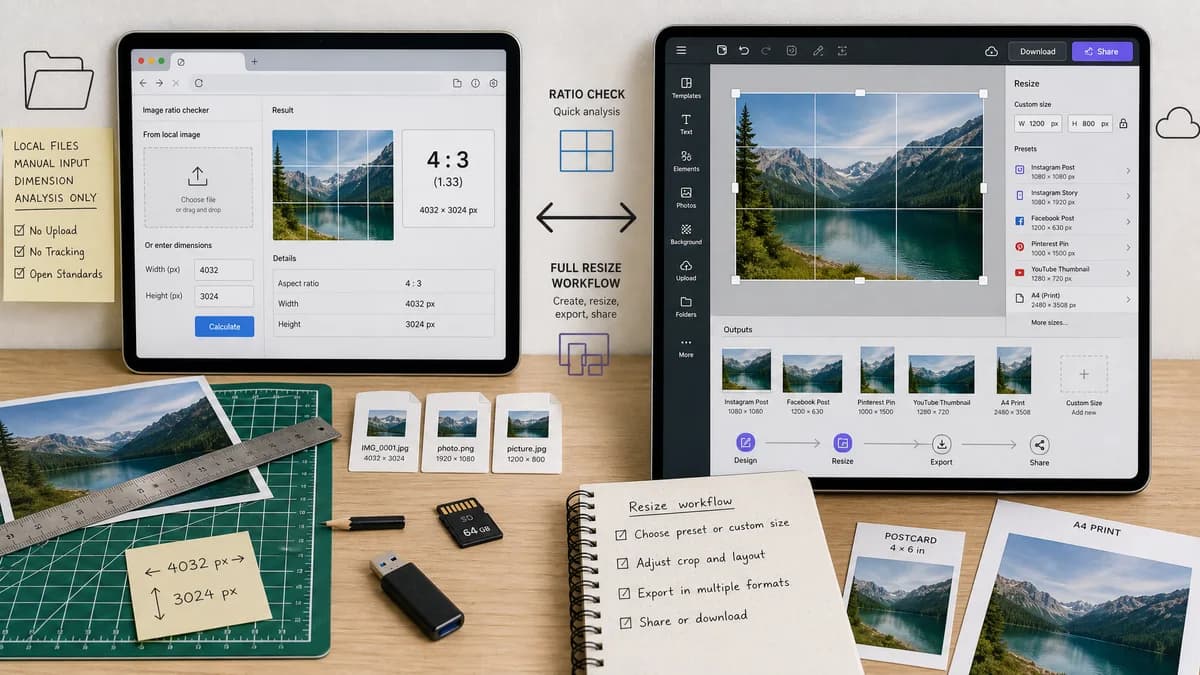
Image Aspect Ratio Calculator provides ratio facts from a local image or manual dimensions without asking the user to create or resize an edited output.
What Adobe Express offers
Adobe Express provides a hosted image resizer and broader design workflow for social, print, and custom-size outputs.
Open alternative signals
Source and openness
Image Aspect Ratio CalculatorBrowser standards and ratio math; no unsupported open-source product claim.
Adobe ExpressProprietary Adobe-hosted product.
Deployment and setup
Image Aspect Ratio CalculatorSingle-purpose web page with upload or manual input.
Adobe ExpressHosted editor and export workflow.
Pricing shape
Image Aspect Ratio CalculatorShared TextFaker free-use and lifetime unlock model.
Adobe ExpressAdobe freemium product with paid plan ecosystem.
Data control
Image Aspect Ratio CalculatorImage dimension reading can happen locally in the browser.
Adobe ExpressResizing is handled inside a hosted editing service.
Decision guide
Use Image Aspect Ratio Calculator for a quick, copy-ready ratio answer before picking a target canvas or resize setting.
Use Adobe Express when the actual goal is to resize, design, and export a finished image.
Side-by-side open source alternative comparison
| Decision point | Image Aspect Ratio Calculator | Adobe Express | Takeaway |
|---|---|---|---|
| Alternative fit | Our workflowBest for ratio facts and handoff text. | Proprietary workflowBest for resizing and design output. | The lighter tool is enough when no output image is needed. |
| Source model | Our workflowStandards-based browser-local calculation. | Proprietary workflowProprietary hosted service. | The source model differs, and scope differs even more. |
| Setup and deployment | Our workflowNo editor setup or template selection. | Proprietary workflowResize inside Adobe Express. | TextFaker is faster for measurement-only work. |
| Feature parity | Our workflowRatio, decimal, orientation, and common match. | Proprietary workflowImage resizing, custom sizes, and design tooling. | Adobe Express is stronger after the desired output is known. |
| Editing and export parity | Our workflowNo editing or download output. | Proprietary workflowDesigned to produce edited image files. | Use the proprietary editor when the file must change. |
| Migration path | Our workflowCopy the ratio into Adobe Express or another editor. | Proprietary workflowKeep the asset in the Adobe workflow. | The tools can be sequential rather than mutually exclusive. |
Detailed research
Open Alternative Fit
The TextFaker alternative is appropriate when the user wants the open web version of a calculation, not an Adobe replacement. A ratio result is a small factual output and does not require a full editor.
Feature Parity And Limits
Adobe Express is built for resizing images. TextFaker only identifies the source ratio and related facts, which is useful before deciding what resize target to use.
- No template library
- No graphic design editor
- No image export
- Copy-ready ratio facts
Data Control And Pricing
Because the TextFaker workflow needs only pixel width and height, it can avoid uploading the selected file for calculation. This matters for quick checks of private screenshots, drafts, and client images.
Where Adobe Express Still Wins
Adobe Express is the better choice when the next step is actually resizing, adding design elements, creating variants, or exporting a finished asset.
Practical Migration
Run the TextFaker check first, copy the labeled result, then set the target size in Adobe Express based on the confirmed ratio.
Research notes
- Adobe's official page describes online photo resizing and custom sizes.
- The TextFaker page should not claim editor or export parity.
- This alternative page should emphasize preflight calculation rather than creative production.
Official source
The proprietary product link is included once here for source checking after the alternative analysis.
Official Adobe Express source