
Open Source Alternatives to Pixlr
Image Aspect Ratio Calculator is a browser-based alternative for users who need this focused result without installing a proprietary desktop app or entering a larger hosted workflow.
This research compares that workflow with Pixlr while keeping the outbound source link at the bottom after the analysis.
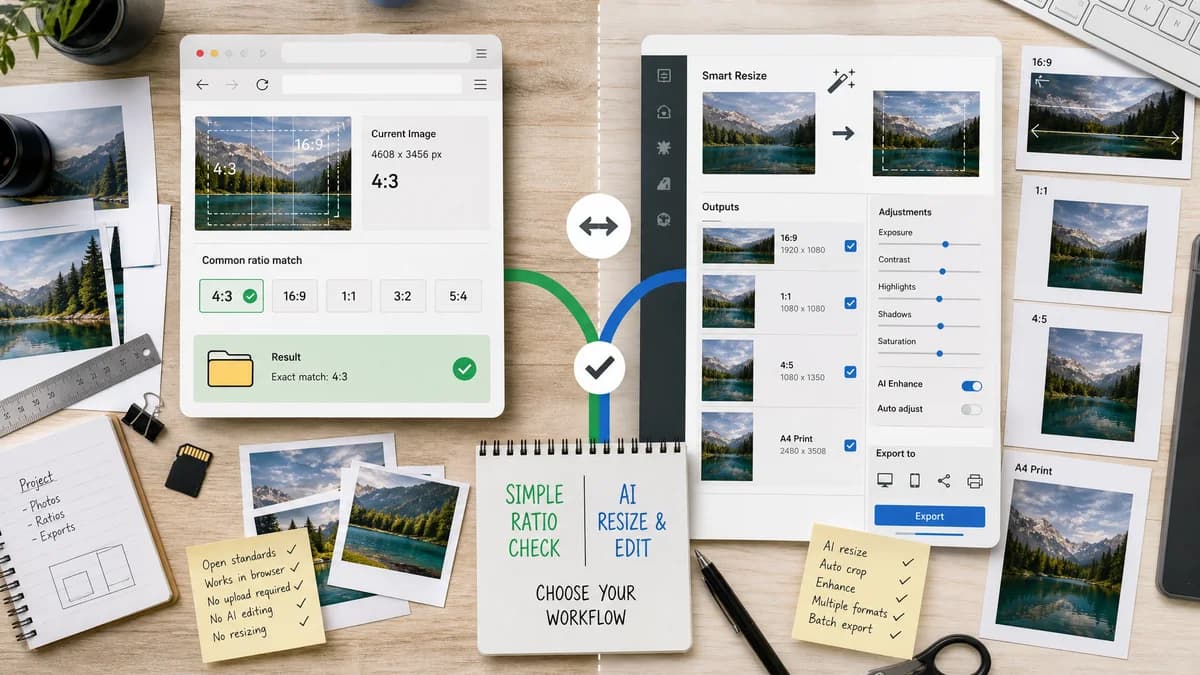
Why Image Aspect Ratio Calculator fits
Image Aspect Ratio Calculator identifies an image's current proportions and common-ratio match without AI resizing or editing.
What Pixlr offers
Pixlr's smart resize page positions the product around resizing images for websites, social media, blogs, printing, and other formats.
Open alternative signals
Source and openness
Image Aspect Ratio CalculatorBrowser-based calculation using image dimensions.
PixlrProprietary AI and photo editing product.
Deployment and setup
Image Aspect Ratio CalculatorSingle-purpose ratio page.
PixlrHosted editing tool with resize options.
Pricing shape
Image Aspect Ratio CalculatorShared TextFaker access model.
PixlrFreemium editor ecosystem.
Data control
Image Aspect Ratio CalculatorReads selected image dimensions locally.
PixlrEditing and AI resize happen in Pixlr's hosted workflow.
Decision guide
Use TextFaker when you need to measure and copy the current ratio before choosing a resize direction.
Use Pixlr when you need AI-assisted resizing, fill, fit, or photo editing output.
Side-by-side open source alternative comparison
| Decision point | Image Aspect Ratio Calculator | Pixlr | Takeaway |
|---|---|---|---|
| Alternative fit | Our workflowCurrent ratio measurement. | Proprietary workflowSmart resizing and photo editing. | TextFaker helps decide the resize target. |
| Source model | Our workflowStandards-based browser utility. | Proprietary workflowProprietary editor. | The open alternative is not a full editor. |
| Setup and deployment | Our workflowUse an upload zone or manual fields. | Proprietary workflowUse Pixlr's resize tool. | TextFaker has less setup for a factual result. |
| Feature parity | Our workflowRatio, decimal, orientation, and common match. | Proprietary workflowResize presets, fill, fit, and editor behavior. | Pixlr wins on modification; TextFaker wins on clarity. |
| Editing and export parity | Our workflowNo export. | Proprietary workflowExports edited images. | Use Pixlr after the desired ratio is known. |
| Migration path | Our workflowCopy the result into resize notes or a design ticket. | Proprietary workflowChoose resize settings in Pixlr. | The ratio result travels between tools. |
Detailed research
Open Alternative Fit
TextFaker can replace Pixlr only for the measurement part of the workflow. It is helpful when the user wants the existing aspect ratio, not an AI-generated resize.
Feature Parity And Limits
Pixlr includes resizing and editing controls. TextFaker's strength is that it avoids those controls and surfaces a small set of objective facts.
Data Control And Pricing
The calculator can keep file handling local for the ratio task. This is useful for quick checks where a hosted editor is more than the job requires.
Where Pixlr Still Wins
Pixlr remains better for AI resizing, visual editing, fill and fit decisions, and output export.
Practical Migration
Confirm the current ratio in TextFaker, then use Pixlr to resize or recompose only if the target ratio differs.
Research notes
- Pixlr's official smart resize page describes AI image resizing and preset dimensions.
- TextFaker should not claim AI resizing capability.
- The alternative value is local measurement before creative resizing.
Official source
The proprietary product link is included once here for source checking after the alternative analysis.
Official Pixlr source