
Image Color Picker vs Adobe Photoshop Color Picker
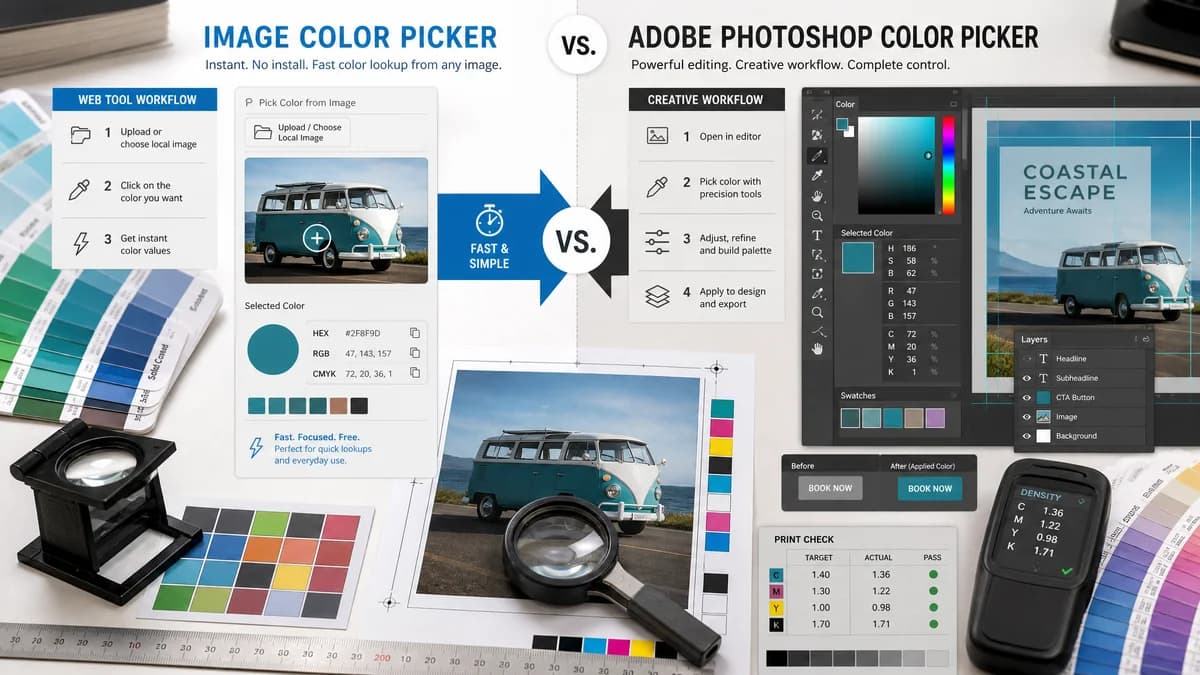
Image Color Picker is the baseline in this comparison: Upload an image locally, click or tap a pixel, and copy HEX, RGB, HSL, and alpha color values.
Adobe Photoshop’s color picker page promotes picking colors from an image and using them across design work with CMYK, RGB, and HEX support.
Quick verdict
Photoshop is stronger for professional editing and creative suite integration. TextFaker is stronger for instant no-install color lookup from a local image.
How Image Color Picker fits
TextFaker should provide the lightweight browser alternative for users who need color codes but do not need professional photo editing features.
How Adobe Photoshop Color Picker fits
Adobe positions the Photoshop Color Picker as a way to pick colors from uploaded JPEG, JPG, or PNG images and apply them in designs. The official page references CMYK, RGB, and HEX and notes an upload size limit in the page content.
Side-by-side comparison
| Decision point | Image Color Picker | Adobe Photoshop Color Picker | Takeaway |
|---|---|---|---|
| Product category | Our workflowStandalone web utility. | Competitor workflowProfessional creative software and web product funnel. | Photoshop is not a direct replacement for a quick utility. |
| Input limits | Our workflowShould define limits based on browser memory and implementation. | Competitor workflowOfficial page states JPEG, JPG, or PNG and up to 40MB for the upload experience. | TextFaker can support more web-native formats if tested. |
| Color formats | Our workflowHEX, RGB, and HSL are planned. | Competitor workflowCMYK, RGB, and HEX are emphasized. | Photoshop has stronger print-oriented positioning; TextFaker should own web values. |
| Privacy | Our workflowNo-upload browser-local processing should be explicit. | Competitor workflowThe page includes an upload interaction tied to Adobe terms and privacy policy. | Local processing is a meaningful contrast. |
| Editing capability | Our workflowNo image editing; focused sampling. | Competitor workflowPart of a full image editing product. | TextFaker should not compete on editing breadth. |
| Cost and setup | Our workflowShould be free and immediate. | Competitor workflowPage includes trial and plan calls to action. | TextFaker fits one-off users better. |
Use Image Color Picker when
- Users who need a quick image color value without opening Photoshop
- Users who want a free browser-local utility
- Users who need HEX, RGB, and HSL for web work
- Users on shared or lightweight devices
Use Adobe Photoshop Color Picker when
- Professional designers and photographers
- Users already paying for or trialing Photoshop
- Users who need CMYK workflows and design asset management
- Users who want to edit the image after sampling a color
Detailed comparison
Market Role
Photoshop validates that color picking from images is important in professional workflows. It also creates an opening for simpler tools that return values without a creative-suite context.
- Position as a quick lookup utility, not a Photoshop replacement.
- Mention no editing software required.
- Focus on copyable web color values.
Privacy Contrast
The Adobe page includes an upload workflow and terms language. TextFaker’s planned browser-local model is easier to explain for sensitive screenshots, brand drafts, and private photos.
- Use “your image stays in your browser” language only if implementation supports it.
- Avoid storing sample images or values server-side.
- Handle large files gracefully.
Format Contrast
Photoshop’s official page highlights JPEG, JPG, and PNG for its upload widget. A browser tool can potentially support WebP, BMP, GIF, and AVIF depending on actual decode support.
- Test every format before listing it.
- Show transparent handling for alpha if supported.
- Document animated GIF behavior if only the first frame is sampled.
Content Angle
The comparison page should help users decide whether they need editing or only a color code.
- Use neutral language about professional editing strength.
- Make the TextFaker best-fit list about speed and simplicity.
- Do not frame Photoshop as less accurate without evidence.
Research notes
- Official Adobe page promotes picking colors from an image and using CMYK, RGB, and HEX.
- Official Adobe page states JPEG, JPG, or PNG and up to 40MB for the upload interaction.
- Official page includes trial and plan calls to action, showing this is tied to a commercial product flow.
- This is an adjacent comparison for users searching for Photoshop-like color picking without Photoshop.
Official source
The only outbound competitor link on this page is placed here for source checking after the comparison.
Official Adobe Photoshop Color Picker source