
Image Color Picker vs Canva Color Palette Generator
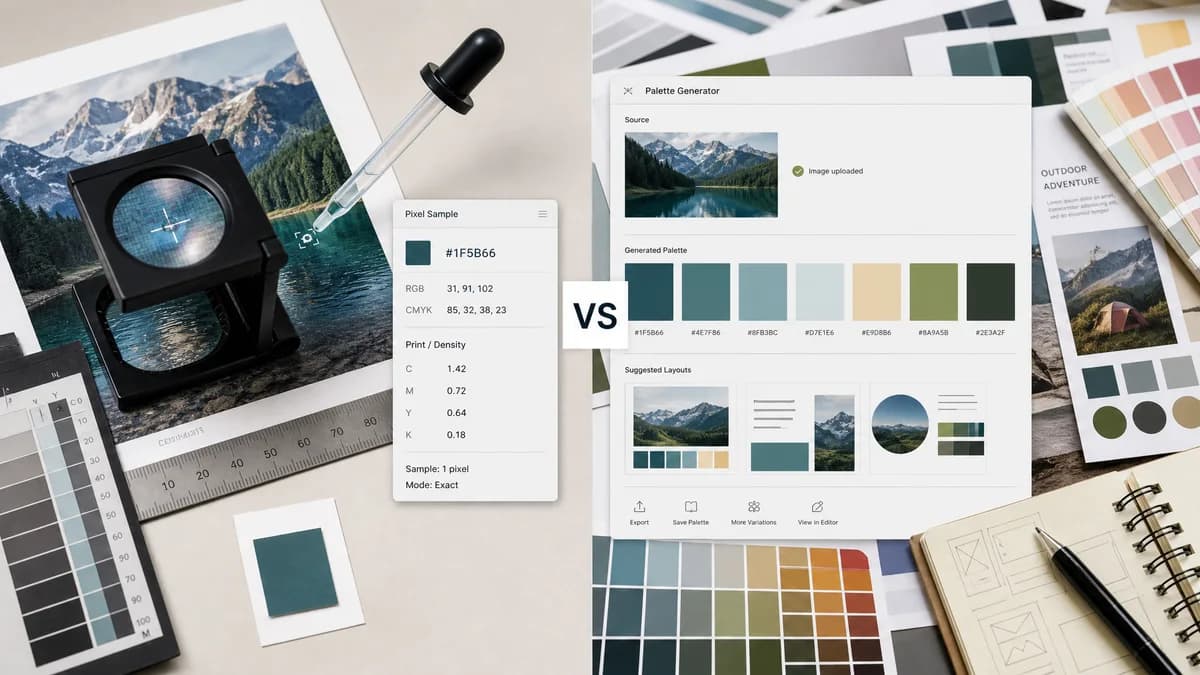
Image Color Picker is the baseline in this comparison: Upload an image locally, click or tap a pixel, and copy HEX, RGB, HSL, and alpha color values.
Canva’s tool creates a color palette from an uploaded photo and shows named colors with hex values.
Quick verdict
Canva is better for automatic palette inspiration. TextFaker is better when the user needs the value of a specific pixel from an image and wants no design-suite workflow.
How Image Color Picker fits
TextFaker should focus on exact pixel sampling rather than automatic palette extraction, making it better for matching a specific logo pixel, screenshot color, or image detail.
How Canva Color Palette Generator fits
Canva’s color palette generator creates a palette from a photo after upload and shows generated colors with hex codes. It connects naturally into Canva’s template and design workflow.
Side-by-side comparison
| Decision point | Image Color Picker | Canva Color Palette Generator | Takeaway |
|---|---|---|---|
| Sampling method | Our workflowManual click or tap on a pixel. | Competitor workflowAutomatic palette generation from an uploaded photo. | Manual picking is better for exact target colors; automatic palettes are better for inspiration. |
| Outputs | Our workflowHEX, RGB, and HSL values for the selected pixel. | Competitor workflowGenerated palette colors with hex values and color names. | TextFaker should emphasize multi-format precision. |
| Workflow destination | Our workflowCopy values for any app or codebase. | Competitor workflowConnects into Canva templates and design creation. | Canva is stronger for users staying inside Canva. |
| Privacy | Our workflowPlanned browser-local no-upload workflow. | Competitor workflowUpload-based palette generator tied to Canva’s platform. | No-upload is a clear TextFaker differentiator for private images. |
| Granularity | Our workflowSpecific pixel or location in an image. | Competitor workflowRepresentative palette extracted from the image overall. | The two tools answer different color questions. |
| Audience | Our workflowDesigners, developers, marketers, and everyday users needing exact values. | Competitor workflowCreators and Canva users seeking design palettes. | TextFaker should target exact-match use cases in copy. |
Use Image Color Picker when
- Users who need one exact color from a specific point
- Users checking a logo, icon, screenshot, or UI image
- Users who want browser-local no-upload processing
- Users who need RGB and HSL as well as HEX
Use Canva Color Palette Generator when
- Users who want an automatic palette from a photo
- Canva users moving directly into templates or designs
- Users who like named color suggestions
- Users creating mood boards or brand inspiration palettes
Detailed comparison
Intent Difference
Canva’s tool is about palette generation, not exact pixel inspection. That makes it adjacent rather than a direct product match.
- Use comparison copy to distinguish palette extraction from pixel sampling.
- Avoid claiming automatic palettes are inaccurate; they solve a different task.
- Highlight exact click or tap selection.
Feature Opportunity
Some users may expect both manual picking and palette generation. TextFaker can launch with manual picking and later add recent picks or dominant colors if demand appears.
- Do not let palette features crowd the main picker.
- A recent-picks strip can satisfy light palette needs.
- Dominant-color extraction can be a future enhancement.
SEO Notes
Canva likely captures searches around photo palette generation. TextFaker should capture action terms like pick color from image and get hex from image.
- Include “exact pixel color” in body copy.
- Use “not just a palette generator” on the comparison page if phrased neutrally.
- Mention RGB and HSL formats for developer intent.
Trust Notes
Canva’s brand trust is strong, so TextFaker needs clear, specific benefits instead of broad claims.
- Show privacy behavior near the upload zone.
- Make output copy controls obvious.
- Keep the page fast and uncluttered.
Research notes
- Official Canva page says it creates a color palette from a photo in seconds.
- Official Canva page shows generated color names and hex values.
- Canva is adjacent because it extracts palettes rather than focusing on one clicked pixel.
- The comparison should target exact sampling versus palette inspiration.
Official source
The only outbound competitor link on this page is placed here for source checking after the comparison.
Official Canva Color Palette Generator source