
Image Color Picker vs ColorZilla
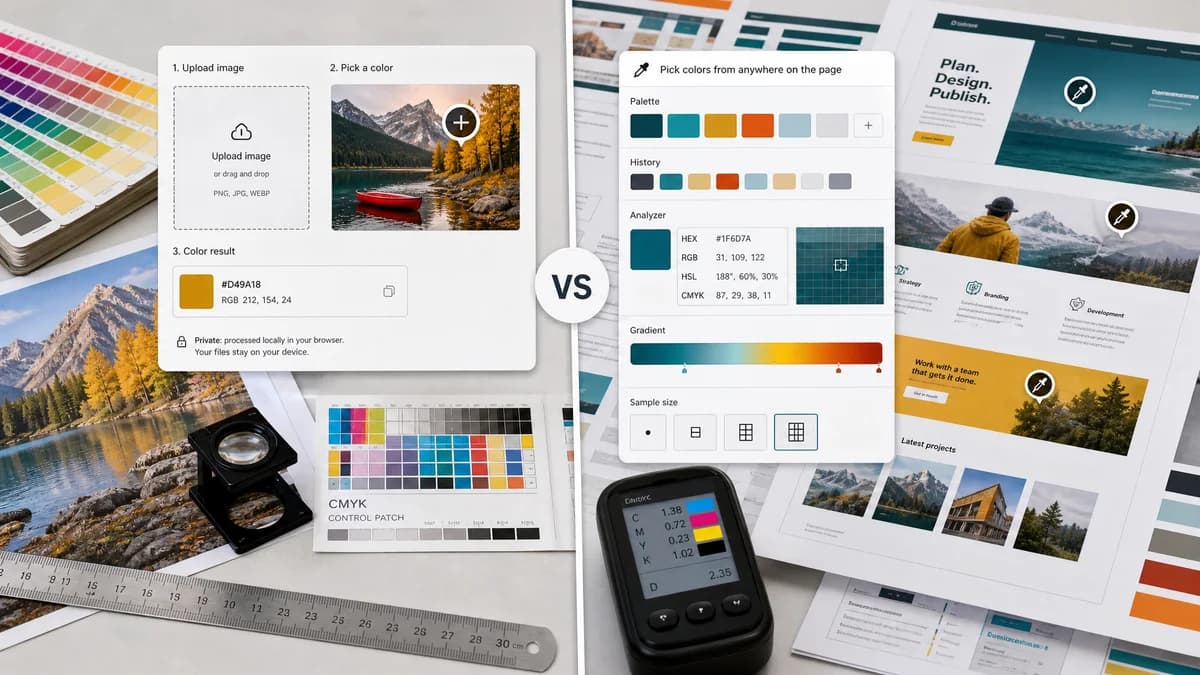
Image Color Picker is the baseline in this comparison: Upload an image locally, click or tap a pixel, and copy HEX, RGB, HSL, and alpha color values.
ColorZilla is a browser extension with an eyedropper, advanced color picker, webpage color analyzer, palette viewer, history, gradients, and sampling sizes.
Quick verdict
ColorZilla is better for ongoing browser-wide color picking from live webpages. TextFaker is better for one-off uploaded image sampling, private local files, and users who cannot or do not want to install extensions.
How Image Color Picker fits
TextFaker should target users who want to pick colors from an uploaded image in a web page without installing an extension or granting browser-extension permissions.
How ColorZilla fits
ColorZilla is a popular extension for sampling colors from any point in the browser, adjusting colors, analyzing webpage palettes, viewing palettes, keeping history, and sampling different area sizes.
Side-by-side comparison
| Decision point | Image Color Picker | ColorZilla | Takeaway |
|---|---|---|---|
| Installation | Our workflowRuns as a normal web page. | Competitor workflowRequires installing a browser extension from a store. | TextFaker has less setup and fewer permission concerns. |
| Sampling target | Our workflowUploaded or pasted image inside the tool. | Competitor workflowAny point in the browser page, plus webpage analysis features. | ColorZilla is broader for webpage work; TextFaker is narrower for image files. |
| Feature breadth | Our workflowHEX, RGB, HSL from selected pixels. | Competitor workflowEyedropper, advanced picker, gradient generator, webpage analyzer, palettes, history, and sampling sizes. | ColorZilla is a power tool; TextFaker should stay lightweight. |
| Privacy model | Our workflowNo-upload browser-local image processing should be the main promise. | Competitor workflowExtension runs in the browser and interacts with webpages under extension permissions. | Some users will prefer a web page over an installed extension. |
| Use frequency | Our workflowGood for occasional one-off image checks. | Competitor workflowGood for frequent developer and designer color picking across sites. | Different frequency and workflow assumptions. |
| Mobile fit | Our workflowCan be designed for tap on mobile browsers. | Competitor workflowBrowser extension workflows are generally desktop-browser oriented. | Mobile support can be a TextFaker differentiator. |
Use Image Color Picker when
- Users who need color values from an uploaded local image
- Users who cannot install browser extensions
- Users who want no extension permissions
- Users who need a simple linkable web tool
Use ColorZilla when
- Developers sampling live webpages repeatedly
- Users who want a browser-wide eyedropper
- Users who need webpage color analysis and gradients
- Users who want sampling sizes and color history inside an extension
Detailed comparison
Workflow Contrast
ColorZilla is not an uploaded-image web tool; it is a browser extension for repeated color work across pages. That makes it adjacent but important for users comparing ways to pick colors.
- Frame TextFaker as no-install image sampling.
- Avoid competing on browser-wide page picking.
- Mention extension-free use as the practical difference.
Feature Lessons
ColorZilla’s feature list highlights useful advanced concepts such as history and sampling area sizes. TextFaker could borrow only the parts that help image picking.
- Recent picks are useful and lightweight.
- Area averaging could be a later advanced option.
- Gradient generation is out of scope.
Trust Notes
Extension permissions can be a concern for some users. A browser-local page for a specific image can feel lower commitment.
- State that no extension is required.
- State local image handling if implemented that way.
- Do not imply ColorZilla is unsafe.
SEO Notes
ColorZilla comparison content can target users who search for extension alternatives or want a color picker without installing anything.
- Use “ColorZilla alternative for images” carefully in comparison content.
- Focus on “uploaded image” and “no extension.”
- Include browser-local and mobile-friendly wording.
Research notes
- Official Chrome Web Store listing describes ColorZilla as an eyedropper, color picker, gradient generator, and color tool suite.
- Official listing says it can get a color reading from any point in the browser.
- Official listing includes webpage color analyzer, palette viewer, history, sampling sizes, and average selected-area sampling.
- This is an adjacent extension comparison, not a direct uploaded-image competitor.
Official source
The only outbound competitor link on this page is placed here for source checking after the comparison.
Official ColorZilla source