
Image Color Picker vs Coolors Image Picker
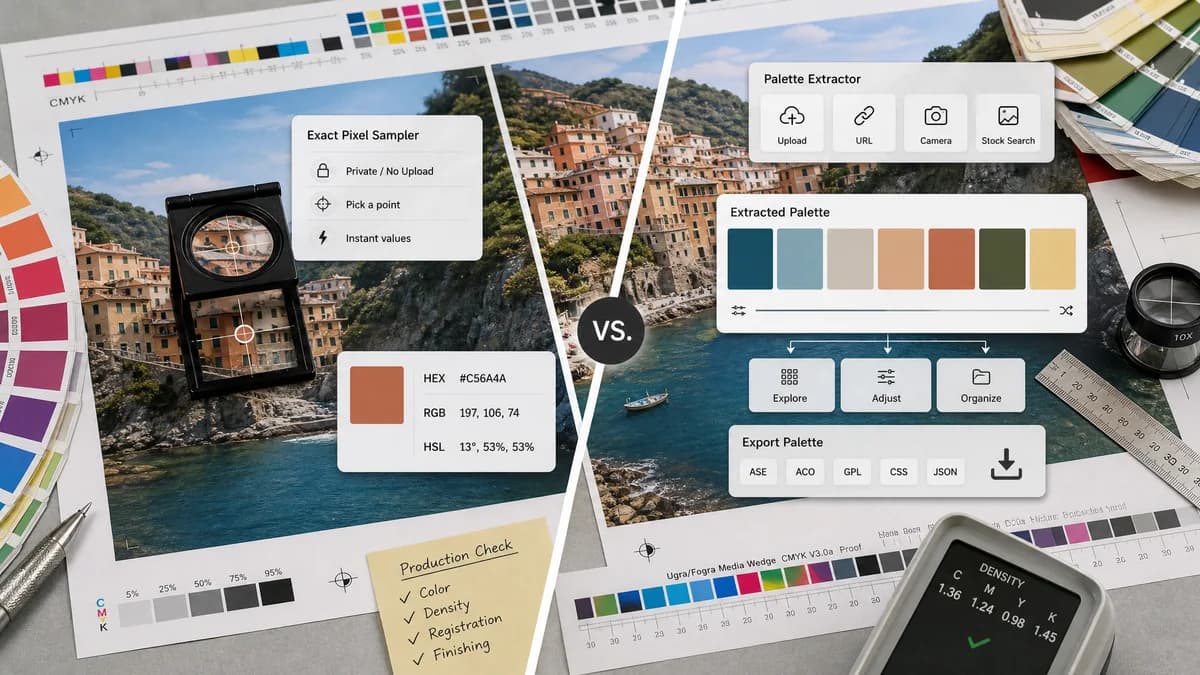
Image Color Picker is the baseline in this comparison: Upload an image locally, click or tap a pixel, and copy HEX, RGB, HSL, and alpha color values.
Coolors Image Picker extracts palettes from photos and supports image upload, URL, camera, stock image search, and exports.
Quick verdict
Coolors is better for palette generation, export, and color-system exploration. TextFaker is better for private, exact, no-upload pixel sampling with direct HEX, RGB, and HSL values.
How Image Color Picker fits
TextFaker should be the lower-friction exact color picker for users who need values from a specific point instead of a managed palette workflow.
How Coolors Image Picker fits
Coolors Image Picker is designed to extract beautiful palettes from photos. Its official tool supports browsing or dropping an image, image URL, camera input, stock images, palette export, and broader palette-management features, some tied to Pro.
Side-by-side comparison
| Decision point | Image Color Picker | Coolors Image Picker | Takeaway |
|---|---|---|---|
| Core task | Our workflowClick or tap a specific image pixel and copy values. | Competitor workflowExtract and manage palettes from images. | The key difference is exact sampling versus palette creation. |
| Input options | Our workflowLocal image upload should be the core, with optional paste or drag and drop. | Competitor workflowBrowse, drop, image URL, camera, and stock image options. | Coolors has broader sourcing; TextFaker can be faster for local files. |
| Exports | Our workflowCopy individual color formats. | Competitor workflowExport palette as image and broader export workflows. | Palette export is not necessary for TextFaker’s initial use case. |
| Account and paid features | Our workflowShould work free without account friction. | Competitor workflowOfficial page references Pro features and limits around saved palettes and advanced options. | TextFaker can be simpler for occasional users. |
| Manual picking | Our workflowManual pixel picking is the primary interaction. | Competitor workflowCoolors help docs describe manually dragging a color picker on a photo as part of palette creation. | Coolors includes manual selection but within a palette workflow. |
| Privacy | Our workflowBrowser-local no-upload processing is planned. | Competitor workflowTool includes upload and cloud-adjacent workflows such as stock image search and account features. | TextFaker should lead with local privacy for sensitive files. |
Use Image Color Picker when
- Users who need exact values from a clicked pixel
- Users who want no account or palette management flow
- Users checking private images locally
- Users who need quick copy output for CSS or design tools
Use Coolors Image Picker when
- Users creating palettes from photos
- Users who want palette export options
- Users who use Coolors for color scheme generation
- Users who want image URL, camera, or stock-image workflows
Detailed comparison
Product Fit
Coolors is a broader color platform. Users who search for image picker may land there for palette inspiration, while TextFaker should satisfy exact color-code lookups.
- Keep the TextFaker page focused on one selected color.
- Use recent picks only as a helper, not a palette system.
- Avoid account-gated features.
Feature Ideas
Coolors shows that users value multiple image sources and export. TextFaker can selectively adopt only features that support exact sampling.
- Drag and drop is high value.
- Paste from clipboard is useful for screenshots.
- Camera input is optional and may increase scope.
SEO Notes
Coolors owns palette-related intent. TextFaker should focus on exact values, CSS-ready formats, privacy, and mobile tap sampling.
- Use “get HEX from image” and “RGB from image” in copy.
- Include HSL in headings or FAQs.
- Keep palette generator comparisons on separate pages.
Risk Notes
If TextFaker adds automatic palettes too early, it may become harder to differentiate from Coolors. The MVP should remain crisp.
- Do not require sign-in.
- Do not prioritize export formats over copy buttons.
- Make the selected pixel visually obvious.
Research notes
- Official Coolors page says Image Picker extracts palettes from photos.
- Official page includes browse or drop image, image URL, camera, stock image, and export palette as image controls.
- Coolors help says users can drag a color picker to manually pick colors on a photo.
- This is a strong adjacent competitor for palette extraction rather than single-pixel sampling.
Official source
The only outbound competitor link on this page is placed here for source checking after the comparison.
Official Coolors Image Picker source