
Image Color Picker vs RedKetchup Color Picker
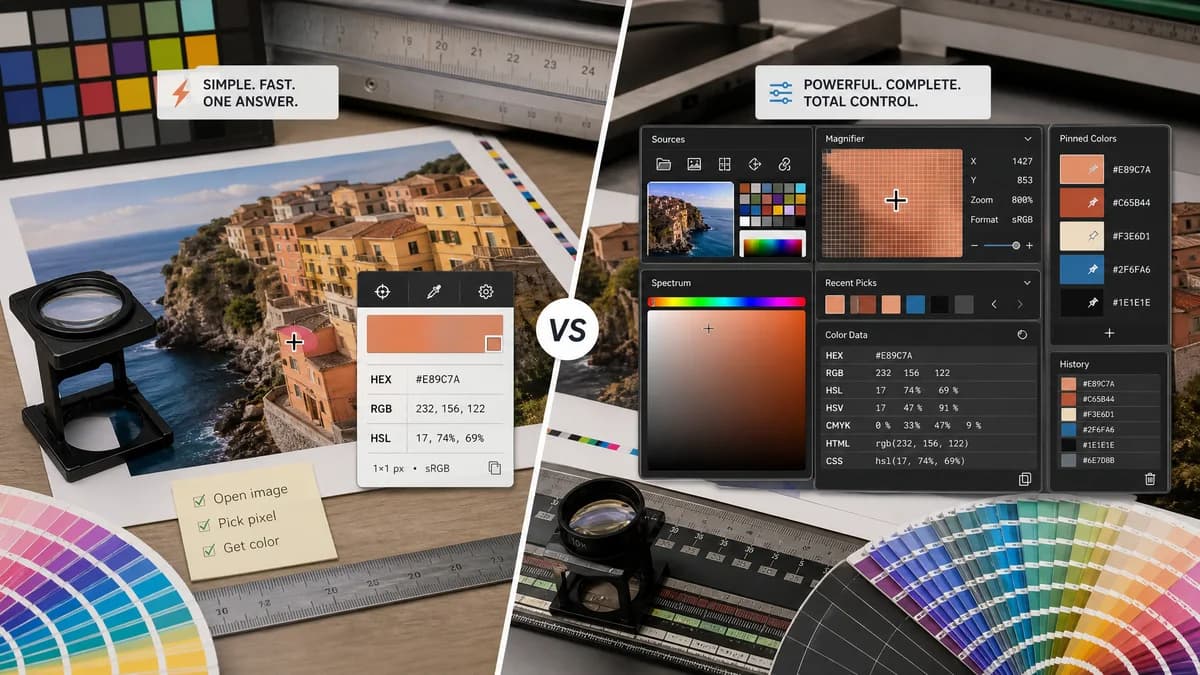
Image Color Picker is the baseline in this comparison: Upload an image locally, click or tap a pixel, and copy HEX, RGB, HSL, and alpha color values.
RedKetchup combines image pixel picking with sampler and spectrum sources, many formats, zoom, magnifier, coordinates, pinned colors, and color conversion.
Quick verdict
RedKetchup is stronger for power users. TextFaker can win for users who want one quick answer without navigating an advanced color conversion interface.
How Image Color Picker fits
TextFaker should be much more focused: local image input, pixel selection, and immediate HEX, RGB, and HSL outputs with minimal settings.
How RedKetchup Color Picker fits
RedKetchup is a broad color workstation. It supports selecting colors from many image formats, switching between image, sampler, and spectrum sources, viewing pixel coordinates, using magnifier and zoom, pinning colors, and converting among HEX, RGB, HSL, HSV, CMYK, and HTML/CSS formats.
Side-by-side comparison
| Decision point | Image Color Picker | RedKetchup Color Picker | Takeaway |
|---|---|---|---|
| Tool scope | Our workflowSingle-purpose image color picker. | Competitor workflowColor picker, image sampler, spectrum picker, converter, and pinned palette manager. | TextFaker should not copy the full workstation scope for an MVP. |
| Supported formats | Our workflowShould support common browser image formats, depending on decoding support. | Competitor workflowLists PNG, JPG, WebP, HEIC, SVG, GIF, ICO, BMP, and TIFF. | RedKetchup has a wider format promise; TextFaker should avoid unsupported claims. |
| Precision aids | Our workflowClick or tap pixel readout; loupe or zoom could be added for differentiation. | Competitor workflowIncludes magnifier, zoom, and pixel X/Y coordinates. | Precision aids are the main advanced feature worth considering. |
| Color conversion | Our workflowHEX, RGB, HSL only per brief. | Competitor workflowConverts among HEX, RGB, HSL, HSV, CMYK, and HTML/CSS with opacity. | TextFaker should stay focused unless analytics show conversion demand. |
| Saved colors | Our workflowCould include session recent picks. | Competitor workflowPinned colors can be saved, loaded, and persisted. | Persistent palette management is not necessary for a quick picker. |
| Interface density | Our workflowCan be compact and task-first. | Competitor workflowFeature-rich interface with many sections and controls. | Simplicity is the clearest product contrast. |
Use Image Color Picker when
- Users who need a fast answer from one uploaded image
- Users who prefer fewer controls and less cognitive load
- Privacy-first image utility users
- Mobile users who need simple tap-to-copy behavior
Use RedKetchup Color Picker when
- Power users who need many color formats
- Users who need CMYK, HSV, opacity, or HTML color names
- Users who want zoom, magnifier, and pixel coordinates
- Users who want pinned colors persisted across sessions
Detailed comparison
Power Features
RedKetchup shows which advanced features matter to expert users: magnification, zoom, coordinates, broad file support, and conversion across several color spaces.
- Consider loupe and coordinate readout as optional launch enhancements.
- Keep CMYK and HSV out of the core unless needed for SEO parity.
- Do not add persistent palette features unless they support the main workflow.
Format Strategy
RedKetchup makes broad image-format claims, including less common formats. TextFaker should test actual browser support before listing formats.
- Use browser-renderable wording when exact support varies.
- Show a helpful unsupported-format error.
- Keep HEIC and TIFF claims out unless verified in target browsers.
UX Strategy
The competitor is useful but dense. TextFaker can create a lower-friction path for users searching from Google with a single image and one color question.
- Make the upload zone the main focus.
- Place sampled values directly beside or below the image.
- Use one-click copy buttons rather than advanced sliders.
SEO Strategy
RedKetchup targets both image picking and color conversion. TextFaker should concentrate the page around image picking and exact pixel values.
- Use comparison pages to cover advanced alternatives.
- Mention color converter only as a related capability if added later.
- Keep the main title aligned with image color picker intent.
Research notes
- Official RedKetchup page lists image, sampler, and spectrum sources.
- Official page lists pixel coordinates, magnifier, zoom, pinned colors, and color conversion.
- Official page supports many image formats including PNG, JPG, WebP, HEIC, SVG, GIF, ICO, BMP, and TIFF.
- This competitor is a power-user benchmark rather than a minimal direct clone.
Official source
The only outbound competitor link on this page is placed here for source checking after the comparison.
Official RedKetchup Color Picker source