
Image Color Picker vs W3Schools Image Color Picker
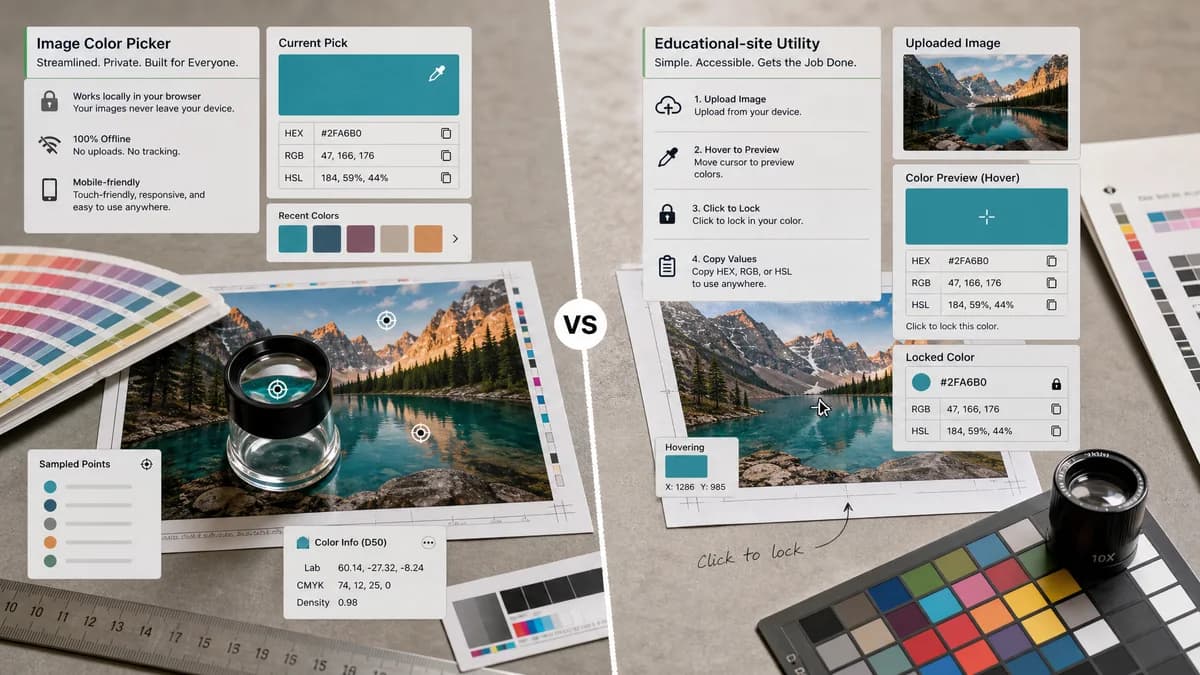
Image Color Picker is the baseline in this comparison: Upload an image locally, click or tap a pixel, and copy HEX, RGB, HSL, and alpha color values.
W3Schools offers a simple image color picker for uploaded images with HEX, RGB, and HSL values.
Quick verdict
W3Schools sets a clear baseline for expected functionality. TextFaker should at least match HEX, RGB, HSL copy controls and recent color handling, then differentiate through privacy language and image workflow polish.
How Image Color Picker fits
TextFaker Image Color Picker can match the core utility while emphasizing local privacy, modern mobile ergonomics, and a tool-page format aimed at non-developer image users as well as developers.
How W3Schools Image Color Picker fits
W3Schools provides a focused picker: upload an image, hover to preview, click to lock a color, then copy HEX, RGB, or HSL. It supports common formats such as PNG, JPEG, WebP, GIF, and BMP.
Side-by-side comparison
| Decision point | Image Color Picker | W3Schools Image Color Picker | Takeaway |
|---|---|---|---|
| Core outputs | Our workflowHEX, RGB, and HSL values are the required planned outputs. | Competitor workflowHEX, RGB, and HSL fields with copy controls. | TextFaker should treat these three formats as non-negotiable launch functionality. |
| Image formats | Our workflowShould support browser-renderable formats such as PNG, JPEG, WebP, GIF, and BMP where canvas decoding permits. | Competitor workflowLists PNG, JPEG, WebP, GIF, and BMP support. | Format messaging should be precise and based on actual browser support. |
| Interaction model | Our workflowClick or tap pixel sampling is central. | Competitor workflowHover previews the image color and click locks the selected color. | Hover preview is useful on desktop; TextFaker also needs a strong touch-first fallback. |
| Recent colors | Our workflowOptional but useful for comparing multiple sampled pixels. | Competitor workflowIncludes recent colors. | A lightweight recent picks strip would be a high-value addition. |
| Audience | Our workflowGeneral users, designers, developers, and privacy-minded users. | Competitor workflowDeveloper and learner audience tied to W3Schools. | TextFaker can write for broader everyday image use cases. |
| Privacy framing | Our workflowNo-upload browser-local processing should be explicit. | Competitor workflowThe official snippet emphasizes upload and picking but not strongly privacy-first in the extracted text. | Privacy can be a stronger differentiator here. |
Use Image Color Picker when
- Users who want a private standalone image utility
- Users working with screenshots, logos, and photos outside a coding tutorial context
- Users who need fast mobile tap sampling
- Users who prefer a tool suite with related image metadata and optimization tools
Use W3Schools Image Color Picker when
- Learners already using W3Schools
- Users who want a very familiar educational brand
- Users who only need common image formats
- Users who want a simple recent colors list
Detailed comparison
Baseline Features
W3Schools shows the minimum credible feature set for a modern image color picker: file drop, hover preview, click lock, three color formats, and copy controls.
- Provide copy buttons beside each format.
- Keep color values visible without scrolling on desktop.
- Show recent picks for multi-color sampling.
Audience Angle
The W3Schools brand is strong with learners and developers. TextFaker can serve the same developer need while also speaking to marketers, creators, and people sampling photos or screenshots.
- Use examples such as logo matching, screenshot sampling, and design handoff.
- Avoid assuming the user knows CSS terminology.
- Include short explanations of HEX, RGB, and HSL.
Mobile Requirements
A hover-first interface can leave mobile users underserved. The TextFaker brief explicitly mentions click or tap.
- Make selected pixel state obvious after tap.
- Use a magnified preview for finger occlusion if feasible.
- Ensure copy buttons are large enough for touch.
Implementation Notes
Browser canvas sampling should be enough for the core feature, but the page should be honest about color management limitations.
- Read pixels from canvas with correct image-to-canvas coordinate mapping.
- Account for scaled previews and device pixel ratio.
- Do not promise print color matching.
Research notes
- Official W3Schools page says users can upload an image and click anywhere to grab exact color as HEX, RGB, and HSL.
- Official page lists PNG, JPEG, WebP, GIF, and BMP support.
- Official page includes hover preview, click-to-lock behavior, and recent colors.
- This comparison is useful for defining minimum feature parity.
Official source
The only outbound competitor link on this page is placed here for source checking after the comparison.
Official W3Schools Image Color Picker source