
Open Source Alternatives to Adobe Color
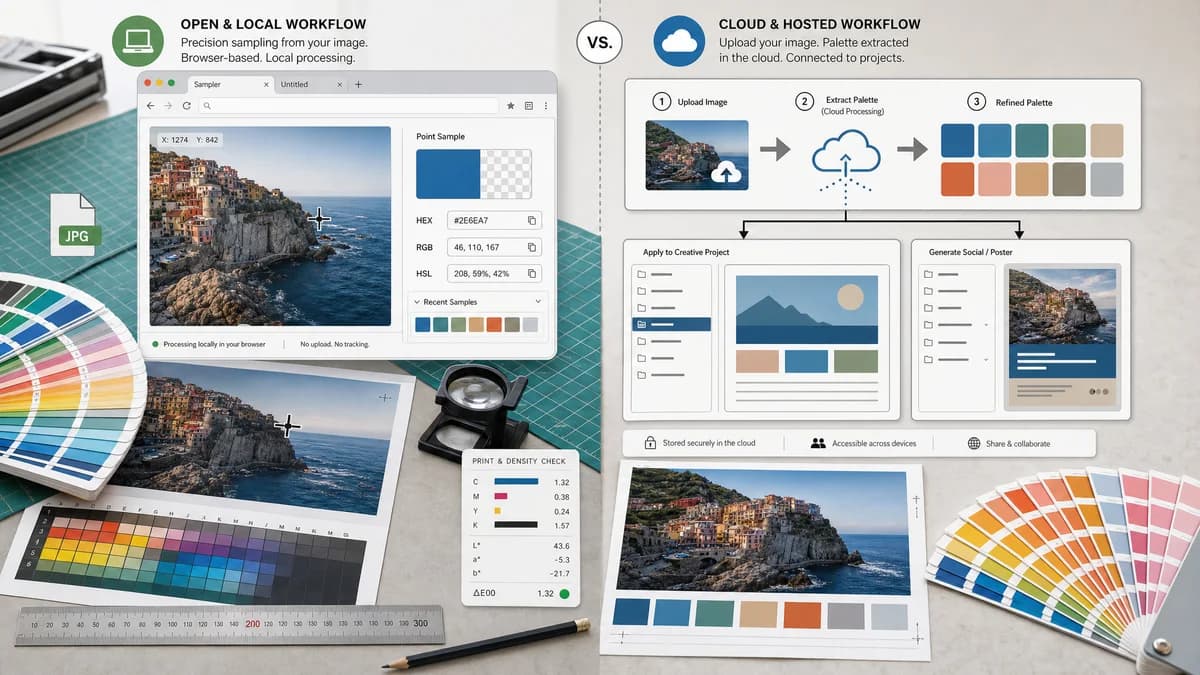
Image Color Picker is a browser-based alternative for users who need this focused result without installing a proprietary desktop app or entering a larger hosted workflow.
This research compares that workflow with Adobe Color while keeping the outbound source link at the bottom after the analysis.
Why Image Color Picker fits
Image Color Picker should prioritize exact point sampling from a user-selected image with copyable HEX, RGB, and HSL values.
What Adobe Color offers
Adobe Color generates palettes from uploaded images, lets users refine swatches, and connects saved palettes to Adobe Express and broader creative projects.
Open alternative signals
Source and openness
Image Color PickerBrowser-based and open-standards-driven; public source status is not claimed.
Adobe ColorHosted Adobe product with private implementation details.
Primary job
Image Color PickerExact pixel color lookup from a local image.
Adobe ColorImage-based palette generation and Adobe Express use.
Output formats
Image Color PickerHEX, RGB, and HSL for web and UI handoff.
Adobe ColorHEX, RGB, and palette-oriented outputs.
Account workflow
Image Color PickerDesigned for direct use without a design library dependency.
Adobe ColorStronger when saving palettes into Adobe workflows.
Decision guide
Use Image Color Picker when you need one or several exact pixel values from an image and do not need saved theme libraries.
Use Adobe Color when the goal is palette generation, mood refinement, saved libraries, and Adobe Express handoff.
Side-by-side open source alternative comparison
| Decision point | Image Color Picker | Adobe Color | Takeaway |
|---|---|---|---|
| Alternative fit | Our workflowBest for exact point sampling. | Proprietary workflowBest for extracting and refining a palette from an image. | These overlap on image colors but solve different depths of workflow. |
| Control | Our workflowUser chooses the pixel directly. | Proprietary workflowAutomatically detects dominant and accent colors, then allows refinement. | Direct sampling is better when one exact color matters. |
| Workflow integration | Our workflowCopy values into CSS, design notes, or another tool. | Proprietary workflowSave and reuse palettes in Adobe Express and creative projects. | Adobe wins when the palette must live inside Adobe. |
| Setup | Our workflowOpen page, upload locally, click or tap. | Proprietary workflowHosted Adobe workflow with optional save and creative handoff. | TextFaker should be faster for one-off color extraction. |
| Limits | Our workflowNot a full palette inspiration tool. | Proprietary workflowNot primarily a no-upload single-pixel inspector. | The alternative page should frame use cases honestly. |
| Data control | Our workflowNo-upload browser-local processing should be central. | Proprietary workflowRequires uploading or using Adobe's hosted page flow. | Local processing is the stronger trust story for sensitive images. |
Detailed research
Open-Source Alternative Fit
Image Color Picker fits users who want an open-source alternative style workflow to Adobe Color because the goal is often simple: pick a color from an image without joining a larger design ecosystem.
Feature Parity and Limits
It can match the essential color-code readout but should not claim parity with Adobe's palette moods, saved libraries, or Adobe Express handoff.
Data, Setup, and Pricing
A browser-local tool keeps the interaction small and direct. Users can inspect a screenshot or logo and copy values without treating the image as a design asset in a cloud palette library.
Where Adobe Color Still Wins
Adobe Color is better for generating a balanced palette, refining swatches, and carrying that palette into Adobe creative projects.
Practical Migration Guidance
Use Image Color Picker for exact sampled values and quick CSS or brand notes. Keep Adobe Color for theme exploration and Adobe Express usage.
Research notes
- Adobe's official page says users can upload a photo, extract colors, download HEX or RGB values, and save palettes for creative projects.
- The page describes automatic detection of dominant and accent colors with manual refinement.
- The TextFaker positioning should distinguish pixel-level picking from automatic palette generation.
Official source
The proprietary product link is included once here for source checking after the alternative analysis.
Official Adobe Color source