
Open Source Alternatives to Adobe Photoshop
Image Color Picker is a browser-based alternative for users who need this focused result without installing a proprietary desktop app or entering a larger hosted workflow.
This research compares that workflow with Adobe Photoshop while keeping the outbound source link at the bottom after the analysis.
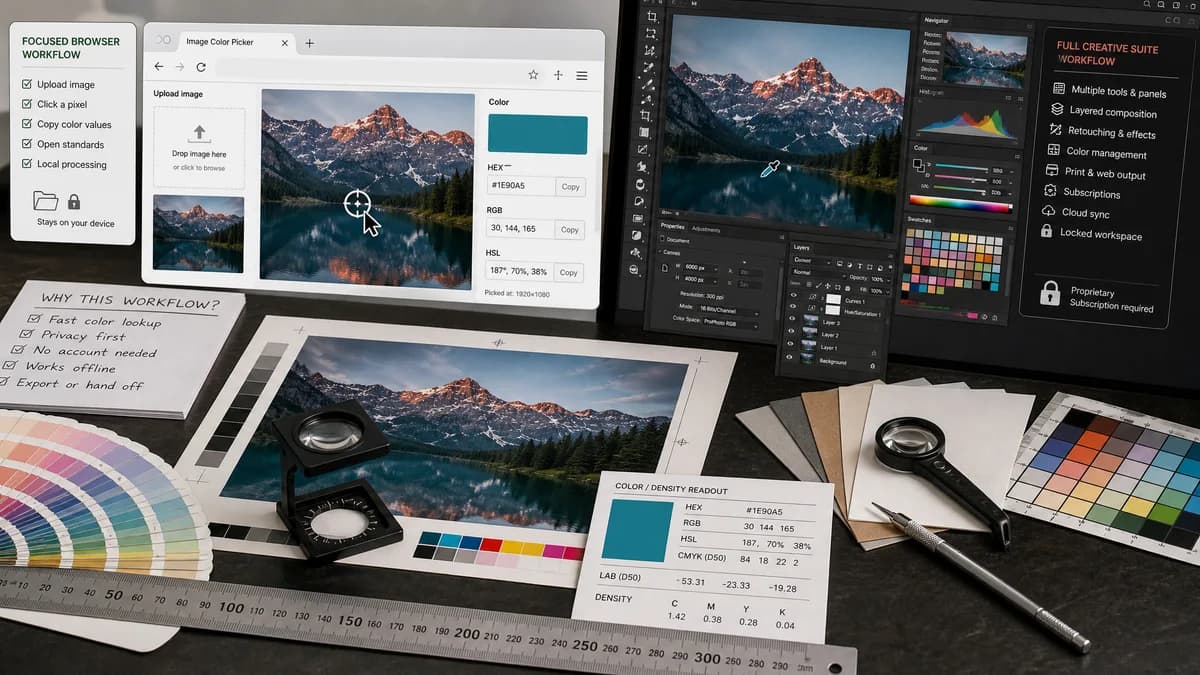
Why Image Color Picker fits
Image Color Picker should let users upload an image locally, click or tap a pixel, and copy HEX, RGB, and HSL values without installing a design application or sending the image to a server.
What Adobe Photoshop offers
Adobe Photoshop provides color picking inside a full image editing workflow, including color spaces, eyedropper-style sampling, and broader design and retouching tools.
Open alternative signals
Source and openness
Image Color PickerBrowser-based and open-standards-driven; public source status is not claimed.
Adobe PhotoshopCommercial Adobe product with private implementation details.
Setup
Image Color PickerOpen the page and choose an image for local pixel sampling.
Adobe PhotoshopRequires using Photoshop or its connected Adobe workflow.
Data control
Image Color PickerDesigned around no-upload image inspection in the browser.
Adobe PhotoshopWorks inside Adobe's product environment and broader account ecosystem.
Workflow scope
Image Color PickerNarrow color readout for HEX, RGB, and HSL.
Adobe PhotoshopFull image editing, design, retouching, and color workflow.
Decision guide
Use Image Color Picker when the job is to inspect one image, grab exact web color values, and leave with copyable results quickly.
Use Adobe Photoshop when color picking is part of retouching, compositing, print preparation, layered edits, or a broader Adobe workflow.
Side-by-side open source alternative comparison
| Decision point | Image Color Picker | Adobe Photoshop | Takeaway |
|---|---|---|---|
| Alternative fit | Our workflowFocused pixel sampler for fast color extraction. | Proprietary workflowFull creative suite with color picking as one feature. | The alternative is speed and scope reduction, not full Photoshop replacement. |
| Feature parity | Our workflowClick or tap a pixel and copy web color values. | Proprietary workflowSamples colors while editing layered images and design assets. | Use Photoshop when the sampled color immediately feeds a larger edit. |
| Privacy model | Our workflowNo-upload workflow is the core promise. | Proprietary workflowRuns within Adobe software and connected services. | A browser-local tool is simpler for sensitive screenshots or client files. |
| Cost and access | Our workflowLightweight web access with TextFaker's shared tool access model. | Proprietary workflowPart of a commercial Adobe product plan. | Users who only need color values avoid buying into a full editor. |
| Migration path | Our workflowUse for one-off color checks before CSS, UI, or brand notes. | Proprietary workflowKeep for professional editing and production files. | Most users migrate the simple lookup task, not their whole design workflow. |
| Output focus | Our workflowPrioritizes HEX, RGB, and HSL values. | Proprietary workflowSupports broader color and editing contexts. | The simpler output is easier to scan for web and UI work. |
Detailed research
Open-Source Alternative Fit
Image Color Picker is a practical open-source alternative style result because users searching that phrase often want a transparent, browser-local workflow rather than another account-based design suite. The honest claim is browser-based and open-standards-driven, with no public-source claim for TextFaker.
Feature Parity and Limits
The useful overlap is exact color sampling from an image and copyable color codes. It should not pretend to match Photoshop's layers, masks, print workflows, adjustment tools, or professional retouching environment.
Data, Setup, and Pricing
For a screenshot, logo, product photo, or client image, opening a local browser tool is lower friction than launching a large editor. The page should emphasize no upload, no install, and a focused result surface.
Where Photoshop Still Wins
Photoshop is stronger when the sampled color needs to become part of a larger edit, a print-managed document, a layered composition, or a team Adobe workflow.
Practical Migration Guidance
Move quick color lookup, CSS handoff, and one-image checks to Image Color Picker. Keep Photoshop for editing, color correction, compositing, and production documents.
Research notes
- Adobe positions Photoshop color picking as part of a broader creative workflow rather than a standalone browser utility.
- The official page references common designer formats such as CMYK, RGB, and HEX.
- The alternative page should be explicit that TextFaker is browser-based and open-standard-focused, not publicly proven open source.
Official source
The proprietary product link is included once here for source checking after the alternative analysis.
Official Adobe Photoshop source