
Open Source Alternatives to Canva Color Palette Generator
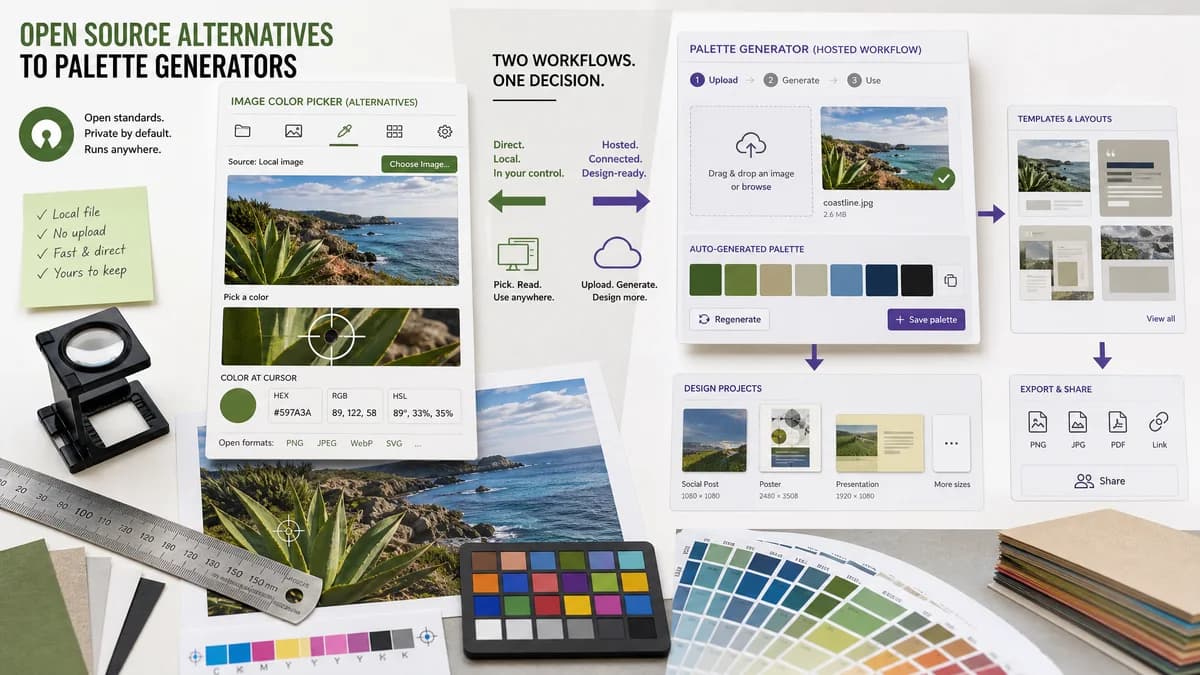
Image Color Picker is a browser-based alternative for users who need this focused result without installing a proprietary desktop app or entering a larger hosted workflow.
This research compares that workflow with Canva Color Palette Generator while keeping the outbound source link at the bottom after the analysis.
Why Image Color Picker fits
Image Color Picker should give users local image selection, tap or click sampling, and immediate HEX, RGB, and HSL values.
What Canva Color Palette Generator offers
Canva Color Palette Generator creates a color palette from an uploaded photo and encourages use of the palette in Canva templates and design projects.
Open alternative signals
Source and openness
Image Color PickerBrowser-based and open-standards-driven; public source status is not claimed.
Canva Color Palette GeneratorHosted Canva product with private implementation details.
Primary job
Image Color PickerPick a precise color from a specific pixel or point.
Canva Color Palette GeneratorGenerate a palette from a photo.
Design integration
Image Color PickerExports values by copying them into other workflows.
Canva Color Palette GeneratorConnects naturally to Canva templates and design assets.
Setup
Image Color PickerNo design project is needed for a quick lookup.
Canva Color Palette GeneratorMost useful inside Canva's design ecosystem.
Decision guide
Use Image Color Picker for exact pixel values from screenshots, brand assets, product photos, and UI references.
Use Canva Color Palette Generator when you want a photo-inspired palette for Canva designs and templates.
Side-by-side open source alternative comparison
| Decision point | Image Color Picker | Canva Color Palette Generator | Takeaway |
|---|---|---|---|
| Alternative fit | Our workflowExact image color picking. | Proprietary workflowPalette generation from a photo. | TextFaker is better for precision; Canva is better for inspiration. |
| Output | Our workflowHEX, RGB, and HSL values from selected pixels. | Proprietary workflowA small generated palette from the image. | Use direct picking when the result must match a visible point. |
| Workflow | Our workflowCopy values to CSS, documentation, or another editor. | Proprietary workflowApply colors in Canva designs and templates. | Canva wins for template creation. |
| Privacy and upload | Our workflowDesigned for no-upload browser-local inspection. | Proprietary workflowA hosted generator flow tied to Canva's service. | TextFaker should lead with local processing for private images. |
| Migration path | Our workflowReplace quick color lookup and screenshot sampling. | Proprietary workflowKeep for Canva projects and generated design palettes. | A partial migration is the realistic recommendation. |
| Learning curve | Our workflowSingle-purpose interface for one task. | Proprietary workflowPart of a broader design platform. | Small tools reduce friction for non-designers. |
Detailed research
Open-Source Alternative Fit
Image Color Picker can serve users who search for open-source alternatives because they may only need the browser-standard part of the workflow: read image pixels and convert them into web color values.
Feature Parity and Limits
It should match exact color value extraction, not Canva's palette suggestions, templates, brand kit behavior, or social design workflow.
Data, Setup, and Pricing
For a one-off image, a no-upload browser tool avoids creating a Canva design just to learn a color. This is especially useful for screenshots, client samples, and quick UI work.
Where Canva Still Wins
Canva is stronger when the colors are immediately used in a template, presentation, social graphic, or brand kit workflow.
Practical Migration Guidance
Use Image Color Picker before design work to collect exact values. Use Canva when the next step is designing inside Canva.
Research notes
- Canva's official page says users upload an image to generate a color palette from a photo.
- The product is palette-oriented, while the requested TextFaker tool is point-sampling-oriented.
- The comparison should avoid claiming Canva lacks privacy features unless directly verified; focus on workflow scope.
Official source
The proprietary product link is included once here for source checking after the alternative analysis.
Official Canva Color Palette Generator source